7 HeyGen Alternatives in 2026: Free and Paid Tools Compared
Synthesia, Colossyan, AI Studios, Captions, D-ID, Vidnoz and Elai: 7 HeyGen alternatives compared, with free plans and dollar prices rechecked in October 2026.
Contents
- How these alternatives were chosen
- 1. Synthesia – the closest match for business
- 2. Colossyan – e-learning, with the most generous free plan
- 3. AI Studios (DeepBrain AI) – HeyGen’s feature set at a similar price
- 4. Captions (Mirage) – a digital twin and dubbing on your phone
- 5. D-ID – the cheapest way in
- 6. Vidnoz – a free allowance every day
- 7. Elai.io – short videos from a slide deck
- Comparison table: HeyGen alternatives
- HeyGen or an alternative?
- Which HeyGen alternative is free?
- Frequently asked questions
At a glance: the 7 tools
-
Synthesia Closest match
Corporate training and internal comms in 140+ languages
-
E-learning and interactive videos; confirm SCORM plan eligibility
-
HeyGen Creator-style features (twin, dubbing) at a similar price
-
Mobile creators: AI twin, captions and lip-dubbing
-
Tight budgets, talking photos and video translation
-
Vidnoz Free every day
A free allowance that refills every day
-
Short videos from a script or a slide deck


HeyGen is still the most complete AI avatar tool for cloning yourself and translating videos with lip-sync, but seven active alternatives cover some or all of what it does as of October 2026. Synthesia and Colossyan target corporate training, AI Studios offers a similar feature set at a similar price, Captions is built for creators on their phones, and D-ID, Vidnoz and Elai.io suit tight budgets.
For each one, you’ll find who it’s for, avatars and cloning, translation, what the free plan actually includes, the entry price listed on the official pricing page, and its limits. The pricing pages of all seven tools were rechecked on Oct. 22, 2026, from France. Six of them, like HeyGen, showed prices in U.S. dollars there; whether U.S. visitors see exactly the same figures couldn’t be confirmed. Synthesia adapts its prices to the visitor’s country, so its dollar prices come from its pricing page and the grid served in the U.S. wasn’t confirmed on screen.
For presenter-led ads, the Arcads vs. Creatify comparison examines two specialized workflows and cost per usable creative.
For footage you already have, the Vozo guide explains dubbing, lip sync and how to budget points for each operation.
To turn source footage into approved language versions, use the guide to translating a video while keeping your voice, including a multilingual budget and review checklist.
How these alternatives were chosen
HeyGen does three main jobs: it makes an avatar read a script, it builds a video clone of you, and it translates an existing video while keeping the speaker’s voice and re-syncing their lips (details in the HeyGen review). The tools on this list meet three criteria:
- They cover those jobs, according to their official documentation: pricing pages, feature pages and help centers.
- They are active and sold to the public as of Oct. 22, 2026, with a public pricing page.
- The real cost of getting started: free plan, cheapest paid plan, and add-ons billed separately.
Tools that cover all three jobs for business users come first, followed by specialized or budget tools. Avatar visual quality isn’t scored here: it varies with the avatar, the language and the script, and the best way to judge it is each tool’s free plan.
Génie Artificiel is funded by affiliate commissions. Synthesia is an affiliate partner: the “Try” button for Synthesia in the summary table at the top of this page and the “See Synthesia’s plans” link in its section are affiliate links that earn the site a commission on subscriptions, and they are labeled as such. Links to sources (pricing pages, help centers) stay direct. No other tool ranked on this page pays a commission, HeyGen included: those links are direct. The ElevenLabs and Vozo reviews linked on this page also include affiliate links. No tool was added or ranked higher because of a commission.
Screenshots and videos added Sept. 28, 2026. Screenshots come from the providers’ public pages, and videos from their official channels. They illustrate avatars and workflows, but use different scripts and settings. To judge the output, compare pronunciation, lip-sync and gestures using the same short script in your target language.
Tools left out
- Argil now describes itself as a video production studio for teams and agents that connects multiple AI models. Its pricing page lists Pro from $50 a month for 2,000 credits (about eight 15-second videos, per the page), with no free plan (Argil pricing, checked Oct. 22, 2026).
- Clip generators (Veo, Kling, Runway…) create scenes from a prompt but don’t have a presenter read your script. They are compared in the top 10 AI video tools guide.
1. Synthesia – the closest match for business
Synthesia turns a script into a video presented by an avatar, in 140+ languages and voices (pricing page, checked Oct. 22, 2026). It’s HeyGen’s most direct competitor, focused on training, employee onboarding and internal communications; our Synthesia vs. HeyGen comparison sets them side by side.
Who it’s for. Training, HR and internal comms teams that publish videos regularly in several languages, and procurement teams that care about security (SOC 2 Type II, ISO 42001 and GDPR, according to the company).
Avatars and cloning. 240+ avatars depending on the plan (9 on the free plan, 125+ on Starter, 180+ on Pro). Personal avatars are built from a photo or a short video, with a recorded consent statement and optional voice cloning: 3 on Starter and 5 on Pro, per the pricing page’s comparison table.
Translation and lip-sync. Dubs your own videos (a file or a YouTube link) into 70+ languages, 140+ on Enterprise, keeping the speaker’s voice. Synthesia’s lip-sync rates in its pricing FAQ and help center now match (checked Nov. 6, 2026): 80 credits a minute versus 40 without in the pricing FAQ, “2× credits” in the pricing table, and 80 a minute in the dubbing help article, which dropped its earlier 240-credit rate. That article lists 134 dubbing languages for all users, though, more than the pricing page’s 70+. One-click translation of a Synthesia video and the multilingual player are Enterprise-only.
Free plan. Basic: 10 minutes of video or dubbing a month plus 500 credits, with no credit card, but no MP4 downloads and a Synthesia watermark on the video: you can only share it by link or embed it.
Entry price. Starter: dollar prices from the pricing page; the grid served to U.S. visitors wasn’t confirmed on screen. The page’s code holds two dollar grids: a “T1” grid at $19/month, or $14/month billed yearly (the code’s fallback setting is a U.S. visitor on this grid), and a standard grid at $29, or $18 billed yearly. Either way, Starter adds 1,250 credits a month, about 12 minutes of video on top of the 10 free minutes every plan gets, plus video downloads. Seen from France, the page shows €19, or €12 billed yearly (Synthesia pricing, checked Oct. 22, 2026). See Synthesia’s plans commission.
Limits
- Tight quotas: about 22 minutes a month on Starter, free minutes included, per the pricing FAQ, and unused credits don’t roll over.
- SCORM export, one-click translation and real-time collaboration require Enterprise.
- The editor only works on a computer.
For a full walkthrough, see the tutorial on creating an educational video with Synthesia and ChatGPT.
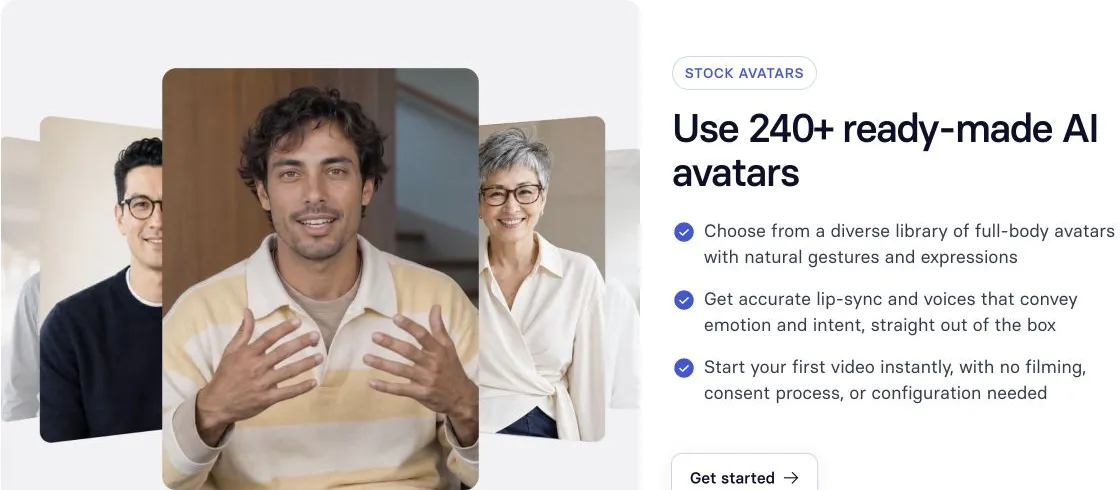
Stock avatar examples on Synthesia’s avatar page, captured Sept. 28, 2026. The number of available avatars depends on the plan.

What to look for: the difference between choosing a stock avatar and customizing its appearance. The video demonstrates creative options; check which features your intended plan includes.
2. Colossyan – e-learning, with the most generous free plan
Colossyan is built for training: a course builder, PowerPoint and PDF import, interactive videos (quizzes, branching) and SCORM export to an LMS.
Who it’s for. Instructional designers and small L&D teams; confirm the plan required to deliver your module to its LMS.
Avatars and cloning. 300+ stock avatars and 700+ voices. “Instant” custom avatars are included on every plan (15 on the free plan and 20 on Professional, per the comparison table), with 3 to 5 cloned voices; a studio avatar filmed on a green screen is a $1,000-a-year add-on.
Translation and lip-sync. 120+ languages, with lip-sync in every language according to the FAQ. Automatic translations of Colossyan videos are capped: 15 a month on the free plan, 20 on Professional, unlimited on Enterprise. Official sources disagree on uploaded videos: Colossyan now offers a free dubbing tool that dubs one clip at a time into 100+ languages with lip-sync, with no maximum length listed, while its translation page still labels dubbing as “Coming Soon” and says uploaded video files aren’t translated. That page also lists 80+ languages, versus 120+ in the pricing table (checked Oct. 22, 2026).
Free plan. Starter, which is free: 20 minutes of video a month with the NEO avatar model, 30 seconds with NEO2, the newest one, videos up to 20 minutes long, and a watermark; watermark removal and unlimited MP4 downloads require Professional.
Entry price. Professional: $89/month, or $59/month billed yearly, for one editor (up to 3, at $30 a month per extra member billed yearly), with 30 minutes a month with NEO and 10 with NEO2 and 5 SCORM exports a month (Colossyan pricing, checked Oct. 22, 2026).
SCORM check, Oct. 22, 2026. Pricing includes five exports a month in Professional, but the SCORM page still lists Enterprise for exporting Colossyan videos. Confirm the plan and export type.
Limits
- Only 10 NEO2 minutes a month on Professional; unused minutes don’t roll over.
- Exports capped at 1080p below Enterprise.
- Dubbing uploaded videos: the free tool handles one clip at a time, the translation page still lists it as “Coming Soon,” and plan allowances aren’t published.

What to look for: the NEO2 avatar’s face, gestures and lip-sync. NEO2 has a separate allowance from NEO: the advertised 20 free minutes do not mean 20 minutes with this model.
3. AI Studios (DeepBrain AI) – HeyGen’s feature set at a similar price
AI Studios is DeepBrain AI’s video editor. Its plans follow the same logic as HeyGen’s: avatar videos from a script, custom avatars, dubbing with lip-sync, and third-party generative models paid for with credits.
Who it’s for. Creators and small businesses that want the equivalent of HeyGen Creator (long videos, a digital twin, dubbing) without a cap on the number of videos.
Avatars and cloning. 2,000+ AI-generated avatars and 100+ stock avatars on Personal (40+ on the free plan). Custom avatars: 1 on the free plan, 3 on Personal, 5 on Team; voice cloning, limited on the free plan.
Translation and lip-sync. AI dubbing with lip-sync in 73 languages and dialects on every plan: 1 minute a month on the free plan, 120 on Personal, 240 on Team. Proofreading of translated scripts and one-click translation start at Team. The site menu advertises dubbing in 150+ languages, but the plan table lists 73 for dubbing, and 150+ for text-to-speech voiceovers on paid plans (checked Oct. 22, 2026).
Free plan. 3 videos a month, up to one minute each, 720p export, 1 custom avatar, 3 dubbing uses and 16 one-time generative credits. The page doesn’t say whether free videos carry a watermark.
Entry price. Personal: $29/month, or $24/month billed yearly, for unlimited videos up to 30 minutes each in 1080p, 3 custom avatars and 120 minutes of dubbing a month (AI Studios pricing, checked Oct. 22, 2026).
Limits
- “Unlimited” refers to the number of videos: length, dubbing and generative credits are still capped by plan (pricing page FAQ).
- SCORM export and quizzes are Enterprise-only; interactive avatars are sold on a separate plan.
- The page still lists Sora among the included generative models (checked Oct. 22, 2026), even though OpenAI announced the Sora API would shut down on Sept. 24, 2026 (OpenAI Help Center, checked Sept. 25, 2026).
4. Captions (Mirage) – a digital twin and dubbing on your phone
Captions, which now brands itself “Captions by Mirage,” is a video editing app for creators. It includes its maker’s avatar models, among them Mirage Avatar X, announced July 28, 2026, which generates expressions, voice and motion together (Mirage Avatar X announcement).
Who it’s for. Creators who shoot and post from their phones (Reels, TikTok, Shorts) and want an AI twin, captions and dubbing in one app.
Avatars and cloning. AI Twin, a digital twin made from a short recording, AI actors and voice cloning, from the Max plan up.
Translation and lip-sync. Captions in 100+ languages; dubbing with re-synced lips (Lipdub) in 30+ languages (Lipdub help page, checked Oct. 22, 2026).
Free plan. A free version limited to editing (trimming, transitions, captions): no AI credits, so no twin, translation or dubbing.
Entry price. Max: $24.99/month, 500 credits a month that roll over up to three months’ worth; Frontier: $69.99/month for 1,400 credits (Captions pricing, checked Oct. 22, 2026). The page notes these are iOS prices, displayed in U.S. dollars.
Limits
- The pricing page doesn’t convert credits into minutes of video.
- Prices are listed for iOS only and may differ on the web or Android.
- No training features (SCORM, quizzes): it’s a social media tool.
5. D-ID – the cheapest way in
D-ID animates photo and video avatars, translates videos and offers conversational agents, plus an API.
Who it’s for. Tight budgets, one-off projects, talking photos, and developers working through the API.
Avatars and cloning. 100+ stock avatars; personal avatars: 1 on the trial and on Lite, 3 on Pro, 5 on Advanced; voice cloning from Pro up (1 voice, 3 on Advanced).
Translation and lip-sync. Video Translate translates a video into as many as 29 languages, with voice cloning and lip-sync (Video Translate, checked Oct. 22, 2026). Plan minutes are shared across videos, agents, translation and the API.
Free plan. No permanent free plan: a 14-day trial with 3 minutes, a full-screen watermark and a personal-use license.
Entry price. Lite: $5.90/month, or $4.70/month billed yearly ($56/year), for 10 minutes a month, with the D-ID watermark and for personal use only. A commercial license starts with Pro: $29/month, or $16/month billed yearly ($191/year), for 15 minutes a month (D-ID pricing, checked Oct. 22, 2026).
Limits
- Commercial use only from Pro, which still carries an “AI” watermark.
- 29 translation languages, versus 175+ on HeyGen.
- Video length is rounded in 15-second increments (pricing page FAQ).
6. Vidnoz – a free allowance every day
Vidnoz makes avatar videos from ready-made templates, with a free allowance that refills every day.
Who it’s for. Freelancers, small businesses and social media managers who want to test for a long time without paying, or produce on a small budget.
Avatars and cloning. 1,600+ avatars on the free plan, 1,700+ on paid plans, and 3,400+ templates. The “Avatar Lite” digital twin is included: 1 for 7 days on the free plan (seen from France; the page has a version without a free Avatar Lite for some countries), up to 3 on Starter and 10 on Business, with extra avatars billed. The studio-quality “Avatar Pro” is still an add-on at $299/year at the listed promotional price; voice cloning is an add-on on Starter ($9.99/month on promotion) and included on Business.
Translation and lip-sync. The video translator (file or URL, lip-synced, 140+ languages per the pricing table) is limited to 1 minute on the free plan and included from Starter, with no allowance listed; one-click translation, advertised for 135 languages, starts with Business ($74.99/month, $56.99 billed yearly).
Free plan. 30 credits a day, or 60 seconds of video, for videos up to 3 minutes long, in 720p, with the Vidnoz watermark (commercial use is allowed with the watermark).
Entry price. Starter: $26.99/month, or $19.99/month billed yearly, for 450 credits a month (15 minutes of video at the page’s rate of 0.5 credit per second) plus 90 free credits a day, videos up to 60 minutes, 1080p with no watermark, and SCORM export (Vidnoz pricing, checked Oct. 22, 2026).
Limits
- Beyond 3 Avatar Lite twins, the studio-quality clone and the voice clone are paid add-ons on Starter.
- Add-ons are shown at 50% off: check the price at checkout.
- Credits don’t roll over from one billing cycle to the next, including those from extra packs.
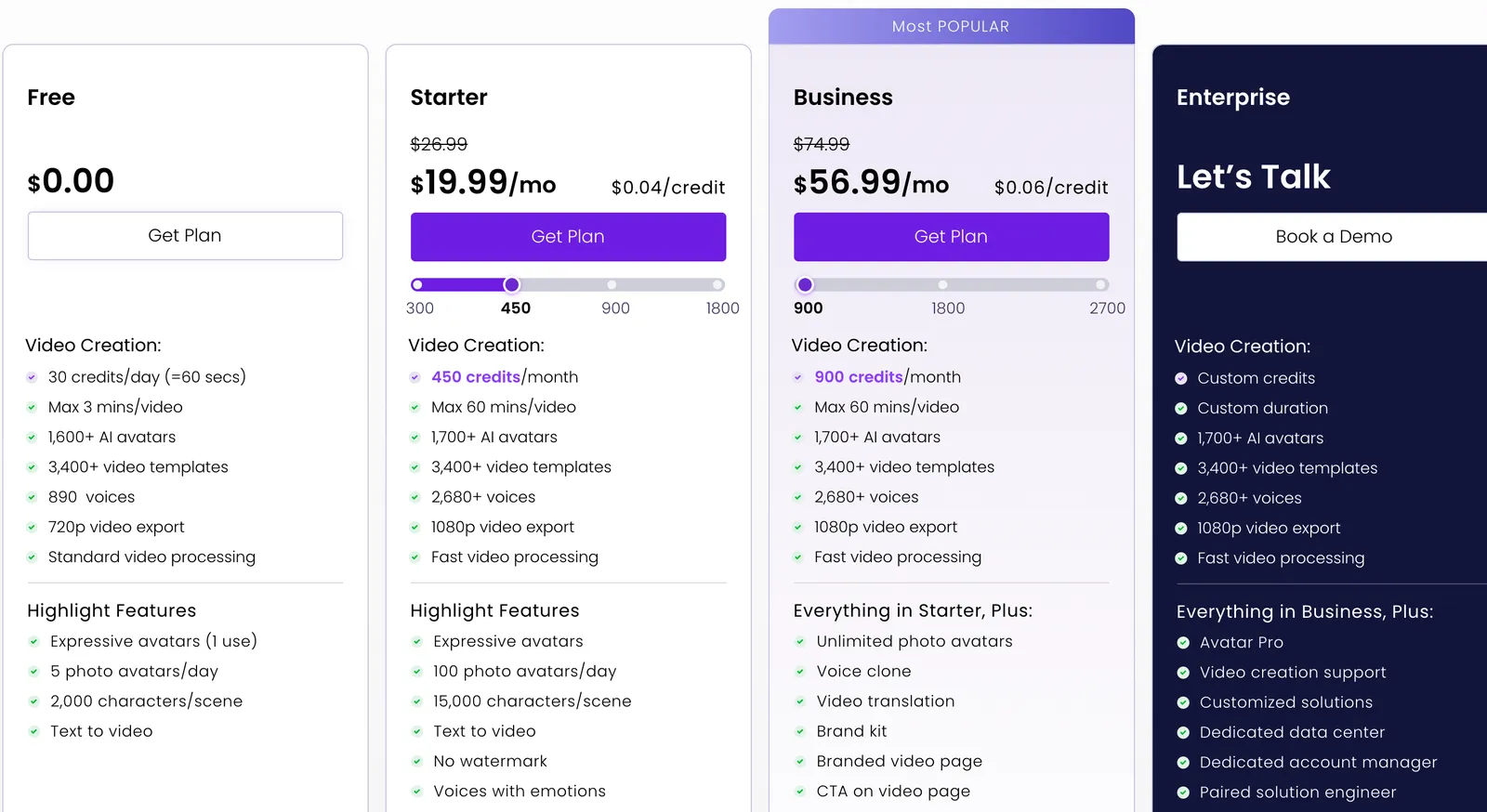
Vidnoz’s plans billed yearly, with the daily free allowance (screenshot taken Sept. 26, 2026; prices unchanged on Oct. 22, 2026).
7. Elai.io – short videos from a slide deck
Elai.io turns a script, a URL or a PowerPoint deck into a video presented by an avatar.
Who it’s for. Small budgets producing short, regular videos, often from existing slides.
Avatars and cloning. 80+ avatars. A “Selfie Avatar” (clone) is a $199/year add-on, and one is included with Team billed yearly; voice cloning is a $200/year add-on.
Translation and lip-sync. Automatic translation of Elai videos into 75+ languages, with a script you can proofread before rendering (auto translation, checked Oct. 22, 2026). The page mentions neither translation of uploaded videos nor lip-sync.
Free plan. 1 minute of video, no credit card, and 3 slides per video. The pricing table says one minute a month, while the help center describes one minute for the account and says the free plan isn’t a recurring subscription (checked Oct. 22, 2026).
Entry price. Creator: $29/month, or $23/month billed yearly ($276/year), for 15 minutes a month; Team: $125/month or $100/month billed yearly, for 50 minutes (Elai pricing, checked Oct. 22, 2026).
Limits
- Minutes are deducted every time you render, even for a new version of the same video.
- SCORM export is Enterprise-only; extra minutes cost $2 each.
- Video and voice clones cost extra on Creator.
Comparison table: HeyGen alternatives
Prices from the official pages on Oct. 22, 2026, viewed from France (links in each section), monthly billing first, then yearly.
| Tool | Best for | Free plan | Entry price | Personal clone | Translation with lip-sync |
|---|---|---|---|---|---|
| HeyGen (baseline) | Twins, marketing, translation | 3 one-minute videos/month seen from France (1 to 3 depending on region, per the help center), watermark, non-commercial | $29 ($24 billed yearly) | Yes, 1 on the free plan | 175+ languages |
| Synthesia | Corporate training | 10 min/month plus 500 credits, no downloads | $19 ($14 billed yearly) or $29 ($18), depending on the grid; U.S. grid not confirmed | 3 from Starter | 70+ languages |
| Colossyan | E-learning, SCORM | 20 min/month (NEO), watermark | $89 ($59 billed yearly) | Yes, on the free plan | 120+ languages (Colossyan videos) |
| AI Studios | HeyGen Creator equivalent | 3 one-minute videos/month, 720p | $29 ($24 billed yearly) | 1 on the free plan, 3 on Personal | 73 languages |
| Captions | Mobile creators | Editing only, no AI | $24.99 (iOS) | From Max | 30+ languages |
| D-ID | Tight budgets, talking photos | 14-day trial, 3 min | $5.90 ($4.70 billed yearly), personal use | 1 on the trial, 3 on Pro | 29 languages |
| Vidnoz | Daily free allowance | 60 sec/day, 720p, watermark | $26.99 ($19.99 billed yearly) | 1 Avatar Lite for 7 days, 3 on Starter | 140+ languages from Starter |
| Elai.io | Slide decks, small budgets | 1 minute | $29 ($23 billed yearly) | $199/year add-on | Not specified |
HeyGen sources: pricing and video translation, checked Oct. 22, 2026, from France; non-commercial use of the free plan per the terms (sec. 4), checked Oct. 18, 2026.
HeyGen or an alternative?
Stick with HeyGen if any of these matter to you (see the HeyGen review):
- Translating your own videos (a file or a YouTube link) with the speaker’s cloned voice and re-synced lips, into 175+ languages and up to 10 languages at once. No alternative on this list advertises as many: 140+ languages on Vidnoz, 73 on AI Studios per its plan table (150+ in its menu), 70+ on Synthesia below Enterprise (134 per its help center), 30+ on Captions, 29 on D-ID.
- A realistic twin built from 15 seconds of footage (Avatar V), with changeable outfits and backgrounds.
- Videos up to 30 minutes from Creator ($29/month) and 4K export from Pro ($49/month).
Switch to an alternative in these cases:
- Shipping SCORM modules to an LMS: Colossyan from Professional ($59/month billed yearly) or Vidnoz from Starter, while HeyGen requires Business ($149/month).
- Corporate training at scale, with security certifications: Synthesia.
- A more predictable budget: on HeyGen, Creator’s 600 credits get you about 150 minutes with Avatar III but about 12 minutes with Avatar V (the calculation is in the HeyGen review). Until spring 2026, the same plan offered unlimited videos (AI video price history). AI Studios and Elai count in videos or minutes, with published caps.
- Doing everything on your phone: Captions.
- Testing for a long time without paying: Colossyan or Vidnoz (see below).
Which HeyGen alternative is free?
No free plan lets you publish regularly without a watermark or logo. Here’s what each one actually gives you as of Oct. 22, 2026:
| Tool | What the free plan includes | What’s missing |
|---|---|---|
| HeyGen | 3 one-minute videos a month seen from France (1 to 3 depending on region, per the help center, checked Oct. 22, 2026), 1 custom avatar, access to Avatar IV | Watermark; non-commercial use only (terms, sec. 4, checked Oct. 18, 2026) |
| Colossyan | 20 min a month (NEO), custom avatars, 15 translations | Watermark; unlimited MP4 downloads on Professional |
| Vidnoz | 60 seconds a day, videos up to 3 min, 1 min of translation | Watermark, 720p |
| Synthesia | 10 min a month plus 500 credits, 9 avatars | No MP4 downloads, Synthesia watermark |
| AI Studios | 3 one-minute videos a month, 1 custom avatar, 1 min of dubbing | 720p; watermark not specified |
| Elai.io | 1 minute, 3 slides per video | Very short allowance |
| D-ID | 14-day trial, 3 minutes | Full-screen watermark, personal use |
| Captions | Editing and captions | No AI credits |
- To test the longest: Colossyan (20 minutes a month) and Vidnoz (one minute a day).
- To judge a clone of yourself: HeyGen, Colossyan and AI Studios include a custom avatar on the free plan; Vidnoz includes an Avatar Lite for 7 days.
- To publish without a watermark, you have to pay everywhere. The cheapest entry is D-ID Lite ($5.90/month), but for personal use and with the D-ID watermark; for commercial use without a watermark, look at Synthesia Starter ($14 or $18 a month billed yearly, depending on the dollar grid), Vidnoz Starter ($19.99/month billed yearly) or AI Studios Personal ($24/month billed yearly).
For production budgets, quizzes and LMS exports, read the Synthesia vs Colossyan comparison, built around three workplace training scenarios.
What About Open-Source HeyGen Alternatives?
The closest free, ready-to-use HeyGen alternatives are still hosted free plans: Vidnoz (60 seconds a day, 720p, watermark), Colossyan (20 minutes a month with NEO, watermark, plus its free dubbing tool for one clip at a time) and Synthesia (10 minutes a month, no MP4 downloads).
Open-source lip-sync and “talking head” projects also exist, but you host them yourself. In practice they need a GPU, come with no avatar library or translation, and the license for their model weights may rule out commercial use, so check it project by project. In every case, animating a real person’s face requires that person’s consent.
Frequently asked questions
What is the best HeyGen alternative?
It depends on the job. Synthesia is the closest match for business video and training, Colossyan for e-learning with SCORM, AI Studios for HeyGen Creator-style features (a twin, lip-synced dubbing, 30-minute videos) at a similar price, and Captions for creators working on their phones.
Is there a free alternative to HeyGen?
Yes for testing, no for publishing without branding. Colossyan gives you 20 minutes a month with a watermark, Vidnoz 60 seconds a day with a watermark, and Synthesia 10 minutes a month without downloads (checked Oct. 22, 2026). Removing the watermark takes a paid plan on every tool.
Which HeyGen alternative translates videos with lip-sync?
AI Studios (73 languages, with 1 free minute), Vidnoz (140+ languages per its pricing table, 1 free minute, then from Starter), Synthesia (70+ languages, with lip-sync costing extra credits), Captions (30+ languages) and D-ID (29 languages). Colossyan also offers a free tool that dubs one clip at a time. HeyGen still covers the most, with 175+ languages. If you only need the voice, ElevenLabs also dubs videos, without changing the picture. For footage you already have, Vozo focuses on translation: 165 target languages and locales, with dubbing and lip sync billed separately in points (languages, checked Oct. 16, 2026). The AI dubbing comparison works out the cost of a dubbed minute across seven tools.
Is Synthesia cheaper than HeyGen?
At the entry level, usually: Synthesia’s pricing page lists Starter at $19 a month ($14 billed yearly) on one dollar grid and $29 ($18) on another, versus $29 ($24 billed yearly) for HeyGen Creator (Synthesia and HeyGen pricing, checked Oct. 22, 2026). Which Synthesia grid U.S. visitors get couldn’t be confirmed on screen; on the higher one, the monthly price matches HeyGen’s. But Starter only includes about 22 minutes of video a month, free minutes included, while Creator’s 600 credits range from about 12 minutes (Avatar V) to about 150 minutes (Avatar III). Full details are in the Synthesia review.
Which HeyGen alternative exports to SCORM?
Colossyan (5 exports a month from Professional, $59/month billed yearly, although its SCORM page still lists Enterprise for exporting videos) and Vidnoz (from Starter, $19.99/month billed yearly). On Synthesia, AI Studios and Elai.io, SCORM is Enterprise-only; on HeyGen, it requires Business ($149/month).
Prices and quotas for these tools change often, and several add-ons are shown at promotional prices. Check the pricing page before you subscribe, and start with the free plan or a single month.