Vozo: Pricing, Video Translation and Lip Sync
Explore Vozo for video translation: U.S. pricing, free trial, dubbing and lip sync. Work through a point-budget example and check its editing limits.
Published . 5 min read. Based on official sources, checked on the update date; every price links to its source. Our method.
Contents
Vozo translates and dubs existing footage, with separate tools for lip sync and on-screen text. It is worth considering for a course, interview or product video that needs another language. The public U.S.-dollar pricing page lists Creator at $29/month, checked Sept. 29, 2026.
This guide draws on official documentation checked on that date. The vendor illustration explains the workflow; it does not establish translation quality on your material. Vozo links are direct, with no active affiliate relationship.
What Does Vozo Do?
The documented Translate & Dub workflow accepts an audio or video file, or a link. Set the languages, voices and speakers, edit the text as needed, then export the result. Lip sync is a subsequent step when required (checked Sept. 29, 2026).
Choose the deliverable before choosing a subscription:
| Your Footage | Processing to Consider | What to Review |
|---|---|---|
| Screen recording with narration | Translate and dub the voice | Menu names and timing against the cursor |
| Presenter speaking to camera | Dubbing, then lip sync | Pronunciation, expressions and moving faces |
| Training video with slides | Dubbing and relevant on-screen text | Terminology, numbers and layout |
These are planning scenarios, not quality scores. A narrated slide deck has no visible mouth that needs lip sync.
Proofreading Before Dubbing Requires Studio
Proofread Before Dubbing lets you check speakers, source text and translations before generating the voice. This step requires Studio or higher (checked Sept. 29, 2026). Editing a dub afterward is a different workflow.
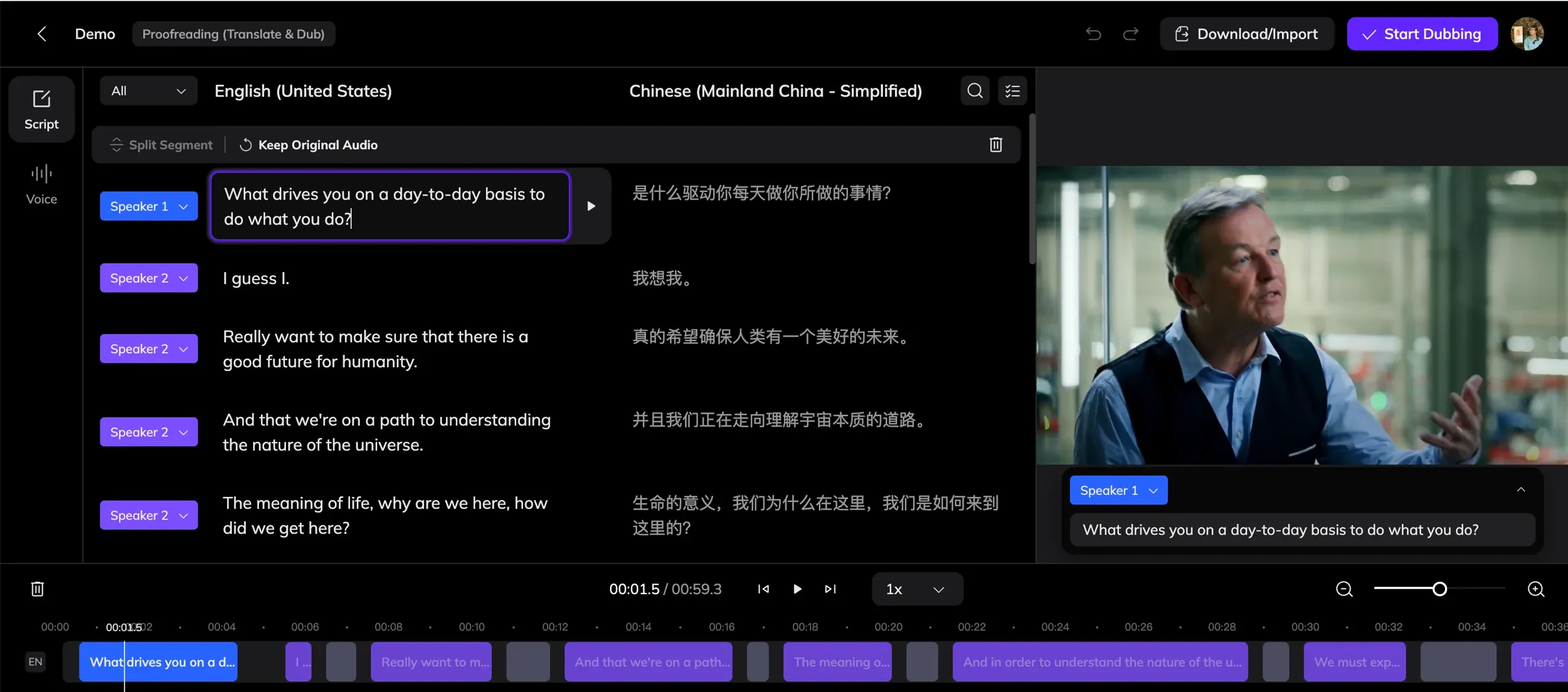
Illustration from Vozo’s proofreading documentation, retrieved Sept. 29, 2026. Compare the two text columns and speaker assignments before using Start Dubbing.
For employee training, that review stage may matter more than a headline language count. Prepare product names and technical terms, then have a fluent target-language reviewer check a representative excerpt. Natural speech can still convey the wrong instruction.
How Much Does Vozo Cost?
Published USD figures on the web pricing page, checked Sept. 29, 2026; the page labels taxes included. These are public prices, not a completed U.S. checkout.
| Plan | Monthly Price | Included Points |
|---|---|---|
| Free trial | $0 | 20 points, up to 3 projects |
| Creator | $29 | 150/month |
| Studio | $99 | 600/month |
Annual billing and larger plans are also offered. Check the final annual total and your billing region before subscribing; prices are localized, so the French euro amounts are not a currency conversion of this table.
A Point Budget for a Ten-Minute Video
The point rules specify 3 points/minute for Translate & Dub, 5 base points plus 5/minute for a new Lip Sync project, and 10/minute for Visual Translate (checked Sept. 29, 2026).
Illustrative calculation: ten minutes in one target language, with no revisions or subtitle removal, uses 30 points for dubbing. A new lip-sync project adds 55, making 85 points combined. Translating on-screen text across those ten minutes adds 100, making 185 points for all three operations.
That full workflow exceeds a Creator month’s 150 points. Another language or repeated corrections would increase the requirement. The minutes on plan cards are alternative uses of one point balance, not separate allowances to add together. Check the estimate before processing: the pricing page’s approximate lip-sync minutes do not map directly to the detailed formula.
Speech-generation rules charge 1 or 3 points per generated minute when edits require new audio, depending on the voice. Regenerating an unchanged segment is free, as are speed, volume and pitch adjustments (checked Sept. 29, 2026). Leave room for corrections instead of allocating every point to the first render.
Limitations That Can Change Your Choice
Voice model selection persists. Vozo positions VoiceREAL around the original speaker’s delivery and VoiceNATIVE around the target-language accent. Its voice model guide says switching models after generation requires a new project (checked Sept. 29, 2026). Compare a short excerpt containing brand names and expressive speech before committing a long recording.
Visual translation has a defined scope. The supported video types cover slides and explanatory overlays. Software buttons and menus, product packaging and text on physical objects are excluded (checked Sept. 29, 2026). A software walkthrough may therefore need new screen recordings or localized annotations as well as translated narration.
Lip sync needs suitable footage. The Lip Sync guide calls for finalized audio and clearly visible mouths without overlapping subtitles (checked Sept. 29, 2026). Review profile shots, cuts and speaker changes in your sample.
Points are not permanent inventory. Trial points expire after seven days. Purchased packs have conflicting validity statements: 60 days on pricing versus one year in the point rules. Confirm the expiry before buying a pack (pricing, point rules, checked Sept. 29, 2026).
Vozo or Another Tool?
For a multilingual batch, follow the guide to translating a video while keeping your voice: review steps, a three-video budget for two languages, and an acceptance checklist.
Start with Vozo when you already have the footage and need to organize localization. If the first job is creating a presenter video, consult the HeyGen guide. For voiceover and audio dubbing requirements, the ElevenLabs guide provides another comparison point. The broader HeyGen alternatives guide separates other use cases.
Use a sample from your own production: a clear voice, a technical term, a number and a scene change. Record correction work, point consumption and reviewer time. That gives you a cost per usable video, rather than just a theoretical generation allowance.
FAQ
Is Vozo Free?
There is a limited trial. Have your sample and reviewer ready before signup so you can use the points within their validity period; it is not a permanent monthly free allowance.
Does Dubbing Automatically Include Lip Sync?
The documentation describes a separate Lip Sync step after the audio is finalized. Budget for it where an on-screen person is speaking.
Can Vozo Translate Software Menus in a Video?
Its visual translation documentation excludes them. Translated narration alone does not fully localize an interface demonstration.
What Should You Keep After Canceling?
Download your exports and retain source files. The billing guide states that projects are deleted 90 days after subscription expiry (checked Sept. 29, 2026); the service is not a substitute for your archive.
The verdict
Consider it for localizing footage you already own. Budget for each processing step and the time needed to review the translation.
- Best for
- Creators, training teams and marketers with an existing video library