Synthesia in 2026: AI Avatars, Plans and Pricing
Contents
- What Does Synthesia Do?
- What Can You Do With Synthesia?
- Tips That Save Minutes
- Which Avatars Does Synthesia Offer?
- How Many Languages? Voices and Dubbing
- How Much Does Synthesia Cost in 2026? Plans and Pricing
- What Does Synthesia’s Free Plan Include?
- What Are Synthesia’s Limitations?
- Synthesia vs. HeyGen: Price per Video Minute
- Synthesia Alternatives
- How to Make a Video with Synthesia
- Frequently Asked Questions
Is Synthesia free? Yes: the Basic plan gives you 10 minutes of video a month with no credit card, but no MP4 download, and free videos carry a Synthesia watermark. Downloads start with Starter, at $19 or $29 a month ($14 or $18 billed yearly): the pricing page holds two dollar grids and picks one by location, and the grid served in the U.S. couldn’t be confirmed on screen (Synthesia pricing, checked Oct. 22, 2026). See Synthesia’s plans commission.
Synthesia turns a script into a video presented by an AI avatar, in 140+ languages and voices (pricing page, checked Oct. 22, 2026), with no camera or shoot. It’s built for businesses first: training, employee onboarding and internal communications. Not to be confused with Synthesia, the piano-learning software.
This page reflects Synthesia as of October 11, 2026, with prices and credit allowances rechecked Oct. 22, 2026, based on its official pages: plans, pricing, quotas and recent releases, followed by a price-per-minute comparison with HeyGen and Colossyan and the main alternatives. Almost everything has changed since this page was first published: prices went down, avatars run on the new Express-3 model, and usage is billed in credits. The latest change came in late September 2026: the Creator plan became Pro, every plan got more credits, and a video minute now costs about 100 credits instead of 120. The AI video price history tracks Synthesia’s pricing since 2024.
What Does Synthesia Do?
A Synthesia video works like a slide deck: a sequence of scenes, each with an avatar, a script and visual elements (images, video clips, text, shapes). According to the features page and the pricing page (checked Sept. 25, 2026), you can:
- Start from a script, a document or a deck: PowerPoint import on every plan, an AI assistant that drafts the script from a prompt (Starter and up), 60+ templates and a library of scene layouts.
- Record your screen with a Chrome extension, then edit the recording in Synthesia.
- Add auto-generated captions, royalty-free music and stock media.
- Make videos interactive: call-to-action buttons and branching from Pro, quizzes on Enterprise.
- Share videos by link or embed them on a website or LMS; embedded videos update automatically when you edit them.
Since Oct. 9, 2026, Synthesia also offers Syren, in beta on every plan: an agent that builds an animated video of up to 3 minutes from a prompt, billed in credits (Syren help article, checked Oct. 11, 2026). See Synthesia Syren: features, pricing and access.
Minutes are only used when a video is generated, not while you edit or preview. If you edit a video you already generated, only the new seconds count (pricing page FAQ, checked Sept. 25, 2026).
For a complete walkthrough, see the tutorial on creating an educational video with Synthesia and ChatGPT.
What Can You Do With Synthesia?
Five common uses, with where to start in the app and the plan you need. A finished minute of video costs about 100 credits; details are in the pricing section.
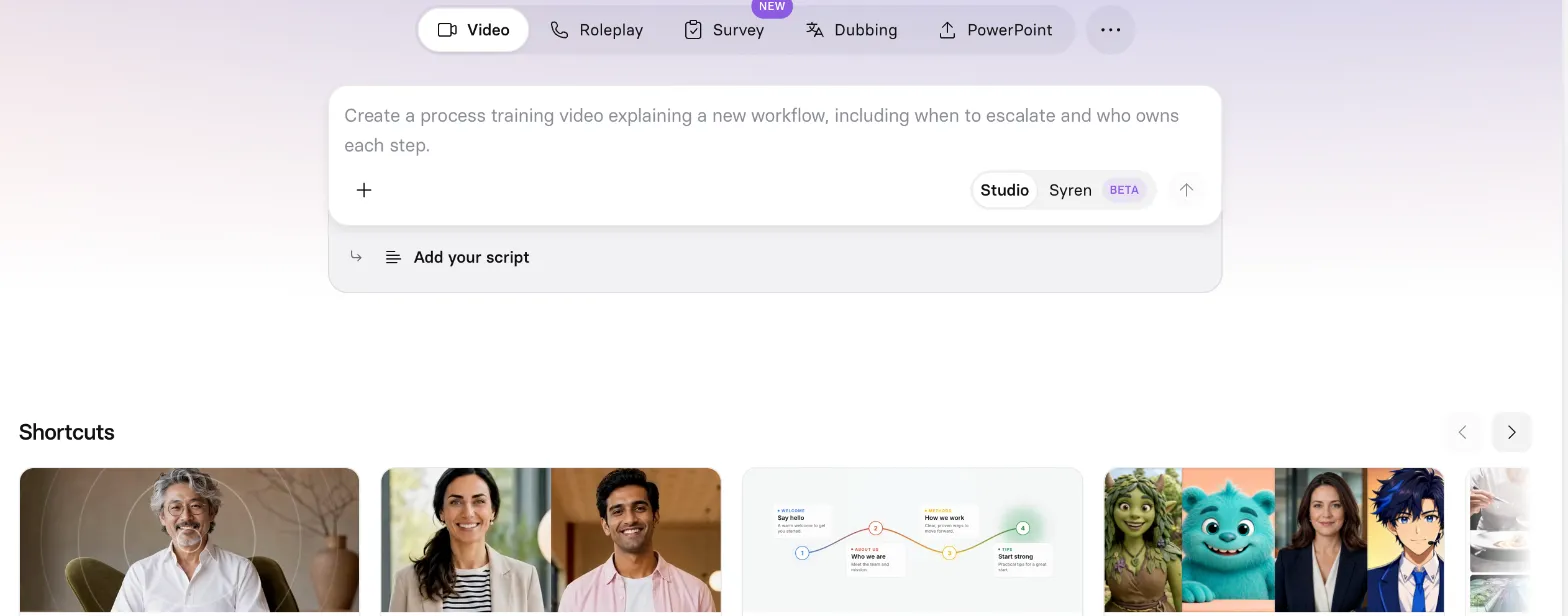
Synthesia’s home screen: start from a prompt, a script, a PowerPoint, a dub or a roleplay (screenshot taken Oct. 13, 2026).
Turn a Slide Deck Into a Training Video
Start from: the PowerPoint tab, which imports a .pptx file; each slide becomes a scene, and you add an avatar and a script. Plan: import is available on every plan, but MP4 download and logo removal require Starter. Synthesia walks through it in its own video:

A tutorial published by Synthesia on its official channel: a company demo, not a test by this site. The interface may have changed since it was posted.
Explain Software or a Process
Start from: the Chrome screen-recording extension, then edit the recording with an avatar narrating. For a process, the home prompt box lets you start from a description (a new workflow, its steps and owners); the script assistant is reserved for paid plans.
A script split by scene, as Synthesia recommends, one idea per scene:
Scene 1: Hi, and welcome. In two minutes, you'll see how to submit an expense report.
Scene 2: Open the Expenses tab, then click New report. Add a photo of the receipt.
Scene 3: Check the amount, pick the project, and submit. Your manager gets a notification.
Localize a Video Into Several Languages
Two routes: have the avatar speak directly in one of 140+ languages and voices, on every plan, or dub an existing video (file or YouTube link) into 70+ languages while keeping the speaker’s voice, from Starter. One-click translation of a whole video and the multilingual player are Enterprise-only (details).
Present With Your Own Avatar
Start from: Personal Avatars. You create the avatar from a photo, or a short video for more natural movement, with a consent recording. Plan: 3 personal avatars on Starter, 5 on Pro. Useful for leadership messages or a course series with the same trainer (details).
Practice a Conversation
Start from: the Roleplay tab. The learner talks with an avatar (interview, sales call, complaint) and gets a score; 10 sessions a month are included on every plan. For a short animated video, with or without a stock avatar, Syren, in beta, creates up to 3 minutes from a prompt; your own Personal Avatar and cloned voice still require Studio (Syren page FAQ, checked Oct. 22, 2026). Our Syren article explains which one to use.
Tips That Save Minutes
- Work scene by scene: scripts are written per scene, a scene can’t exceed 5 minutes, and a scene break acts as a natural pause (script help article, updated July 20, 2026).
- Add pauses with the dedicated button in the timeline toolbar (1 second by default, no limit on how many) instead of padding the text.
- Generate only at the end: minutes are only counted at generation, and editing a generated video only uses the new seconds (FAQ on the pricing page).
- Pick annual billing to absorb peaks: monthly credits don’t roll over, while an annual credit pool can cover a busy month.
- Try it free before paying: the Basic plan gives 500 credits a month to judge avatars and voices, without MP4 download.
Which Avatars Does Synthesia Offer?
Synthesia advertises 240+ ready-made avatars, but how many you get depends on your plan: 9 on Basic (free), 125+ on Starter, 180+ on Pro and the full library on Enterprise (pricing, checked Sept. 25, 2026).
- Personal avatar (your “digital twin”): created from a single photo, or a short video for more natural movement, with a recorded consent statement and optional voice cloning (avatars page, checked Sept. 25, 2026). The pricing table lists 3 on Starter, 5 on Pro and unlimited on Enterprise; the page’s FAQ now simply says personal avatars are included with paid plans (checked Oct. 11, 2026).
- Studio avatar (Express-1): a paid add-on at $1,000 a year, for annual plans only, with up to 10 days of processing.
- Avatar Builder: create a realistic or stylized character from a text prompt.
- Outfits and settings: change an avatar’s outfit and background, or prompt it to act in a generated scene (Synthesia cites Google’s Veo 3 model).
Avatars now run on Express-3, which replaces Express-2 on every plan. Synthesia says it brings sharper lip sync, expressions that follow the tone of the script (serious, upbeat, neutral and so on) and up to 2x faster rendering (Express-3 announcement, checked Sept. 25, 2026).
Two real-time products round out the lineup: Roleplay Sessions, practice conversations with an avatar that scores the learner (10 shared sessions a month on every plan, 25 on Enterprise), and an Interactive Avatar API to put a listening, responding avatar inside your own product (Sept. 16, 2026 announcement), billed at $0.10 a minute per the API tab of the pricing page. Every account gets a one-time 60 minutes of interactive avatar, and Roleplay learner seats are an add-on at $29 a month ($25 billed yearly) (checked Oct. 18, 2026).
How Many Languages? Voices and Dubbing
- 140+ languages and voices for avatar narration on every plan, with a range of accents and narration styles.
- AI dubbing of your own videos (file upload or YouTube link) into 70+ languages, 140+ on Enterprise, preserving the speaker’s voice. The dubbing help article gives 134 languages for all users, says self-serve plans can’t publish videos dubbed from a YouTube link, and reserves transcript and translation editing for Enterprise (checked Oct. 11, 2026). Lip sync costs more credits, but Synthesia publishes three different rates: see the pricing section. If you only need the voice track, ElevenLabs, which specializes in AI voices, also offers video dubbing.
- 1-Click Translation of an entire Synthesia video into 140+ languages and the multilingual player (viewers pick their language) are Enterprise-only.
Cost per dubbed minute and lip sync across seven tools: AI dubbing software compared.
Source: pricing page, checked Oct. 7, 2026. As recently as October 5, 2026, the same page listed “160+ languages & voices” and 1-Click Translation into “80+ languages” (Oct. 5, 2026 capture); Synthesia hasn’t explained the change in numbers. Its own pages aren’t aligned yet: the structured data on the avatars page, which isn’t shown on screen, still says “160+ languages,” and the same page advertises dubbing into “130+ languages,” versus 70+ outside Enterprise on the pricing page (checked Oct. 7, 2026).
How Much Does Synthesia Cost in 2026? Plans and Pricing
Synthesia bills in credits, one shared pool for video generation, dubbing, surveys and AI-generated clips; the pricing page converts them into minutes. Dollar prices from the Synthesia pricing page (checked Oct. 22, 2026); where two prices are given, the first comes from the page’s “T1” grid and the second from its standard grid (details on the U.S. grid below the table):
| Basic (free) | Starter | Pro | Enterprise | |
|---|---|---|---|---|
| Monthly billing | $0 | $19 or $29/mo | $89/mo (both grids) | Custom |
| Annual billing | – | $14 or $18/mo ($168 or $216/yr) | $59 or $64/mo ($708 or $768/yr) | Custom |
| Credits | 500/mo, included on every plan | 1,250/mo on top (15,000/yr on annual) | 6,000/mo on top (72,000/yr on annual) | Custom |
| Video, per the pricing page | Up to 10 min/mo | Up to ~12 min/mo (~150 min/yr) | Up to ~60 min/mo (~720 min/yr) | Unlimited |
| AI dubbing instead of video, per the pricing page (76 credits/min) | 10 min/mo | 16 min/mo (197 min/yr) | 78 min/mo (947 min/yr) | Custom |
| Stock avatars | 9 | 125+ | 180+ | 240+ |
| Personal avatars | – | 3 | 5 | Unlimited |
| Seats | 1 editor | 1 editor, 3 guests | 1 editor, 5 guests | Custom |
| MP4 download | No | Yes (1080p) | Yes (1080p) | Yes |
| Synthesia logo | Yes | Removable | Removable | Removable |
Today’s price for your country: see Synthesia’s plans commission.
These allowances are alternatives, not additional quotas. A typical finished video minute uses about 100 credits, more if the avatar is on screen throughout. On top of each plan’s credits, every plan gets 10 minutes of video (usable for dubbing), 3 survey responses and 500 credits a month. Synthesia counts that total two ways: the pricing FAQ gives “about 22 minutes a month” for Starter (10 included minutes plus about 12 from the 1,250 plan credits), while the credits guide adds the 500 included credits, for 1,750 credits “about 17 minutes” on top of the 10 included minutes (both checked Oct. 22, 2026). Minute figures are rounded guides.
Dubbing credits: Synthesia publishes three rates. The pricing FAQ and the credits guide charge 40 credits a minute without lip sync and 80 with it. The pricing calculator uses 76 credits per dubbing minute, which is how the cards arrive at 197 dubbing minutes a year on Starter (15,000 ÷ 76). The dubbing help article states that lip sync uses 240 credits per dubbed minute (all checked Oct. 11, 2026). At 80 credits, Starter’s 1,250 monthly plan credits cover about 15 minutes of lip-synced dubbing; at 240, about 5. Until Synthesia aligns these figures, budget with the highest rate and check the cost shown before generating.
Pro also comes in larger tiers (Pro 2× to 8×, 12,000 to 48,000 extra credits a month, from $176 to $676 monthly on both grids).
Synthesia has two dollar price grids. The page code holds a “T1” grid (Starter at $19 a month or $14 billed yearly, Pro at $89 or $59) and a standard grid (Starter at $29 or $18, Pro at $89 or $64). A script picks one based on the visitor’s location, and Synthesia doesn’t publish which countries get which grid; its credits guide only says you can see “pricing for your region” in your billing settings.
Which grid U.S. visitors get couldn’t be confirmed on screen. Two clues point to the $19 grid: the code’s fallback visitor is a U.S. visitor in tier T1, and archived copies of Synthesia’s geolocation script, captured from U.S. addresses, place the United States in tier T1 (latest Internet Archive capture, Oct. 20, 2026).
On the other hand, loaded without its scripts, the page shows the $29 grid, and its code can apply a pricing experiment on top; from France, where these checks were made, it shows euros (checked Oct. 22, 2026). Every dollar calculation on this page therefore uses both grids; check the price at checkout.
What each plan adds, per the same page:
- Basic (free): no credit card, to try the editor. Share by link or embed only.
- Starter: video downloads, logo removal, the video assistant, AI dubbing, guest comments.
- Pro (formerly Creator): 5 personal avatars, video API (160 credits a minute, from the plan’s credits), interactive videos, multiple avatars per scene, a customizable share page, priority support.
- Enterprise: unlimited minutes, every avatar, live collaboration, brand kits, SCORM export, 1-Click Translation, SAML/SSO and a dedicated customer success manager.
Unused minutes and credits don’t roll over, and video creation pauses once you hit your limit (pricing page FAQ). Since September 9, 2026, you can also buy extra credits and turn on automatic top-ups from the billing dashboard (announcement, dated on the updates page); purchased credits are valid for 12 months, and their price is not published: the billing help article only says you pick a preset or custom amount in Billing (pricing FAQ and help article, checked Oct. 22, 2026).
Visitors in France see euro prices (€19 or €12 a month for Starter, €79 or €49 for Pro): the page places them in tier T1 and shows the T1 grid in euros (checked Oct. 22, 2026).
What Does Synthesia’s Free Plan Include?
Earlier English and French versions of this page disagreed on this (3 minutes a month versus 36 minutes a year). The official pricing page says the Basic plan includes 10 minutes of video or dubbing, 3 survey responses and 500 credits a month, with 9 avatars and one editor (checked Oct. 22, 2026).
The catch: MP4 downloads require a paid plan, and free videos carry the Synthesia logo. You can share a free video by link or embed it, but you can’t take the file with you. The free plan is for judging the avatars, voices and editor before paying, not for producing videos to publish elsewhere.
For a quick first look, Synthesia also offers a free video without an account: pick an avatar and a template, type a short script, and the video arrives by email (name and email required).
What Are Synthesia’s Limitations?
- Still-tight quotas: about 22 to 27 minutes a month on Starter, included minutes and credits combined, depending on which Synthesia page you read. One 15-minute module fits (10 included minutes plus about 500 credits); two exceed a monthly Starter allowance, while an annual plan’s balance can absorb an occasional peak.
- Key L&D features are Enterprise-only: SCORM export to an LMS, 1-Click Translation, the multilingual player, quizzes, brand kits and live collaboration.
- Desktop only: the editor isn’t available on mobile; mobile visitors are pointed to a demo instead.
- Inconsistent official figures: lip-synced dubbing costs 80, 76 or 240 credits a minute depending on the page; Starter’s monthly total is about 22 minutes in the pricing FAQ and about 27 in the credits guide; and two dollar price grids coexist in the page code ($19 for Starter on the T1 grid, $29 on the standard grid), with the one served in the U.S. unconfirmed on screen. The French-language pricing page still shows the old FAQ ($264 and $804 annual totals, Creator) under its new plan cards (grids and French page checked Oct. 22, 2026; other figures Oct. 11, 2026). Check the cost shown before generating and the total at checkout.
- Content moderation: every video goes through Synthesia’s moderation, with priority turnaround only on Enterprise.
On security, Synthesia holds SOC 2 Type II, ISO 27001, ISO 27701 and ISO 42001 certifications, says it complies with GDPR, and hosts data on AWS in Ireland, with backups in Frankfurt (Trust Center, checked Oct. 18, 2026), which matters to procurement and legal teams at larger companies.
On rights, customers own their videos (customer terms, in force since July 20, 2026), and Synthesia says it doesn’t use customer data to pre-train its models (AI governance). Its acceptable use policy, however, bans using a stock avatar in a paid social media ad without its written approval. Our Synthesia vs. HeyGen comparison sets these terms against HeyGen’s.
Synthesia vs. HeyGen: Price per Video Minute
All three make avatar videos, but they aim at different buyers and meter usage differently: Synthesia in credits (about 100 per finished minute), HeyGen in credits whose rate depends on the avatar model, Colossyan in minutes per avatar model. The table below is a calculation, not a vendor price: monthly price ÷ avatar-video minutes included in the plan, with the whole allowance spent on video, no dubbing and no promotions.
| Plan, monthly billing | Price | Video minutes a month | Price per video minute |
|---|---|---|---|
| Synthesia Starter, T1 grid | $19 | ~22 (pricing FAQ) to ~27.5 (credits guide: 10 included minutes + 1,750 credits ÷ 100) | $0.69 to $0.86 |
| Synthesia Starter, standard grid | $29 | ~22 to ~27.5 | $1.05 to $1.32 |
| Synthesia Pro (both grids) | $89 | ~70 (pricing card: ~60 + 10 included) to ~75 (credits guide: 10 + 6,500 ÷ 100) | $1.19 to $1.27 |
| HeyGen Creator, Avatar III video look | $29 | 600 credits ÷ 4 = 150 | $0.19 |
| HeyGen Creator, Avatar IV video look | $29 | 600 ÷ 31 ≈ 19 | $1.50 |
| HeyGen Creator, Avatar V | $29 | 600 ÷ 48 = 12.5 | $2.32 |
| Colossyan Professional | $89 ($59 billed yearly) | 30 NEO + 10 NEO2 | ≈ $2.23 (≈ $1.48 billed yearly) |
Sources: Synthesia pricing and credits guide, HeyGen pricing and credit costs, Colossyan pricing, checked Oct. 11, 2026; Synthesia’s pricing page and credits guide rechecked Oct. 22, 2026. Colossyan’s page displays the annual price; the $89 monthly rate comes from its pricing code. Rounded to the cent.
What the calculation shows:
- The HeyGen avatar model matters more than the plan. A Creator minute ranges from about $0.19 with Avatar III to $2.32 with Avatar V, roughly three times Synthesia Starter’s rate on the $19 grid and about twice its rate on the $29 grid. Synthesia doesn’t price by model: every plan uses its Express-3 avatars.
- Billed yearly, Synthesia Starter works out to about $0.51 to $0.64 a minute at $14 (T1 grid) or $0.65 to $0.82 at $18 (standard grid), and HeyGen Creator at $24 to $0.16 (Avatar III) to $1.92 (Avatar V).
- Rollover differs: HeyGen carries unused credits over for one month, Synthesia and Colossyan don’t. Synthesia’s 100 credits per minute is a typical figure; a video with the avatar on screen throughout uses more, and HeyGen says some accounts see different rates. Check the cost shown before generating.
- Colossyan’s minutes are split by model: 30 NEO minutes and 10 NEO2 minutes don’t add up to 40 NEO2 minutes.
To redo the calculation with the price shown in your country: see Synthesia’s plans commission.
Avatars, translation, SCORM and data terms are compared in full in our Synthesia vs. HeyGen comparison.
If you want to generate footage from a prompt rather than a presenter, see the guide to the top AI video tools in 2026.
| Synthesia | HeyGen | Colossyan | |
|---|---|---|---|
| Best known for | Corporate training and comms | Creators, marketing, video translation | E-learning and courses |
| Free plan | Basic: 10 min/mo, no MP4, logo | 3 videos/mo up to 1 min each, watermark | Starter: 20 min/mo (NEO), watermark |
| Entry paid plan | Starter: $19/mo ($14 billed yearly) on the T1 grid or $29 ($18) on the standard grid, U.S. grid unconfirmed | Creator: $29/mo ($24 billed yearly) | Professional: $59/mo billed yearly ($89 monthly) |
| Stock avatars | 240+ (varies by plan) | 700+ on paid plans | 300+ |
| Languages | 140+ | 175+ on paid plans | 120+ |
| SCORM export | Enterprise | Business ($149/mo) | Professional (5 streaming exports a month) per pricing; Enterprise for Video per the SCORM guide |
Sources: Synthesia pricing, checked Oct. 22, 2026; HeyGen pricing and Colossyan pricing, checked Oct. 11, 2026.
- Pick HeyGen for marketing and social videos, longer videos (up to 30 minutes each from Creator), and translating your own footage: 175 languages and dialects with voice cloning and lip sync on paid plans (HeyGen pricing, checked Oct. 11, 2026), versus 70+ for Synthesia dubbing outside Enterprise on its pricing page. Its free plan also includes one custom video avatar, which Synthesia keeps for paid plans.
- Pick Colossyan for interactive training workflows. Pricing advertises five streaming SCORM exports a month on Professional, but the SCORM guide still lists Enterprise plans for Colossyan Video: confirm the offer covering your export before subscribing (checked Oct. 11, 2026).
- Pick Synthesia for an organization that wants a large avatar library, broad language coverage, security certifications and hands-on support, or for a few short videos a month on Starter.
Disclosure: Synthesia is an affiliate partner of Génie Artificiel, which earns a commission on subscriptions made through the buttons and “See Synthesia’s plans” links on this page; Vozo, listed among the alternatives, is one too; HeyGen and Colossyan are not. This doesn’t change the prices or limitations described here.
Synthesia Alternatives
The right alternative depends on what you need Synthesia for:
- Interactive training on a smaller budget: Colossyan’s Starter plan is now free (20 NEO minutes a month, with a watermark), and Professional adds MP4 downloads and SCORM exports. The Synthesia vs. Colossyan comparison sizes budgets for three workplace training scenarios.
- Marketing videos, a video twin or translating existing footage: HeyGen, detailed in the HeyGen guide.
- Dubbing footage you already have, with optional lip sync: Vozo, which bills dubbing and lip sync separately in points.
- A wider shortlist: the HeyGen alternatives guide compares seven avatar platforms, Synthesia and Colossyan included, along with AI Studios, Captions, D-ID, Vidnoz and Elai.io, with free plans and U.S. prices.
How to Make a Video with Synthesia
- Sign up for a free account at synthesia.io on a desktop computer.
- Start from a template, an imported PowerPoint deck or a blank video.
- Paste your script into each scene and choose the avatar, language and voice.
- Add visuals, captions and music, then preview scene by scene.
- Generate the video; that’s when minutes are deducted. Share it by link, or download the MP4 on a paid plan.
Tip: keep sentences short and give each scene a single idea. To prepare the script, the Synthesia and ChatGPT tutorial walks through a full method.
For production budgets, quizzes and LMS exports, read the Synthesia vs Colossyan comparison, built around three workplace training scenarios.
Frequently Asked Questions
Is Synthesia free?
Yes. The Basic plan is free with no credit card: 10 minutes of video a month, 500 credits and 9 avatars. But free videos keep the Synthesia logo and can’t be downloaded as MP4; you need at least Starter for that (pricing, checked Oct. 22, 2026).
How much does Synthesia cost per month?
In dollars, Starter costs $19 or $29 a month ($14 or $18 billed yearly) and Pro, formerly Creator, $89 a month ($59 or $64 billed yearly), depending on which of its two dollar grids the pricing page serves you based on your location; which one U.S. visitors get couldn’t be confirmed on screen. Enterprise pricing is custom (pricing, checked Oct. 22, 2026).
How many videos can I make on Starter?
Starter adds 1,250 credits a month, roughly 12 minutes of typical video, to the 10 included minutes every plan gets: about 22 minutes a month in total, counted by the second, according to the pricing FAQ. The credits guide also counts the 500 credits every plan receives, for about 27 minutes (checked Oct. 22, 2026). On an annual plan, the plan adds 15,000 credits, or about 150 minutes a year. Unused minutes don’t roll over; if you run out, you can buy extra credits from Billing, valid for 12 months, at a price Synthesia doesn’t publish (pricing FAQ and billing help, checked Oct. 22, 2026), or move up a plan.
Can I create an avatar of myself?
Yes, from a photo or a short video, with a recorded consent statement and optional voice cloning. Personal avatars are included from Starter up; a Studio avatar (Express-1) is a $1,000-a-year add-on on annual plans.
Does Synthesia export SCORM?
Yes, but only on Enterprise. On other plans you can embed a video in your LMS with an embed code, without the completion tracking a SCORM package provides. Colossyan’s SCORM options are compared in Synthesia vs. Colossyan. To export a whole course to an LMS without Enterprise, see the AI course creators comparison.
How does Synthesia compare with HeyGen?
Synthesia is geared toward corporate training, with strong security credentials and 140+ languages and voices for avatar narration (pricing page, checked Oct. 11, 2026). HeyGen offers more stock avatars, videos up to 30 minutes each on its entry plan and translation of your own videos into 175 languages and dialects. Per video minute, Synthesia Starter works out to about $0.69 to $0.86 on monthly billing at $19, or $1.05 to $1.32 at $29 (the page’s two dollar grids), versus $0.19 to $2.32 for HeyGen Creator depending on the avatar model (calculation above). See the HeyGen guide.
The verdict
An AI avatar platform built for corporate training and communications, strong on languages and security, but with tight minute quotas and several key features locked to the Enterprise plan.
- Best for
- L&D, HR and internal comms teams producing regular videos in several languages

Synthesia
Affiliate link: if you subscribe through this link, we earn a commission at no extra cost to you.