AI Dubbing Software in 2026: Cost per Dubbed Minute, Lip Sync and Voice Rights
Murf Dub, HeyGen, Vozo, Synthesia, Rask and Kapwing compared: calculated cost per dubbed minute, lip sync, voice cloning and consent rules, checked Oct. 2026.
Contents
At a glance: the 7 tools
-

Paying only for the minutes you dub, with no subscription
-

Keeping each speaker's voice and the background audio, without lip sync
-

Teams already making avatar videos, with lip sync on every plan
-

Lip-synced translation at the lowest calculated cost per minute
-

Proofreading, lip sync and on-screen text, billed in points
-

An allowance counted in minutes, with SRT import and export
-

Dubbing and lip sync inside a browser video editor
The seven paid tools compared here dub an existing video with AI for about $0.19 to $3 per dubbed minute without lip sync, and up to $3.65 with it, calculated from the official pricing pages on Oct. 8, 2026 (Synthesia’s rechecked Oct. 11). Murf Dub charges $0.50 a minute per language with no subscription. Synthesia Starter ($19 a month at U.S. prices), Kapwing Pro ($24) and HeyGen Creator ($29) include lip sync on their entry plans. YouTube also dubs for free, but only on your own channel, in a limited set of languages and with no editing.
Voice and lip-sync quality aren’t scored here: this page compares prices, allowances and published terms. The step-by-step workflow (sample, review, export) is in the guide to translating a video while keeping your voice.
Which AI dubbing tool should you choose?
- Pay only for what you dub: Murf Dub, $0.25 a credit and 2 credits per minute and language.
- Keep each voice and the background audio, no lip sync needed: ElevenLabs, from $6 a month.
- Already making avatar training videos: Synthesia, where lip sync is on every plan.
- Lip sync at the lowest calculated cost: HeyGen Creator, 60 to 100 lip-synced minutes for $29.
- Proofread speakers and translation, then translate on-screen slides: Vozo.
- A monthly allowance counted in plain minutes: Rask AI.
- Dub and keep editing in the same timeline: Kapwing.
How much does a dubbed minute cost?
This table is a calculation, not a price quoted by the providers: monthly price ÷ dubbed minutes included, on the entry plan with commercial use, monthly billing, the whole allowance spent on dubbing, before sales tax (Kapwing’s prices include it) and without promotions. One dubbed minute = one minute of source video in one target language.
| Tool and entry plan | Monthly price | Dubbed minutes included | Cost per dubbed minute |
|---|---|---|---|
| Murf Dub, pay as you go | No subscription, $0.25 a credit | 2 credits per minute and language | $0.50 |
| ElevenLabs Starter, Dubbing v2 | $6 | 2 min | $3.00 |
| ElevenLabs Creator, Dubbing v2 | $22 | 9 min | $2.44 |
| ElevenLabs Creator, legacy v1, no watermark | $22 | 40 min | $0.55 |
| Synthesia Starter, no lip sync | $19 | 31 or 16 min (1,250 credits ÷ 40 or 76) | $0.61 to $1.16 |
| Synthesia Starter, lip sync | $19 | 16 or 5 min (1,250 credits ÷ 80 or 240) | $1.22 to $3.65 |
| HeyGen Creator, no lip sync | $29 | 150 min (600 credits ÷ 4) | $0.19 |
| HeyGen Creator, lip sync (Speed / Precision) | $29 | 100 / 60 min | $0.29 / $0.48 |
| Vozo Creator, no lip sync | $29 | 50 min (150 points ÷ 3) | $0.58 |
| Rask AI Creator, no lip sync | $39 | 25 min | $1.56 |
| Kapwing Pro, no lip sync | $24 | 50 min (1,000 credits ÷ 20) | $0.48 |
Sources: Murf (Dub tab), ElevenLabs (compare table, Automatic Dubbing tab), HeyGen credits, Vozo point rules, Synthesia, Rask AI and Kapwing credits, all checked Oct. 8, 2026; Synthesia’s U.S. prices checked Oct. 11, 2026. Rounded to the nearest cent.
- Synthesia publishes three rates: its pricing FAQ says 40 credits a minute without lip sync and 80 with it; its calculator uses 76, and its dubbing help article says lip sync uses 240 credits a minute (checked Oct. 11, 2026). The table shows both ends. Outside the U.S., Synthesia’s standard dollar grid puts Starter at $29, which raises these costs by about half ($0.93 to $1.76 without lip sync, $1.86 to $5.57 with it).
- Promotions left out: ElevenLabs’ first-month discounts (Starter at $1 until Oct. 18, Creator at $11) and Rask AI’s yearly prices, shown under a countdown banner announcing a price change.
- Yearly billing lowers several entries: HeyGen Creator is $24 a month ($0.16 per unlipped minute), Kapwing Pro $16 ($0.32), Synthesia Starter $14 ($0.45 to $0.85), ElevenLabs Creator $18.33.
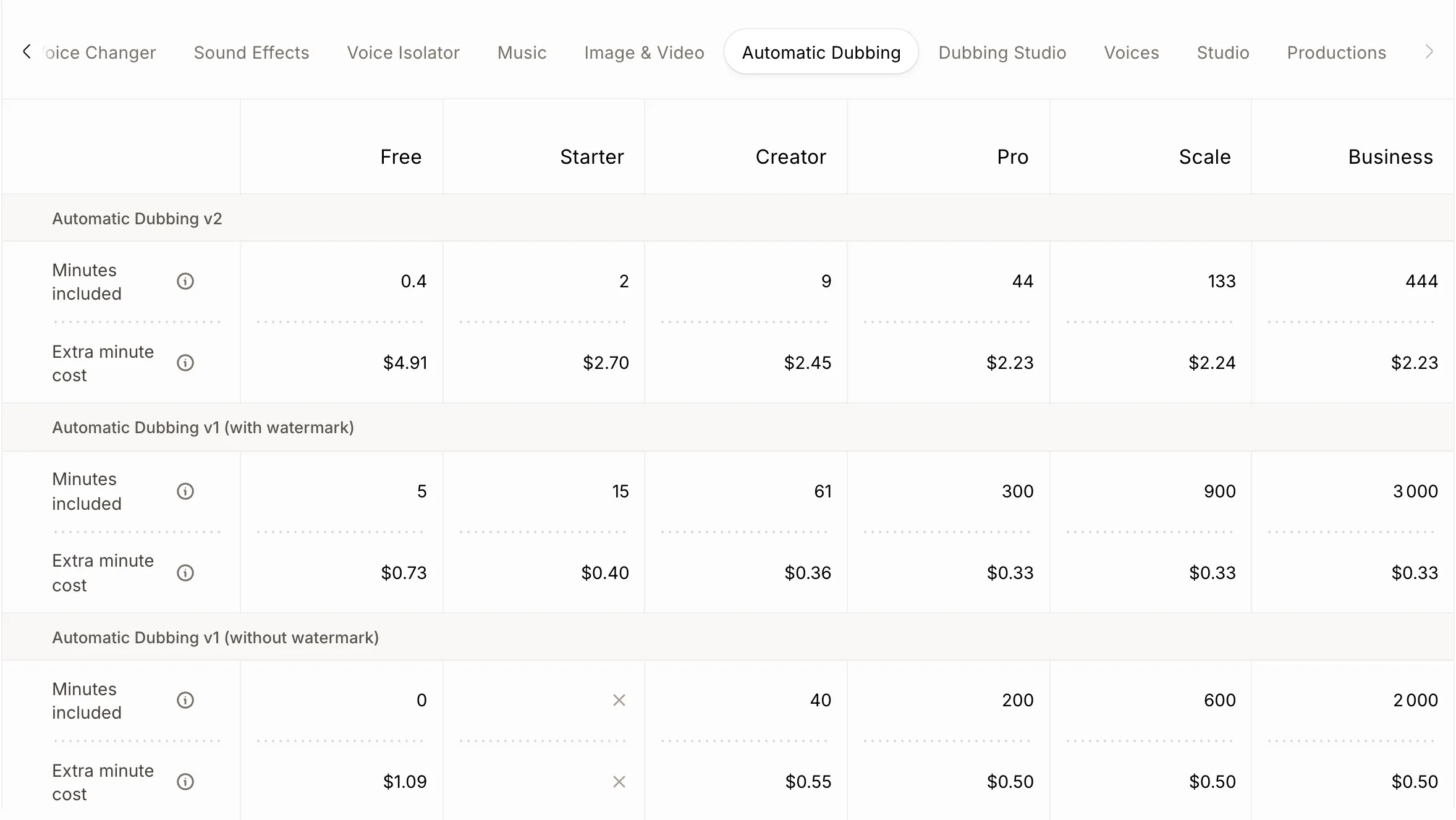
ElevenLabs’ pricing page, Automatic Dubbing tab of the compare table, screenshot taken Oct. 8, 2026. The current Dubbing v2 model includes far fewer minutes than the legacy v1 model on the same plan.
Cost of a 10-minute video dubbed into two languages
Scenario: one 10-minute video into two languages, so 20 dubbed minutes, plus 20 lip-synced minutes where lip sync is offered. Each figure is the monthly outlay of the cheapest plan that covers the job in one month, before tax, with no retries (calculation).
| Tool | Without lip sync | With lip sync |
|---|---|---|
| Murf Dub | $10 (40 credits, confirmed by the public calculator) | Not offered (“coming soon”) |
| ElevenLabs, Dubbing v2 | $48.95: Creator $22 + 11 extra minutes × $2.45 | Not part of Dubbing |
| ElevenLabs, legacy v1 | $22: Creator, 40 minutes without watermark | Not part of Dubbing |
| Synthesia | $19: Starter, 800 to 1,520 of 1,750 credits | $19 at 80 credits a minute (1,600); $89 Pro at 240 (4,800) |
| HeyGen | $29: Creator, 80 of 600 credits | $29: 120 (Speed) or 200 (Precision) credits |
| Vozo | $29: Creator, 60 of 150 points | $99: Studio; 60 + 2 × (5 + 10 × 5) = 170 points exceed Creator |
| Rask AI | $39: Creator, 20 of 25 minutes | $99: Creator Pro, 20 + 20 minutes of standard lip sync |
| Kapwing | $24: Pro, 400 of 1,000 credits | $24: 400 + 20 × 30 = 1,000 credits, the whole allowance |
Synthesia’s 1,750 credits are Starter’s 1,250 plus the 500 every plan gets monthly (the 10 free minutes are left aside). Vozo’s lip sync counts one new project per language; Creator plus a point pack, whose price isn’t displayed, may cost less than Studio.
The seven tools, one by one
The first two only replace the voice track; the next five can also re-sync the speaker’s lips.
1. Murf Dub – pay as you go at $0.50 a dubbed minute
Murf Dub is Murf’s dubbing product, separate from its Studio voiceover plans. It translates a recording and keeps the background audio.
Entry price. Pay as you go from $0.25 a credit, with no watermark; automated dubbing uses 2 credits per minute and language, file length rounded up to the next 30 seconds (pricing, credit rules, checked Oct. 8, 2026).
Free offer. 100 credits and 2 projects on the pricing page; the help center still says 200 credits, one project and watermarked downloads.
Limits. Lip sync is “coming soon” on the AI dubbing page, which elsewhere promises “accurate lip-syncing.” The same page counts “40+” and “28+” languages, French included. Editing (translation, transcript, voice) happens after the first dub.
Try Murf commission.
2. ElevenLabs – voice-preserving dubbing, billed by model
ElevenLabs dubs audio and video while keeping each speaker’s voice and the background sound, with up to 32 speakers per file.
Entry price. Starter at $6 a month includes 2 minutes of Dubbing v2, the default model; Creator at $22 includes 9 (pricing page compare table, checked Oct. 8, 2026). Dubbing v2 covers 92 languages, with French from France and Canada as separate dialects (dubbing docs, API pricing).
What you can edit. Nothing in the app on v2: transcript editing and regeneration are API-only on Enterprise. Dubbing Studio, which allows them, runs on the legacy v1 model and is “in maintenance mode.”
Export. v2 returns one lossless audio file and a video “preview, not a production master”; Dubbing Studio exports MP4, AAC, WAV, AAF and SRT (formats).
Limits
- No lip sync in Dubbing, per the help center.
- Rights are less clear than elsewhere: see the consent section below.
Try ElevenLabs commission.
3. Synthesia – lip sync on every plan, editing on Enterprise
Synthesia is built for avatar videos; its AI dubbing translates an uploaded file or a YouTube link with a clone of the speaker’s voice.
Entry price. Starter at $19 a month or $14 billed yearly, the U.S. price, adding 1,250 credits a month to the free allowance (pricing, checked Oct. 11, 2026). Prices depend on location: Synthesia’s geolocation script places U.S. visitors in the tier served this grid, while the page code serves other countries a standard dollar grid, Starter at $29 or $18 billed yearly. Check the price at checkout.
What’s included. Lip sync and “voice and accent preservation” are ticked on every plan, Basic included; “unrestricted editing” and a glossary are Enterprise-only, and the help center says “all editing” is Enterprise-only.
Free plan. 10 minutes of video or dubbing a month, with a watermark and no MP4 download.
Limits. 70+ dubbing languages below Enterprise on the pricing page, 134 “for all users” in the help center. Dubs made from a YouTube link can’t be published on self-serve plans.
Try Synthesia commission.
4. HeyGen – lip sync from the $29 Creator plan
HeyGen translates an uploaded video or a YouTube link with a clone of the speaker’s voice, with or without lip sync.
Entry price. Creator at $29 a month ($24 billed yearly) with 600 credits, voice cloning and 175+ languages; translation uses 4 credits a minute without lip sync, 6 in Speed mode and 10 in Precision mode (pricing, credits, checked Oct. 8, 2026).
What you can edit. Proofreading the translated script requires Pro, from $49 a month. The proofread view exports the translation as SRT, and a “translate audio only” option skips lip sync (HeyGen Academy).
Free plan. 3 videos a month up to 1 minute, a watermark and limited trial access to lip-synced translation. The terms (updated July 23, 2026) restrict free-plan output to “personal, non-commercial” use.
Limits. Creator can’t buy extra credits: running out means moving to Pro. The help center notes that credit rates can vary by account.
5. Vozo – every step billed in points
Vozo separates dubbing, lip sync and on-screen text translation, each with its own point rate.
Entry price. Creator at $29 a month for 150 points, Studio at $99 for 600 (pricing, U.S.-dollar version, checked Oct. 8, 2026). Dubbing costs 3 points a minute, lip sync 5 points plus 5 a minute per new project, on-screen text 10 a minute (point rules).
What you can edit. The pricing table now ticks “proofreading editor” on Creator, while the proofreading documentation still says Studio and above. Two cloning models: VoiceREAL keeps the delivery, VoiceNATIVE the target-language accent.
Free offer. 20 points valid 7 days (about 6 dubbed minutes), with a watermark.
Limit. The terms (July 27, 2026) name Honeybee Technology Ltd. but grant no explicit license for commercial use of outputs, and a boilerplate clause bans using “the Services and/or the Content” for any “revenue-generating endeavor.”
6. Rask AI – minutes-based plans, lip sync from Creator Pro
Rask AI, from Brask Inc., counts its allowance in minutes of translated output.
Entry price. Creator at $39 a month for 25 minutes; Creator Pro at $99 for 100 minutes adds lip sync; Business at $249 for 250 (pricing, monthly view, checked Oct. 8, 2026). Standard lip sync uses 1 minute per minute of video, Enhanced 3.
Free offer. 3 minutes, no card required.
Limits
- The same page’s FAQ still prices Creator at “$60/month” for 25 minutes.
- Voice cloning works into 32 languages, French and Spanish included; translation covers 135+.
- Monthly minutes don’t roll over; yearly ones do while the plan is active.
7. Kapwing – dubbing inside a video editor
Kapwing is a browser video editor; dubbing, lip sync and subtitles draw on the same monthly credits.
Entry price. Pro at $24 a month ($16 billed yearly) per member, 1,000 credits; dubbing uses 20 credits a minute and lip sync 30 (pricing, credits, checked Oct. 8, 2026). Prices are in dollars, taxes included.
What you can edit. An optional side-by-side review of transcript and translation before the voice is generated; export as MP4, MP3 and SRT (dubbing guide).
Limits
- Cloning the original speaker is the default “if supported for that language” in the guide, but the dubbing FAQ reserves it for Business ($64 a month) and Enterprise.
- The free plan has 10 credits for life (30 seconds of dubbing) while the FAQ mentions dubbing videos under 8 minutes.
- The terms never name the company behind the service.
What about YouTube’s free automatic dubbing?
YouTube dubs eligible videos for free inside YouTube Studio, with no download. Per the help center (checked Oct. 8, 2026):
- Languages: English videos into 20 languages, including Spanish and French. French, German and most other languages are dubbed only into English; Spanish also into Arabic and Portuguese.
- Voice: some languages use “expressive speech” that copies pitch and intonation, which isn’t a voice clone. Lip sync is an experimental feature for select channels.
- Control: dubs can’t be edited, only reviewed before publishing; videos over 120 minutes or with copyrighted content are excluded.
Lip sync, voice cloning and editing: what’s included?
As documented by each provider on Oct. 8, 2026 (pages linked in each tool’s section).
| Tool | Lip sync | Clones the original voice | Edit before generating | Target languages |
|---|---|---|---|---|
| Murf Dub | No (“coming soon”) | Yes | No, after the first dub | 40+ (28+ elsewhere on the page) |
| ElevenLabs | No | Yes, similarity adjustable | No on v2; yes on legacy Dubbing Studio | 92 on v2 |
| Synthesia | Yes, every plan | Yes | Enterprise only | 70+ (134 per the help center) |
| HeyGen | Yes, from Creator | Yes, from Creator | Yes, from Pro ($49) | 175+ (30+ free) |
| Vozo | Yes, in points | Yes, two models | Studio per the docs, Creator per the pricing table | 165 |
| Rask AI | From Creator Pro ($99) | Yes, into 32 languages | Built-in editor, trial included (timing not stated) | 135+ |
| Kapwing | Yes, from Pro | Business per the FAQ, default per the guide | Yes, every plan | 149 language options |
Can you dub someone else’s voice? Consent and commercial rights
Every one of these tools clones the speaker. What their terms require, checked Oct. 8, 2026:
| Tool | Company named in the terms | Commercial use | Voice consent rule |
|---|---|---|---|
| Murf Dub | Murf Inc. | Under the user agreement | Explicit written consent of every “Consenting Speaker” (Dub terms) |
| ElevenLabs | Eleven Labs Inc. | Paid plans, except beta services | No replicating a voice “without consent or legal right” (use policy) |
| Synthesia | Synthesia Limited | Paid plans | Customer collects “all necessary consents” |
| HeyGen | HeyGen Technology, Inc. | Paid plans | All “rights, licenses, consents” for your content |
| Vozo | Honeybee Technology Ltd. | Not stated for outputs | Written consent of each identifiable person |
| Rask AI | Brask Inc. | Yes, you own the output | No infringing privacy or publicity rights |
| Kapwing | Not named | You own your content | Rights to clone the speaker required (help center) |
The ElevenLabs case. The documentation still calls Dubbing v2 “alpha.” ElevenLabs’ Beta Services Addendum covers anything “designated as alpha,” and its publishing rules exclude beta output from commercial use. Yet the Dubbing v2 terms (now part of the ElevenCreative terms, updated Oct. 9, 2026, checked Oct. 11, 2026) only exclude professional audiovisual productions (films, series, streaming, VOD, theatrical releases) outside Enterprise, and explicitly allow YouTube, TikTok and Instagram. Confirm with ElevenLabs before a commercial project on v2.
For a voice that isn’t yours, get written consent that names the languages and uses. This is a summary of published terms, not legal advice.
How this comparison was made
- Sources: pricing pages, help centers, documentation and terms, read on Oct. 8, 2026, with no account and no paid processing; Synthesia’s prices rechecked Oct. 11, 2026. Dollar prices as displayed; Synthesia’s are the U.S. rate card in its page code, the grid its geolocation script serves to U.S. visitors, and Vozo’s come from its server-rendered version, since both show euros from France.
- Selection: tools that dub an existing video with a public price. Left out: Speechify Studio (its dubbing page describes choosing “a lifelike AI voice,” not cloning the speaker) and CAMB.AI (Pro at $20 includes 4 dubbing minutes, about $5 each, with no lip sync or cloning details on the pricing page). YouTube is covered separately because it only works on your own channel.
- Order: by use (voice track only, then tools that also offer lip sync), then by the lowest monthly price displayed, excluding promotions, for a plan with commercial use and no watermark; ties are broken by the calculated cost per dubbed minute. A tool whose terms don’t name the company behind it goes to the end of its group (Kapwing). It isn’t a quality ranking.
- Affiliate links: Génie Artificiel is funded by affiliate commissions. It’s an independent ElevenLabs affiliate and an affiliate of Murf, Synthesia and Vozo (since Oct. 16, 2026, rank unchanged), whose links are labeled. The other tools pay nothing, and none was added or moved up for a commission.
For voice generation from a script rather than dubbing, see the ElevenLabs alternatives, with a cost per minute of speech.
FAQ
What is the cheapest way to dub a video with AI?
For a single video, Murf Dub’s pay-as-you-go credits: $10 for 10 minutes into two languages. YouTube’s automatic dubbing is free, but only on your channel, without editing and mostly from or into English.
Is lip sync worth paying for?
Only when a face speaks on screen. For a screen recording or slides, a dubbed voice and subtitles are enough; lip sync then raises the bill on Vozo and Rask AI, which need a higher plan for it.
Can I upload the dubbed track to YouTube?
Yes, if your channel has YouTube’s advanced features: multi-language audio takes an audio-only file about as long as the video (checked Oct. 8, 2026). ElevenLabs, Murf and Kapwing export audio; delete YouTube’s automatic dub in that language first.