Translate a Video and Keep Your Voice: Steps and Costs
Translate videos while keeping your voice: six steps, Vozo and HeyGen costs for two languages, editing limits, and a practical checklist before publishing.
Published . 7 min read. Based on official sources, checked on the update date; every price links to its source. Our method.
Contents
Translating a video while keeping your voice requires dubbing with voice cloning. Lip sync is a separate decision: it matters when viewers can see someone speaking. This guide covers six steps and a budget for three ten-minute videos translated into two languages.
Have the original files, permission from the speakers, and a reviewer who understands the target language ready. The worked process uses Vozo Studio because it documents proofreading before voice generation; HeyGen and ElevenLabs provide alternative workflows. Vozo Studio lists $99/month on its public USD pricing page, checked September 30, 2026. Pricing can localize by location; confirm your checkout. The interface image comes from the vendor’s documentation, and the figures below are calculations, not voice-quality measurements.
Decide What Actually Needs Translation
| Source video | Work to plan | Unnecessary expense to avoid |
|---|---|---|
| Screen recording with narration | Translate and dub the narration; add captions if needed | Lip sync when no mouth is visible |
| Presenter speaking to camera | Dub first; consider lip sync afterward | Regenerating lips before approving the script and audio |
| Training slides | Narration, slide text, and numbers | Assuming that dubbing also translates the slides |
| Footage where the original voice should remain audible | Translated subtitles | Cloning a voice without an editorial reason |
This guide starts with existing footage. For building a new avatar-led training video from a script, see the Synthesia vs. Colossyan comparison.
Vozo, HeyGen, or ElevenLabs?
| Starting point | Workflow to examine | Important limit |
|---|---|---|
| Vozo | Review speakers and text before generating the dub | Pre-dubbing proofreading requires Studio; lip sync uses additional points |
| HeyGen | Video translation with or without lip sync | Translated-script proofreading requires Pro or higher |
| ElevenLabs | Audio dubbing with voice preservation | v2 Alpha has no in-app editor; Dubbing Studio uses the older v1 model |
Sources checked September 30, 2026: Vozo proofreading, HeyGen plans, and ElevenLabs Dubbing. “Studio” describes different products at the two vendors. These choices follow editing needs, not affiliate arrangements.
Vozo vs. HeyGen for talking-head footage: compare a representative excerpt in your target languages, script controls, and exports first. Prices and allowances size the workload; they do not establish which tool will reproduce your voice more convincingly. For off-screen narration, leave lip quality out of that decision.
Six Steps to Translate a Video and Keep Your Voice
1. Prepare a Representative Sample
Choose 45–60 seconds containing a name, a number, a technical phrase, and a speaker change if relevant. Keep the source file and write a short glossary of brands, acronyms, product names, and approved translations. An easy introduction does not represent an entire training course.
2. Import the File and Select Languages
In Translate & Dub, upload your file or provide an authorized link, then set the source and target languages following Vozo’s getting-started guide, checked September 30, 2026. Start with one target language before producing every version. Check speaker assignments: the right words spoken by the wrong cloned voice still need correction.
3. Select the Voice Model and Review the Text
Vozo describes VoiceREAL as prioritizing source expression and VoiceNATIVE as prioritizing a natural target-language accent. Its voice-model documentation says switching after generation requires a new project (checked September 30, 2026). These are vendor descriptions, not comparative quality scores.
With Studio, enable Proofread before dubbing when creating the project, then start the translation. The proofreading editor opens before voice generation. Check speakers, recognized source text, and translation before Start Dubbing. Pay special attention to numbers, negatives, and technical vocabulary: fluent wording can still change an instruction.
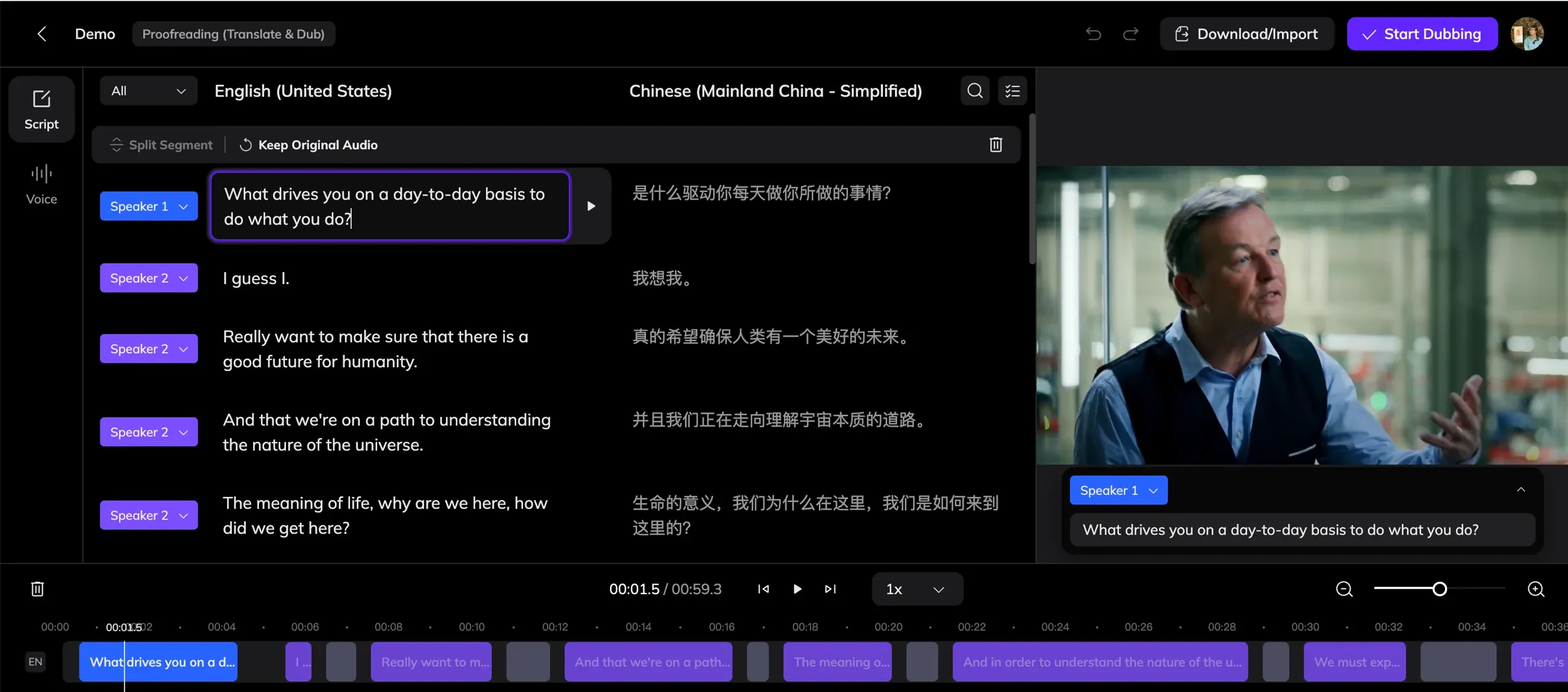
Original illustration from Vozo’s documentation, retrieved September 29, 2026; feature checked again September 30. The columns support reviewing meaning and speaker assignments before generating audio.
4. Generate the Dub and Listen to Difficult Passages
Review the excerpt with someone proficient in the target language. Separate translation errors, pronunciation problems, and unsuitable voice or accent choices. Fix the cause before regenerating. Vozo’s speech-generation rules distinguish free adjustments from changes that generate audio and consume points (checked September 30, 2026).
5. Add Lip Sync After Approving the Audio
If a presenter is visible, use Lip Sync after finalizing the dub. Vozo’s guidance calls for visible mouths without subtitles covering them (checked September 30, 2026). Inspect profile views, edits, and speaker changes as well as the opening shot.
6. Check the Export and Keep Your Source Files
Watch the exported video with its final captions and audio levels. Save the original, approved transcript, glossary, subtitles, and each delivered version. Include language and version in filenames so an earlier correction does not accidentally get published.
Budget: Three Videos, Two Target Languages
Assumptions: 3 videos × 10 minutes × 2 languages = 60 translated minutes. Output durations are assumed to match the sources. No other account usage, revisions, burned-in subtitle removal, or on-screen text translation is included.
| Operation | Calculated Vozo points | Calculated HeyGen credits |
|---|---|---|
| Dubbing without lip sync | 60 × 3 = 180 | 60 × 4 = 240 |
| Dubbing with lip sync | 180 + 6 × (5 + 10 × 5) = 510 | Speed: 60 × 6 = 360 |
| Alternative lip-sync mode | — | Precision: 60 × 10 = 600 |
Sources: Vozo point rules and HeyGen credit rules, checked September 30, 2026. The Vozo calculation assumes six new Lip Sync projects; variants within an existing project have different fixed fees. HeyGen’s modes are alternatives, so do not add 240, 360, and 600 together. Points from one vendor are not comparable to credits from another.
If pre-generation script review is required, Vozo Studio covers this workload with 600 points for $99/month; HeyGen Pro starts with 1,000 credits for $49/month. These are monthly subscriptions from the public USD Vozo and HeyGen pages, checked September 30, 2026. Confirm the final price and applicable taxes at checkout; no annual commitment is assumed.
HeyGen Creator at $29 has enough credits for these first-pass calculations but does not include translated-script proofreading in this workflow. Vozo Creator’s 150 monthly points do not cover even the 180-point dubbing-only workload without an additional allowance. A low entry price is not enough to select a plan: check both controls and remaining balance before generating.
For ElevenLabs v2, the dubbing cost is shown before confirmation. Do not automatically apply the older credit amounts still listed in the pricing FAQ to this new model. See its dubbing-cost guidance, checked September 30, 2026.
Include Review Time in Your Budget
An illustrative internal budget, not an observed service rate: allocating one $99 Vozo Studio month to this batch and assuming 90 minutes of review valued at $40/hour gives $99 + $60 = $159. If all 60 output minutes pass review, that is $2.65 per delivered minute, excluding editing and paid revisions. Replace those assumptions with your own time and spending. Rejected generations are not delivered minutes.
Use an Acceptance Checklist
For each issue, record language, timecode, speaker, correction, and approval status. This is a process for your own review, not a record of tests conducted by Génie Artificiel.
| Check | Evidence required before publishing |
|---|---|
| Meaning | Numbers, negatives, names, and instructions match the approved script |
| Voice | Correct speaker, understandable pronunciation, no missing sentences |
| Timing | Complete phrases and pauses that match the demonstration |
| Lips, when needed | No distracting defects in frontal shots, profiles, or cuts |
| Image and captions | Relevant labels translated, readable captions, no forgotten source-language text |
| Delivery | Complete export, correct version name, source and subtitles archived |
Software tutorials need an extra check: Vozo excludes interface buttons and menus from Visual Translate, checked September 30, 2026. Plan a new recording in the target language or suitable annotations. Dubbing does not change the buttons viewers see.
FAQ
Can the Translated Voice Sound Exactly Like the Original?
Voice cloning aims to preserve speaker identity, but accent, expression, and pacing can change. Have the speaker and a target-language reviewer approve an excerpt before processing the whole library.
Does a Training Video Need Lip Sync?
Only consider it when a visible person is speaking and the mismatch affects the presentation or understanding. Screen recordings with narration can use dubbing and captions alone.
Will a Free Trial Cover This Sixty-Minute Batch?
Vozo’s advertised 20 trial points do not cover the 180-point dubbing calculation here. Use the trial for a representative excerpt, then budget the complete batch.
How Does a Third Target Language Change the Calculation?
The same three ten-minute videos would produce 90 translated minutes. Recalculate Lip Sync project counts, revisions, and review time as well. Do not simply multiply the subscription price by three.