Coursebox: Pricing, AI Courses and SCORM Export
Explore Coursebox pricing, its free plan and a three-course budget. Compare dynamic and self-hosted SCORM exports, missing features and cancellation limits.
Published . 6 min read. Based on official sources, checked on the update date; every price links to its source. Our method.
Contents
Coursebox helps turn documents into structured training with lessons, quizzes and activities. The main purchasing decision is whether your LMS should load a live Coursebox course or receive a self-hosted package that remains usable after cancellation. Those options require different plans and do not preserve the same features.
This guide analyzes official documentation checked September 30, 2026. Budget examples use euro prices displayed in France, not verified US checkout prices or currency conversions. Coursebox buttons use affiliate links: we may earn a commission. Cited sources remain direct links.
What Can You Create with Coursebox?
The document-to-course workflow is intended to turn existing material into lessons and assessments. Review the structure, check factual accuracy and match each exercise to what learners should be able to do. A readable explanation alone does not demonstrate that someone can apply a workplace procedure.
Planning example: an onboarding program contains three courses, each covering a separate process. For every course, prepare an observable objective, a current source document, a worked example and a question with an explained answer. Separate courses are useful when each module needs its own assignment and completion record in the destination LMS.
This is a course-authoring decision. If your main deliverable is a presenter-led video, the Synthesia vs. Colossyan comparison covers that workflow. A video inside a course and an exported course package solve different needs.
How Much Does Coursebox Cost?
The following figures were displayed on the French pricing page on September 30, 2026. Tax treatment was not stated in the observed grid. US buyers should check the current local offer on the Coursebox pricing page; the amounts below are a documented regional example.
| Plan | Monthly Billing, France | Annual Billing, France | Main Purchase Decision |
|---|---|---|---|
| Free | €0 | €0 | Explore course creation without exports |
| Creator | €30/month | €300/year, equivalent to €25/month | Publish and export dynamic SCORM |
| Pro | €90/month | €900/year, equivalent to €75/month | Export self-hosted SCORM or use LTI |
| Pro + LMS | €270/month | €2,700/year, equivalent to €225/month | Custom domain, learner management and learning pathways |
| Enterprise | Custom | According to agreement | Contractual and organizational requirements |
Creator, Pro and Pro + LMS each include one administrator. Course authors and editors count as administrators; learners are a separate category. Creator lists 500 AI page credits per month and Pro 7,000. Generation allowances are not a guarantee of a particular number of finished courses.
Can You Build Three Courses for Free?
The advertised free plan allows three mini-courses with up to five pages each, with Coursebox branding and no credit card required. It is useful for examining a small module. It does not include a free SCORM delivery: the official plan comparison reserves PDF, HTML and SCORM downloads for paid plans (checked September 30, 2026).
Prepare a short, representative lesson before paying: one instruction, one illustration and one question whose answer you can verify. Look for omitted steps, inconsistent terminology and feedback that explains why an answer is right. This gives you a concrete basis for deciding whether to develop the course further.
Dynamic or Self-Hosted SCORM: What Changes?
SCORM packages let an LMS deliver training and record supported learning data. Exporting a ZIP does not necessarily put the entire course inside it. Coursebox’s SCORM mode comparison, checked September 30, 2026, distinguishes these options:
| Decision | Dynamic SCORM, Creator and Up | Self-Hosted SCORM, Pro and Up |
|---|---|---|
| Dependency | Loads the course hosted by Coursebox | Package runs on your LMS or server |
| After cancellation | Stops working | Previously exported package remains usable |
| After editing | Existing content updates; structural changes require another export | Export a new package |
| Online features | Retained according to the course and plan | AI tutor, text-to-speech listen mode, short answers, assignment submissions, discussions and imported SCORM content |
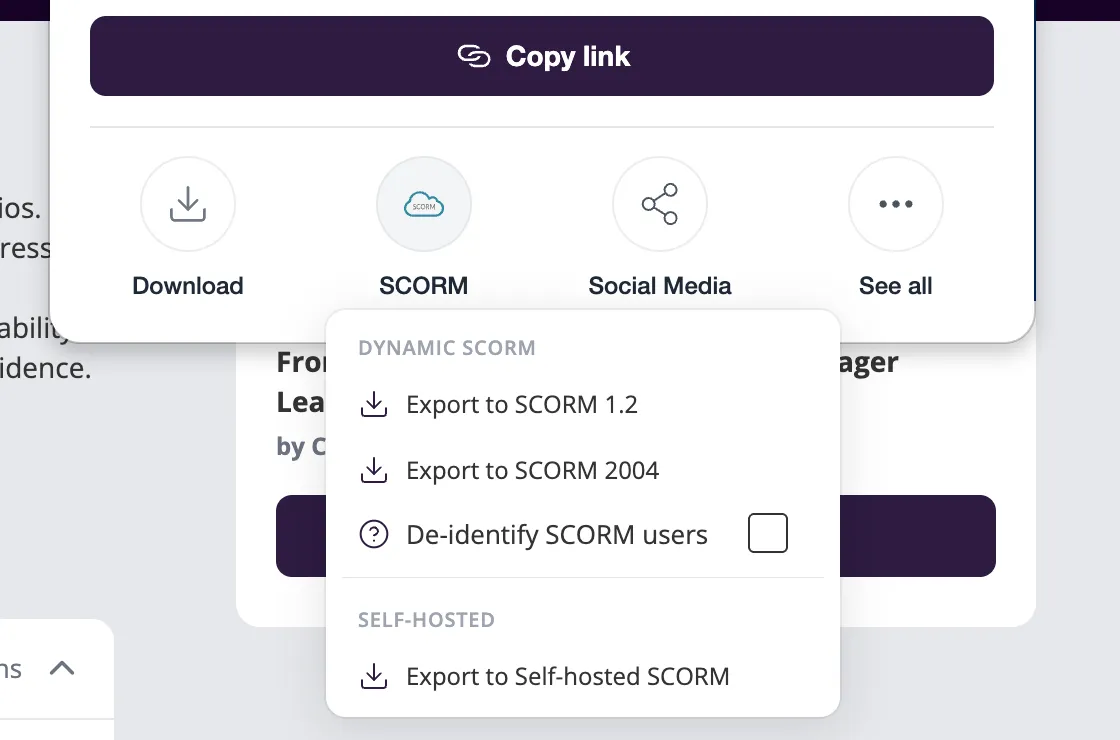
Excerpt from the official Share & Export illustration, retrieved September 30, 2026. The menu distinguishes formats; their appearance here does not mean they are available on the free plan.
The LMS integration guide explains that LTI also launches the hosted course, so it is not a backup that survives cancellation. Export a self-hosted package before the subscription ends if you need to retain that version. The offline learning guide details the features excluded from self-hosted packages. Embedded external media, such as a YouTube video, may still require network access.
A Concrete Budget for Three Courses
Assume one author produces three courses within one month, stays within the plan’s allowances and already has a destination LMS. Writing, review, applicable taxes and LMS hosting are excluded. This calculation uses the France prices above; it is not a US price quote or an observed production result.
| Required Deliverable | Coursebox Subscription for That Month | Allocation Across Three Courses |
|---|---|---|
| Three live courses using dynamic SCORM | Creator: €30 | €10 per course for that month |
| Three self-hosted SCORM packages | Pro: €90 | €30 per course for that month |
The first figure does not buy permanent delivery. Keeping Creator for twelve months costs €360 with monthly payments, compared with €300 billed annually. Annual billing requires paying for the year even if initial authoring takes only a month.
Pro’s exported self-hosted package can survive cancellation, but it loses several features at export. A module assessed through a short-answer question or submitted assignment may therefore need redesign. Compare the delivered learning experience before treating €30 and €90 as interchangeable ways to produce the same result.
For two authors on Pro, the public calculator displayed €190/month or €1,900/year on September 30, 2026. Simply doubling the base plan price would give the wrong budget. Confirm administrator requirements before choosing the subscription.
What Should You Verify Before LMS Delivery?
Create an acceptance record for each module:
- Launch the package with a learner account in the destination LMS.
- Check every media item, question and feedback message.
- Exit partway through and check whether progress resumes correctly.
- Complete the assessment with correct and incorrect answers, recording what reaches the LMS.
- Archive the ZIP, export date and list of omitted features.
This is a suggested acceptance procedure to run in your own environment. Coursebox’s documentation distinguishes SCORM 1.2 and 2004 reporting; do not assume that both deliver identical assessment data.
The user agreement, checked September 30, 2026, makes users responsible for source-material rights and reviewing AI output. Uploading a manual does not grant resale rights, and using someone else’s likeness or voice requires the necessary permission. This is a documentation summary, not legal advice.
For separately produced narration, the Murf Studio and Dub guide explains voiceover budgets and usage rights. If the course is mainly interactive video, consider the different authoring workflow described in the Colossyan guide.
FAQ
Does the Free Plan Export SCORM?
No, under the plans documented on September 30, 2026. Creator provides dynamic SCORM; Pro provides self-hosted exports.
Do You Need Pro + LMS if You Already Have an LMS?
Not solely to export a self-hosted package: that feature is documented from Pro. Pro already includes portal branding with your logo and colors. The plan comparison reserves features such as a custom domain, learner management and learning pathways for Pro + LMS.
Will an Exported Course Work After Cancellation?
A previously downloaded self-hosted package remains usable. Dynamic SCORM and LTI require an active subscription. Save a copy and validate its content before cancellation.
Does Self-Hosted SCORM Keep the AI Tutor?
No. It excludes the AI tutor and several online activities. If those features are essential to learning, prepare an alternative activity or keep the hosted version.
The verdict
Consider it for structured training delivered through an LMS. Choose between a live course connection and a self-hosted package before comparing subscription prices.
- Best for
- Instructional designers, trainers and small teams turning existing documents into courses

Coursebox
Affiliate link: if you subscribe through this link, we earn a commission at no extra cost to you.