Submagic Pricing, Free Trial and Limits
Contents
Submagic automatically adds animated captions, zooms, cuts and B-roll to your short videos for TikTok, Reels and Shorts. Its Magic Clips feature can also cut a long video into several clips. Plans start at $19 a month ($12 billed annually) for 15 videos of up to 2 minutes each; the free trial lets you process 3 short videos, with a watermark. Submagic is made by Turbo Studio, a company based in Paris, France.
This page is based on Submagic’s pricing page, help center, terms of use and privacy policy, checked Oct. 6, 2026. The amount shown at checkout is what counts. Links to these sources are direct, not affiliate links.
How Much Does Submagic Cost in 2026?
Submagic charges per member, per month (Submagic pricing, checked Oct. 6, 2026). Under its terms, prices are exclusive of taxes and billed in US dollars outside the European Union.
| Plan | Monthly | Annual (per month) | Credits a month | Max length per video | Export |
|---|---|---|---|---|---|
| Starter | $19 | $12 | 45 (“15 videos”) | 2 minutes | 1080p, 30 fps |
| Pro | $39 | $23 | 120 (“40 videos”) | 5 minutes | 1080p or 2K, 30 fps |
| Business | $69 | $41 | 300 (“100 videos”) | 30 minutes | Up to 4K, 60 fps |
| Custom | Custom | Custom | Custom | Custom | – |
Every paid plan exports without a watermark. Pro adds auto zooms, bad-take and silence removal, audio cleanup, Storyblocks B-roll and posting to one account per social platform. Business adds 4K, custom templates and vocabulary, priority support and rendering, and posting to three accounts per platform. The page contradicts itself on Business custom templates: 10 on the plan card, 5 in the comparison table.
Annual billing is advertised as up to 41% cheaper: $84 saved a year on Starter, $192 on Pro and $336 on Business.
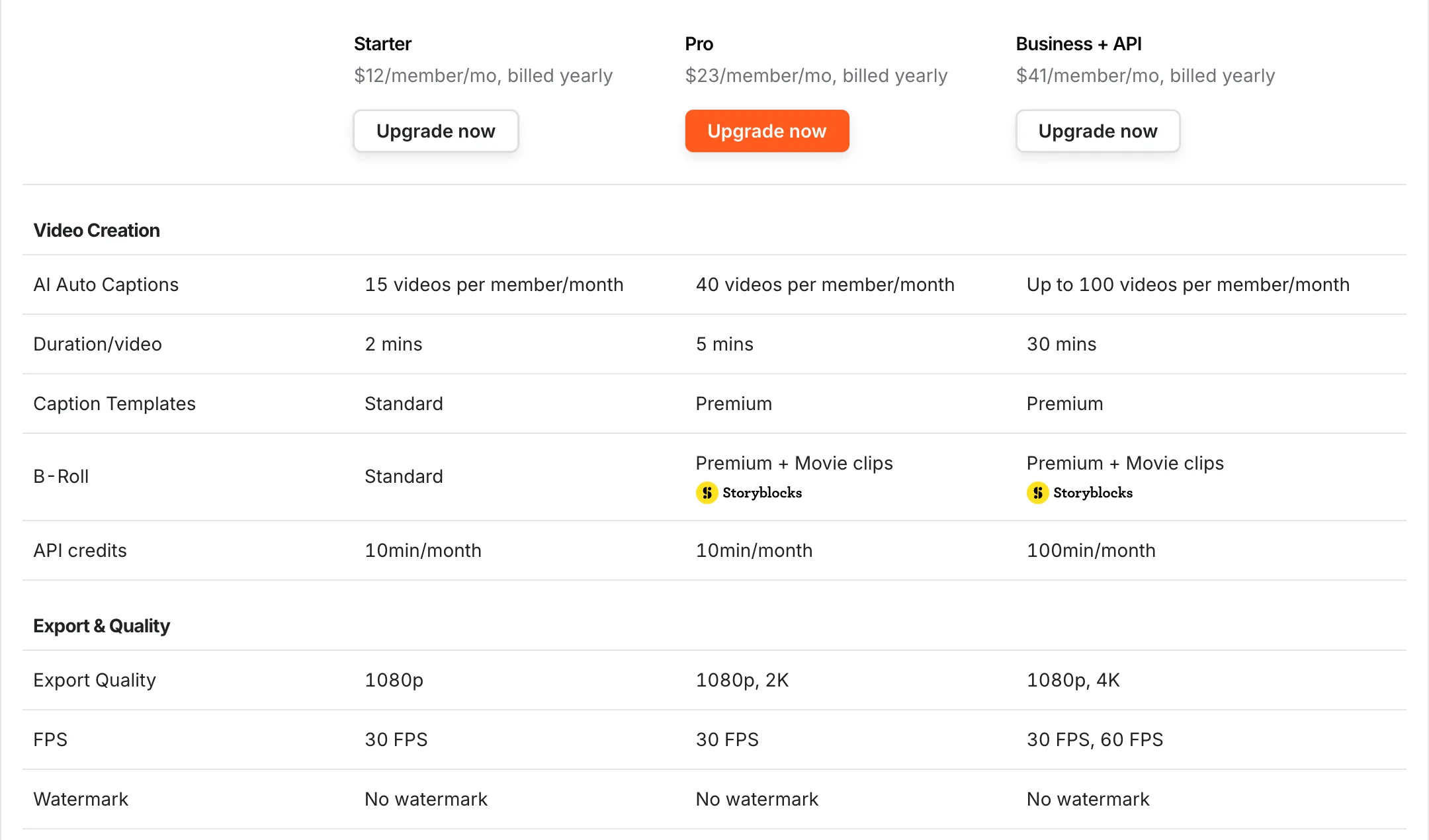
The comparison table on Submagic’s pricing page: the number of videos and, above all, the maximum length per video set the plans apart (screenshot taken Oct. 6, 2026).
Is Submagic Free?
No, but there’s a free trial, with no credit card required according to the pricing page. Per the help center, you can upload 3 short videos and edit them as you like; downloads carry a watermark until you subscribe (checked Oct. 6, 2026). There’s no permanent free plan.
The Real Limit: Length per Video
The number of videos a month is generous if you post one short a day. The limit that matters is the maximum length of each video: 2 minutes on Starter, 5 on Pro, 30 on Business. A 10-minute interview only fits on Business, or after you cut it down yourself.
Credits. Each plan comes with monthly credits, which the page translates into videos (3 credits per video) and which also pay for AI-generated videos and images. The pricing page doesn’t publish a per-feature rate card, so check the cost shown in the app before you generate anything.
Magic Clips, the feature that cuts a long video into several shorts, promises more than 20 captioned, reframed clips per video (Magic Clips page). The pricing page only mentions Magic Clips limits for custom plans, but the help center describes Magic Clips as a $19-a-month add-on for 10 videos on top of a subscription (“How much does it cost” help article, updated Sept. 30, 2026, checked Oct. 8, 2026). See how it compares in our OpusClip alternatives. If you regularly clip long videos, OpusClip has a clearer rate: 1 credit per minute of source video.
The API is sold separately: 10 minutes a month on Starter and Pro, 100 on Business, then packs from 250 minutes ($57 a month) to 10,000 minutes ($1,000 a month).
Which Submagic Plan Should You Choose?
- To try it: the 3-video free trial, to judge the caption styles.
- Shorts under 2 minutes, light editing: Starter, $12 a month billed annually.
- Videos up to 5 minutes, with auto zooms and cuts: Pro, the most complete plan for a solo creator.
- Longer formats, 4K or a team: Business, billed per member.
Canceling and Refunds
According to the terms of use and the help center (checked Oct. 6, 2026):
- you cancel from your profile, through the Stripe billing portal; cancellation takes effect at the end of the paid period. You can also pause your subscription for a few months;
- monthly and annual fees are non-refundable;
- the contract is governed by French law.
Your Videos and Your Data
Under section 13 of the terms, you keep all rights to your videos, but you grant Turbo Studio a worldwide, non-exclusive license to use, modify, reproduce and distribute them on and through the platform. The company may use them for promotional purposes; to opt out, email support@submagic.co from your account’s address. The terms also note that generated results may not be unique and that you’re responsible for how you use them.
Neither the terms nor the privacy policy mention training models on your videos. The service is hosted on Amazon Web Services; data is processed in the European Union and outside it, including the United States, under the European Commission’s Standard Contractual Clauses.
Submagic vs. OpusClip vs. SendShort
All three caption and produce short videos; the full comparison is on our SendShort page.
- Submagic: the most polished for dressing up shorts you’ve already filmed (animated captions, zooms, cuts).
- OpusClip: the most direct way to start from a long video, with a permanent free plan.
- SendShort: captions, faceless videos and high-volume clipping.
For step-by-step captioning in Submagic and the free options (YouTube Studio, Clipchamp), see our guide to adding subtitles automatically. To translate a video in your own voice, see our video translation guide.
FAQ
Is Submagic free?
No. A free trial lets you process 3 short videos with a watermark. After that, plans start at $19 a month, or $12 a month billed annually.
What’s the maximum video length on Submagic?
2 minutes on Starter, 5 minutes on Pro and 30 minutes on Business, per video.
How do you remove the Submagic watermark?
Subscribe to any paid plan: all three export without a watermark. The free trial keeps it.
Does Submagic offer refunds?
No. Subscriptions are non-refundable, though EU consumers have a 14-day withdrawal right under the terms.
Who makes Submagic?
Turbo Studio SAS, a company headquartered in Paris, France. Its terms of use are governed by French law.
How do you cancel Submagic?
From your profile, open the Stripe portal and choose “Cancel Subscription.” You keep access until the end of the paid period; a pause of a few months is also available.
Useful Links
The verdict
A good pick for captioning and punching up shorts you've already filmed. Check each plan's maximum video length before you pay.
- Best for
- TikTok, Reels and Shorts creators who film their own videos

Submagic
Affiliate link: if you subscribe through this link, we earn a commission at no extra cost to you.