OpusClip Pricing, Free Plan and Limits
Contents
OpusClip turns a long video (podcast, interview, webinar, livestream) into vertical clips ready to post, with animated captions, automatic reframing and a “Virality Score” for each clip. There is a free plan: 60 minutes of video a month with no credit card, but with a watermark, no editing and personal use only. Paid plans start at $15 a month (Starter, 150 minutes); Pro costs $29 a month, or $14.50 a month billed annually, for 300 minutes.
This page is based on OpusClip’s pricing page, help center, terms of service and privacy policy, checked Oct. 6, 2026; plan prices and credits rechecked Oct. 19, 2026. Prices are shown in US dollars, and the amount shown at checkout is what counts. Links to these sources are direct, not affiliate links.
Is OpusClip Free?
Yes, with real limits. The “free forever” plan gives you 60 credits a month, or 60 minutes of source video, with no credit card (OpusClip pricing, checked Oct. 6, 2026). Clips render up to 1080p with auto reframing and AI captions. In exchange:
- every clip carries an OpusClip watermark;
- there’s no editing: you keep the clips as the AI cuts them;
- clips can’t be exported after 3 days;
- use is personal and non-commercial only: the terms of service (effective Nov. 17, 2025) reserve commercial use for paid plans.
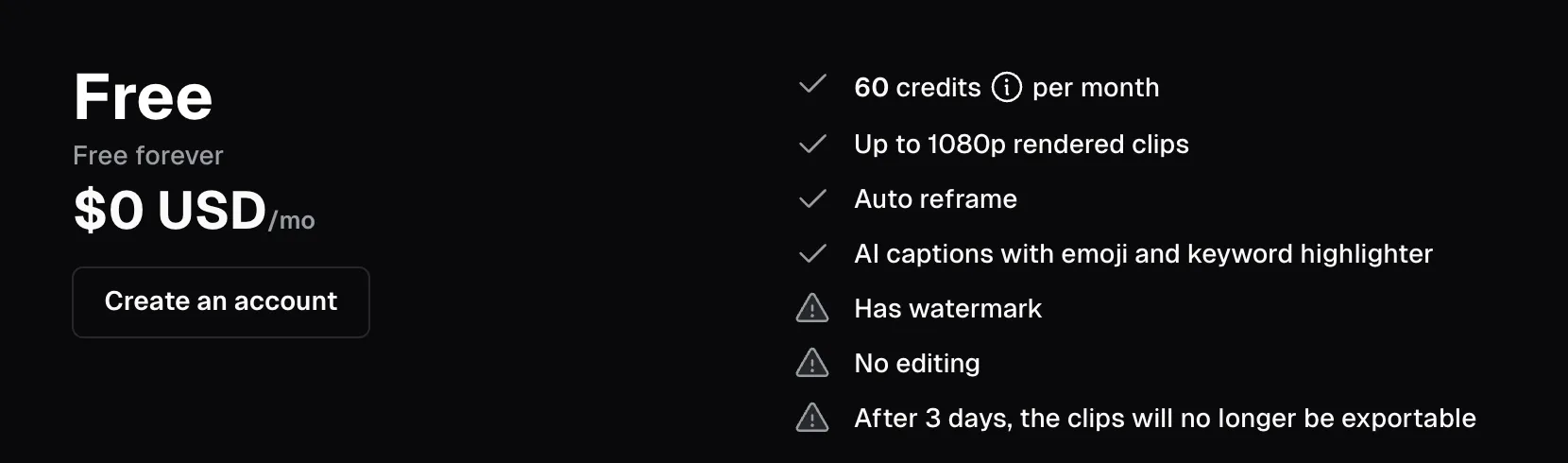
The free plan on OpusClip’s pricing page: the three warning signs mark its limits (screenshot taken Oct. 6, 2026).
The free trial is not the free plan. The “Start your free trial” buttons on Starter and Pro open a no-card trial of the Pro features, but not all of them: according to the help center, exports keep the watermark, and posting to social platforms, 4K, music, clip analytics and Seedance 2.0 are excluded (checked Oct. 6, 2026). The pricing page doesn’t say how long the trial lasts.
In practice, the free plan is for judging how well OpusClip cuts one or two of your videos. To publish without a watermark, you need a paid plan.
How Much Does OpusClip Cost in 2026?
Prices from the pricing page and the help center, checked Oct. 6, 2026:
| Plan | Monthly | Annual | Credits | What you get |
|---|---|---|---|---|
| Free | $0 | – | 60 a month | Watermark, no editing, 3-day export window |
| Starter | $15/mo | Not offered | 150 a month | Editor, no watermark, posting to YouTube, TikTok and Instagram |
| Pro | $29/mo | $14.50/mo ($174/yr) | 300 a month, 3,600 a year | Team workspace (2 seats), AI B-roll, 16:9 and 1:1 formats, export to Premiere Pro and DaVinci Resolve, dubbing |
| Business | Custom | Custom | Custom | API, dedicated processing queue, priority support |
Pro is sold in “packs”: each pack adds 300 monthly credits and 2 seats, up to 4 users per team workspace. The help center also lists a Max plan (1,500 credits a month per pack), sold only through Agent Opus, the same company’s video generator, with credits that also work in OpusClip.
How Much Does a Video Cost on OpusClip?
1 credit = 1 minute of source video, no matter how many clips you get out of it (how credits work, checked Oct. 6, 2026). A video under a minute counts as 1 credit; partial minutes beyond that are rounded down (4.5 minutes = 4 credits). You can process only part of a video to save credits. Posting a clip to X costs 3 credits per account.
Dividing each price by the minutes included gives the cost of an hour of source video (our math):
| Plan | Price per minute processed | One hour of video | What the credits cover |
|---|---|---|---|
| Free | $0 | $0 | One one-hour episode a month |
| Starter | $0.10 | $6 | Two and a half hours a month |
| Pro, monthly | ≈ $0.097 | ≈ $5.80 | Five hours a month |
| Pro, annual | ≈ $0.048 | ≈ $2.90 | 60 hours a year |
Monthly credits stay valid for 60 days (one month of rollover), according to both the help center and the pricing page with monthly billing. On an annual plan, the help center says the year’s 3,600 credits arrive up front and last 12 months; with annual billing selected, though, the pricing page reads “Unused credits roll over for 2 months,” without explaining how that fits with the 12-month validity (checked Oct. 7, 2026). If you cancel, remaining credits expire on their original date.
Which OpusClip Plan Should You Choose?
- To try it: the free plan, on one representative video, before paying anything.
- One podcast or long video a week (up to 2.5 hours a month): Starter at $15, if vertical clips are all you need.
- Several hours a month, or a small team: Pro. Annual billing halves the price per minute, but locks you in for a year and hands over all the credits at once.
- More than a few hours a week: compare SendShort, whose Business plan advertises “unlimited” clipping, which its FAQ defines as 100+ shorts a month subject to fair use (checked Oct. 7, 2026), before stacking Pro packs.
Can You Use OpusClip Clips Commercially?
On a paid plan, yes: the terms of service allow commercial use. On the free plan, use is limited to personal, non-commercial purposes. Either way, you’re responsible for the rights to the source video (footage, music, guests): OpusClip only cuts it.
Your Videos and Your Data
The terms of service state that you keep ownership of your videos. For private projects, the license you grant OpusClip is limited to running the service; it’s broader for anything you share publicly on the platform. Neither the terms nor the privacy policy (effective Nov. 17, 2025) mention training models on your videos. OpusClip participates in the EU-US Data Privacy Framework and says it goes through an annual SOC 2 Type II audit (data security).
Watch Out for a Fake OpusClip Site
OpusClip’s official site is opus.pro. On Bing, though, opus-clip.com shows up second for “opus clip gratuit” (French for “free”), reusing OpusClip’s name, pitch and prices. Its footer reads, in French, that it is “an independent, unofficial website”; the domain was registered on March 24, 2026 (checked Oct. 6, 2026). Check that the address is opus.pro before you sign up or pay.
OpusClip vs. SendShort vs. Submagic
All three clip and caption short videos, each with a different strength; the full comparison is on our SendShort page.
- OpusClip: the most direct way to start from a long video, with clipping included on every plan.
- SendShort: captions, faceless videos, clipping from Professional and an “unlimited” Business plan, defined as 100+ shorts a month subject to fair use.
- Submagic: animated captions and automatic editing for shorts you’ve already filmed.
To make a clip from a text prompt rather than an existing video, see our top 10 AI video tools. To translate a video in your own voice, see our video translation guide. To caption a video without clipping it, for free or with Submagic, see our guide to adding subtitles automatically. Eight more tools, with a cost per hour of source video, are compared in our OpusClip alternatives.
FAQ
Is OpusClip really free?
The free plan has no time limit: 60 minutes of video a month, no credit card. Clips carry a watermark, can’t be edited, must be exported within 3 days and can’t be used commercially.
How do you remove the OpusClip watermark?
Upgrade to a paid plan, starting with Starter at $15 a month. The free trial of the paid plans keeps the watermark.
How many minutes do 150 credits give you?
150 minutes of source video, or two and a half hours a month on Starter, however many clips you pull from each video.
Do OpusClip credits expire?
Yes: after 60 days for monthly credits (one month of rollover), and after 12 months on an annual plan according to the help center. With annual billing, the pricing page mentions a 2-month rollover without further detail.
Is OpusClip worth it for podcasts?
It’s built for that use case: drop in a full episode and get vertical clips with captions. At an hour per episode, Starter covers about two episodes a month and Pro about five; weekly long episodes point to Pro.
How do you cancel OpusClip?
From the subscription page in your dashboard (the crown icon). Changes take effect at the start of the next billing cycle (plans help page).
Useful Links
- OpusClip pricing and how credits work
- Features not included in the free trial
- Terms of service and privacy policy
- Our SendShort page, comparing SendShort, Submagic and OpusClip
The verdict
A strong pick for turning podcasts, interviews and webinars into short clips. The free plan is enough to judge the results, not to publish.
- Best for
- Podcasters, YouTubers and marketing teams repurposing long videos

OpusClip
Affiliate link: if you subscribe through this link, we earn a commission at no extra cost to you.