SendShort in 2026: Pricing, Plans and Alternatives
Contents
- What Can You Do With SendShort?
- Tips Before You Pay for SendShort
- How Much Does SendShort Cost? Plans and Pricing
- Is SendShort Free?
- Which SendShort Plan Should You Choose?
- SendShort vs. Submagic vs. OpusClip
- What Are SendShort’s Limitations?
- How to Turn a Long Video into Shorts with SendShort
- FAQ
- Useful Links
SendShort automatically captions your videos, cuts a long video (podcast, interview, livestream) into vertical shorts for TikTok, Reels and YouTube Shorts, and generates “faceless” videos, with no one on camera, from a text prompt. It’s built for creators and small brands who post short-form video every day. Plans start at $19 a month ($15 billed annually), and long-video clipping is included from the Professional plan, at $29 a month ($23 billed annually). There’s no free trial right now, but SendShort says you can ask for a refund within 24 hours of paying.
This page is based on SendShort’s pricing page and its FAQ, homepage, features page and terms of service, checked Oct. 7, 2026. The pricing page was redesigned sometime between Sept. 28 and Oct. 7, 2026: prices didn’t change, but long-video clipping, previously Business-only, moved down to Professional, and the “No credit card required” line is no longer displayed. Prices are in US dollars, and the amount shown at checkout is what counts. Links to these sources are direct, not affiliate links.
What Can You Do With SendShort?
According to the pricing page, homepage and features page (checked Oct. 7, 2026), SendShort covers six jobs:
- Captioning short videos: auto-generated captions with animated styles and custom themes (3 on Starter, unlimited after that). The pricing page advertises 100+ languages; the homepage FAQ names about fifty of the most used ones, including English and Spanish. Automatic caption translation starts on Professional.
- Turning a long video into shorts: upload a file or paste a YouTube link, and the AI picks the best moments, reframes to vertical while keeping the speaker centered, and cuts the clips. This is included from Professional, and advertised as “unlimited” on Business.
- Polishing clips: a B-roll (cutaway footage) and sound-effect library from Starter; AI hook titles, auto B-roll, your own fonts, music and images, silence removal, noise reduction and AI voiceover from Professional.
- Creating without filming: faceless videos from a prompt, TikTok slideshows, music videos, AI avatar videos and photo-to-video, in amounts that depend on the plan (table below). Automated series keep producing these videos based on your instructions.
- Scheduling and publishing: a TikTok and YouTube scheduler, a content calendar and unlimited social accounts on every plan. The pricing FAQ doesn’t list any other platform.
- Running SendShort from an AI assistant: a connector for Claude, ChatGPT or Grok, plus an API, included from Professional according to the pricing page. The homepage, however, labels both the AI agent and the API “Business plan,” so SendShort contradicts itself.
SendShort translates captions and offers AI voiceover; its pages don’t mention dubbing a video in your own voice. For higher-quality voiceovers or voice cloning, see ElevenLabs; for an avatar presenter who talks for several minutes, HeyGen.
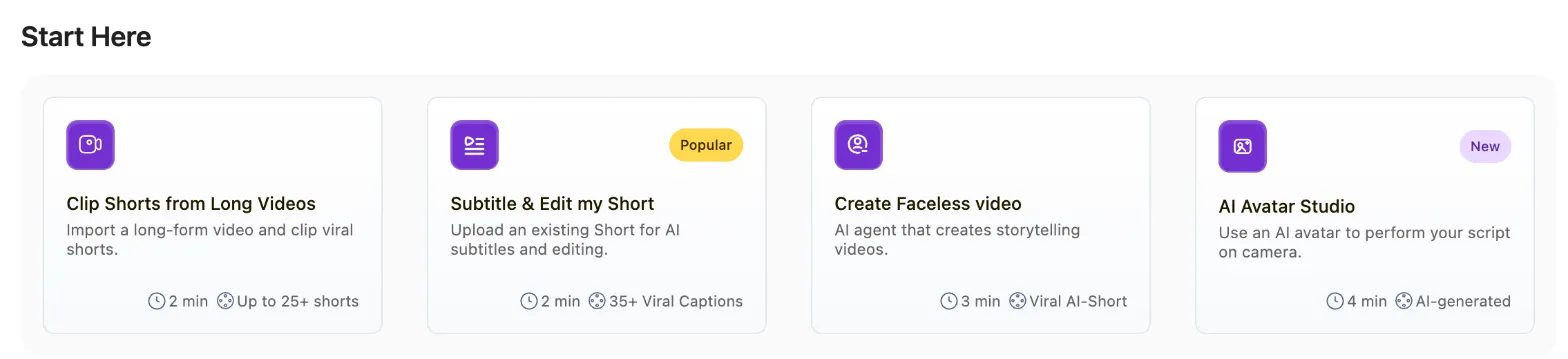
SendShort app home screen, captured October 13, 2026 from an account without a subscription (creation is locked). This shows the vendor’s interface, not a test by this site.
Clip a Podcast or Interview into Shorts
Workflow: “Clip Shorts from Long Videos.” Plan: Professional or higher ($29/month, or $23 billed annually), with shorts up to 3 minutes. Cost: every clip produced counts toward the 50 shorts per month. Pick a video with one person speaking on camera: the vertical reframe follows the speaker. The steps are detailed below.
Caption a Short You Already Filmed
Workflow: “Subtitle & Edit my Short.” Plan: Starter is enough (20 shorts a month, 90 seconds max). Cost: one short per video. To publish the same video with captions in another language, automatic translation requires Professional.
Create a Faceless Video from Your Own Script
Workflow: “Create Faceless video,” then “Write Your Own Story” in the content list. The form asks for a title and a story, “read exactly as written,” of at least 50 characters; the Optimize button offers a rewrite. You then pick one of six voices (Alloy, Echo, Fable, Nova, Onyx, Shimmer), an art style, the language and a music mood (checked October 13, 2026). Plan: 3 faceless videos a week on Starter, 10 on Professional.
A short, concrete story built around a promise you can keep in 30 seconds:
Title: 3 mistakes that ruin your drip coffee

Story: Is your drip coffee bitter? Three mistakes are usually to blame.
One: a grind that's too fine, which over-extracts the coffee.
Two: boiling water; aim for 195 to 205 degrees instead.
Three: coffee that was ground weeks ago.
Fix just one tomorrow morning and taste the difference.
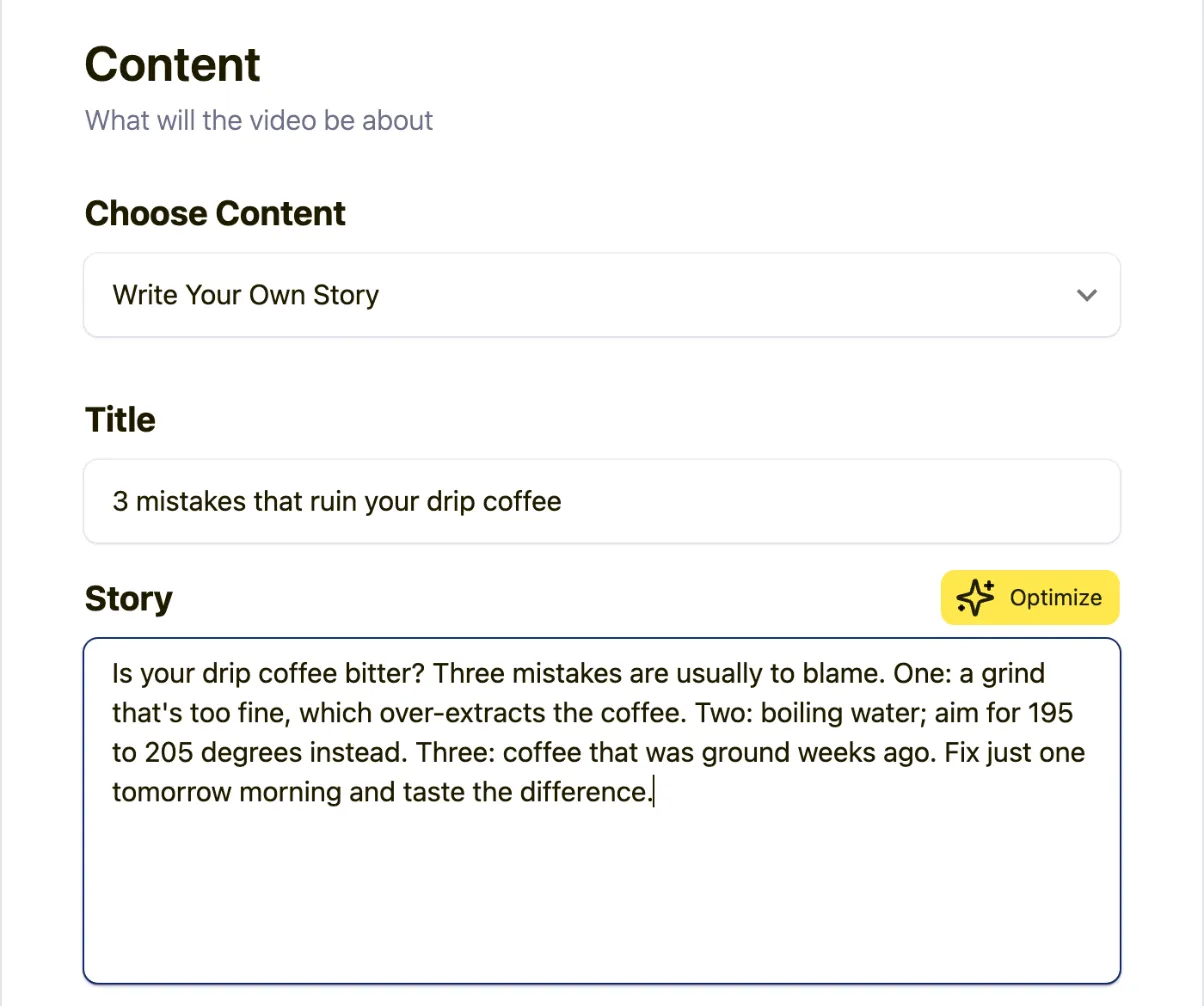
SendShort’s faceless form filled in with a sample script, captured October 13, 2026; no video was created. This shows the vendor’s interface, not a test by this site.
Without a script, the same list offers AI-generated topics: scary stories, interesting history, urban legends, fun facts, life pro tips, product marketing or a custom topic.
Publish Every Day on Autopilot
Workflow: “Automated Series” keeps producing faceless videos from your instructions; the calendar then schedules them to TikTok and YouTube. Plan: the scheduler is included from Starter; series require Professional (2 series) or Business (10).
Tips Before You Pay for SendShort
- Have your test videos ready before subscribing. There is no free trial; the pricing FAQ offers a refund within 24 hours of payment (details). Keep a typical long video and a typical short at hand so you can judge the output the same day.
- Set the video language before creating. On October 13, 2026, the faceless form defaulted to English, out of 21 available languages.
- Write for the ear. The story is read exactly as written: short sentences, a hook in the first line, and numbers spelled the way they should be spoken.
- Pick the plan by clip length, not just clip count: 90 seconds on Starter, 3 minutes on Professional, 10 minutes on Business.
- Read “unlimited” as “100+ shorts a month.” Beyond that, the FAQ asks you to contact SendShort; a daily automated series across several accounts can reach that ceiling.
How Much Does SendShort Cost? Plans and Pricing
SendShort lists three plans in US dollars on its pricing page (checked Oct. 7, 2026). Annual billing is advertised as “-20%.” The page doesn’t mention sales tax.
| Starter | Professional | Business | |
|---|---|---|---|
| Monthly price | $19/mo | $29/mo | $59/mo |
| Billed annually | $15/mo ($180/yr) | $23/mo ($276/yr) | $47/mo ($564/yr) |
| Shorts a month | 20 | 50 | “Unlimited” |
| Longest short | 90 sec | 3 min | 10 min |
| Long video to shorts | No | Yes, within the 50 shorts | “Unlimited” |
| Faceless videos | 3 a week | 10 a week | “Unlimited” |
| TikTok slideshows | 10 a week | 10 a week | “Unlimited” |
| Music videos | No | 10 a month | “Unlimited” |
| AI avatar · photo-to-video | No | 2 · 5 a month | 3 · 10 a month |
| Automated series | No | 2 | 10 |
| Export | 1080p, 30 fps | 2K, 30 fps | 4K, 60 fps |
| Watermark | No | No | No |
The annual totals ($180, $276 and $564) are our math, based on the monthly prices shown with annual billing. The “23% OFF” and “30% OFF” badges on the Professional and Business cards overstate the discount: the actual savings come to about 20% to 21% on each plan ($15 instead of $19, $23 instead of $29, $47 instead of $59, our math).
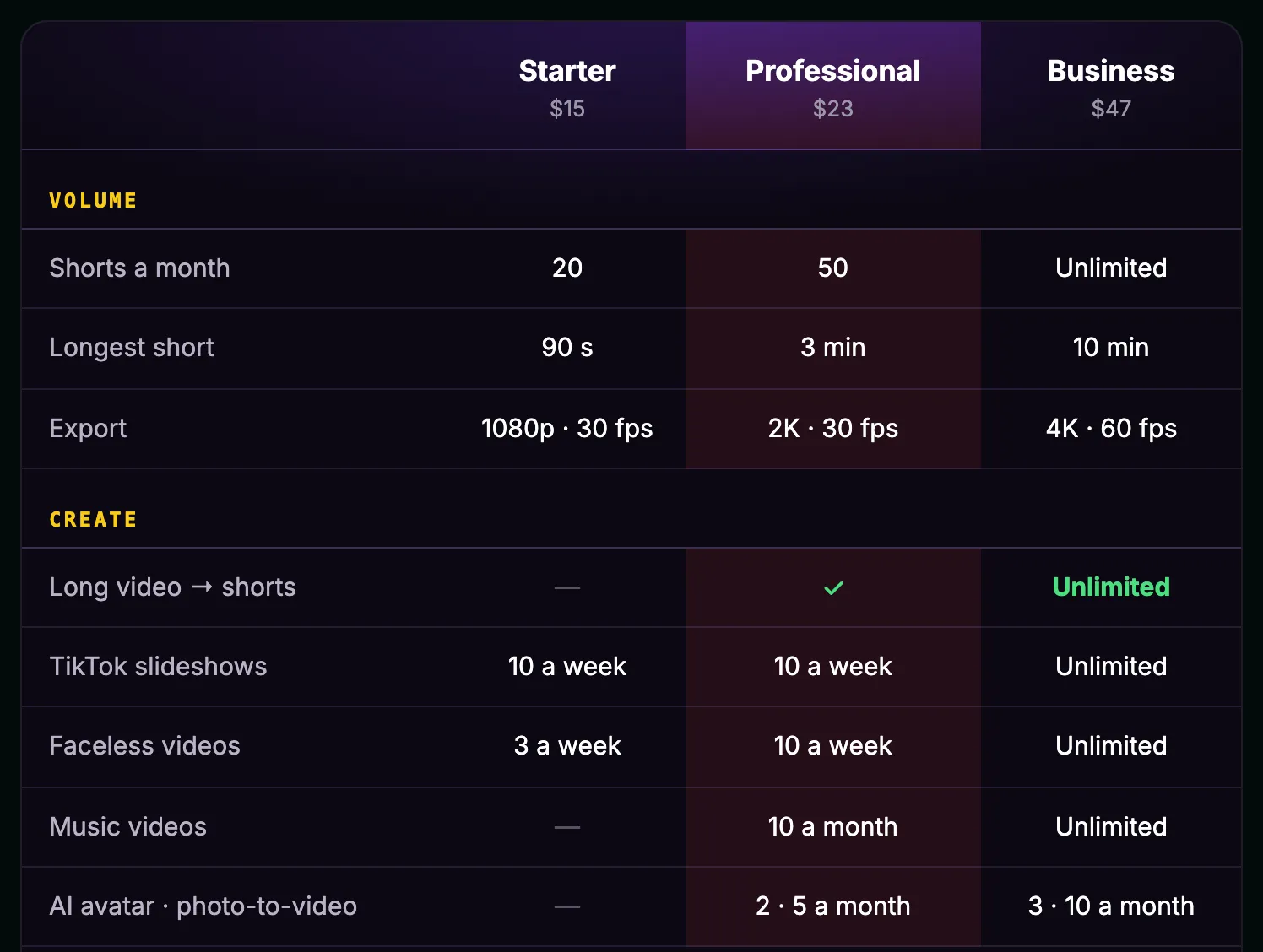
The comparison table on SendShort’s pricing page, showing monthly prices with annual billing: the “Long video → shorts” row is checked from Professional (screenshot taken Oct. 7, 2026).
What each plan adds, according to the same page:
- Starter: auto captions and animated styles, 3 custom themes, a full editor (timeline, fonts, hooks), the B-roll and sound-effect library, the TikTok and YouTube scheduler, a content calendar, unlimited social accounts, and 1080p export with no watermark.
- Professional: long-video clipping, unlimited themes, your own fonts, B-roll, music and images, AI hook titles, auto B-roll, silence removal and noise reduction, AI voiceover, automatic caption translation, the AI agent and API, 2 automated series, export up to 2K, and captions as an SRT file.
- Business: “unlimited” volumes, shorts up to 10 minutes, 4K export at 60 fps, conversion to 9:16, 1:1 and 16:9, more avatar and photo-to-video clips, and 10 automated series.
Is SendShort Free?
No. Under “Is there a free trial?”, the FAQ on the pricing page answers “Not at the moment” and suggests asking for a refund within 24 hours of paying instead (checked Oct. 7, 2026). There’s no free plan either, so the minimum is $19 for a month, or $180 a year with annual billing (our math: 12 × $15).
The features page still says “Try Today for Free”; the pricing FAQ is newer and more specific.
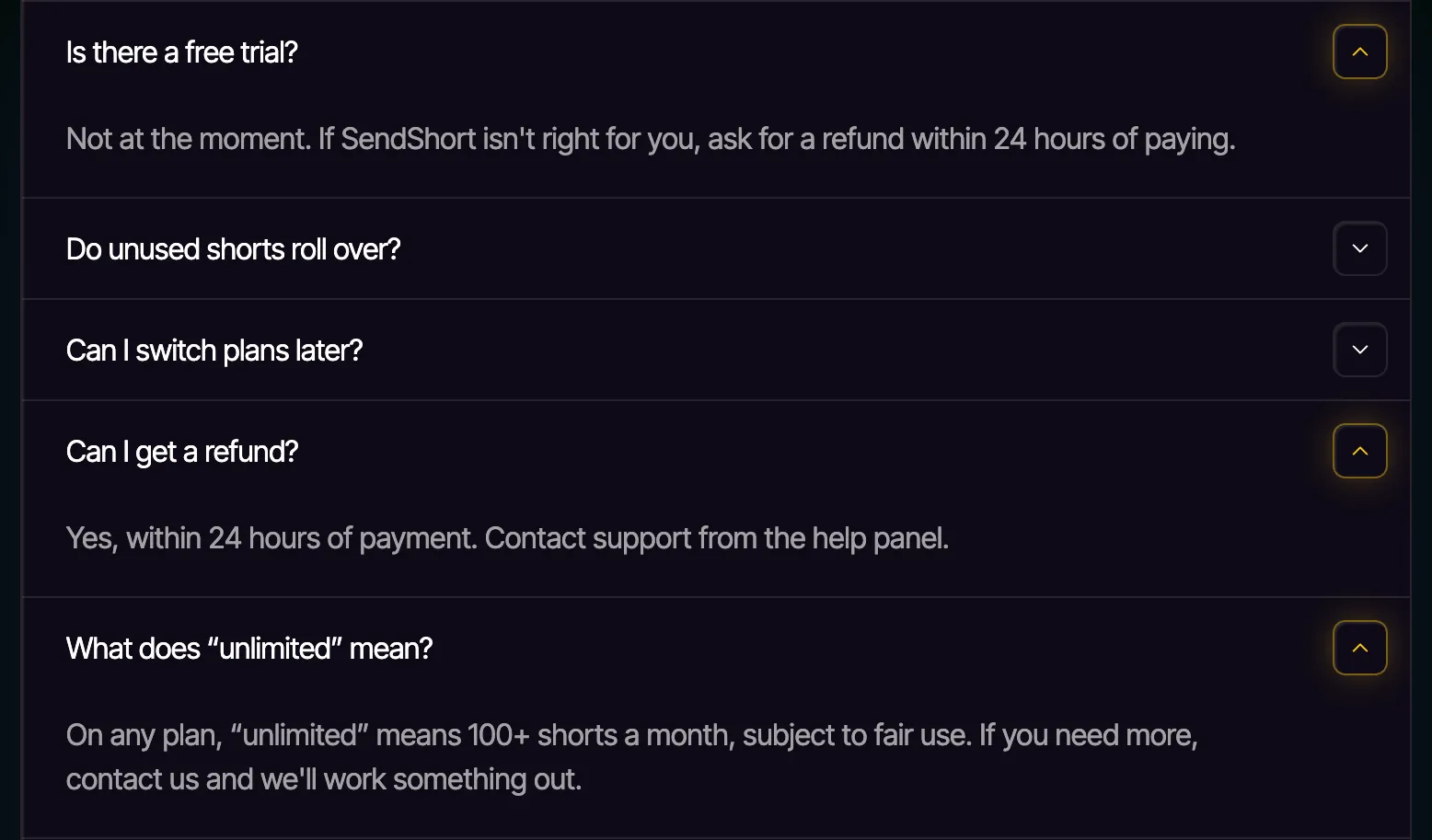
The FAQ on SendShort’s pricing page: no free trial, a 24-hour refund window and what “unlimited” means (screenshot taken Oct. 7, 2026).
If you want to judge automatic clipping before paying anything, OpusClip has a permanent free plan with 60 minutes of video a month, watermarked (see the comparison below).
Which SendShort Plan Should You Choose?
- Starter is enough if you already shoot vertical video and mostly need captions and scheduling: 20 shorts a month, up to 90 seconds each.
- Professional is now the entry point for turning a podcast or interview into shorts. Watch the counter: every clip you produce counts as one short, and the FAQ’s own example is a 60-minute podcast that becomes 8 clips, using 8 shorts. At that rate, the 50 monthly shorts cover about six episodes (our math), at $23 a month billed annually, or $0.46 per short.
- Business makes sense beyond 50 shorts a month, for clips between 3 and 10 minutes, 4K at 60 fps, 1:1 or 16:9 conversion, or more than two automated series.
Unused allowances don’t roll over: monthly limits reset every month, and weekly ones (slideshows, faceless videos) every week. According to the FAQ, you can switch plans at any time.
SendShort vs. Submagic vs. OpusClip
All three tools add captions and produce short videos, but each has a different strength. Prices were checked on the official pages on Oct. 7, 2026.
| SendShort | Submagic | OpusClip | |
|---|---|---|---|
| Main strength | Captions, clipping, faceless videos, series | Animated captions and editing for shorts you’ve already filmed | Clipping long videos |
| Free option | No free plan or trial; 24-hour refund | Trial: 3 short videos, watermarked | Free plan: 60 minutes a month, watermarked |
| Entry plan | $19/mo ($15 billed annually): 20 shorts of up to 90 sec | $19/mo ($12 billed annually): 15 videos of up to 2 min | $15/mo: 150 minutes of source video |
| Next plan | $29/mo ($23 billed annually): 50 shorts of up to 3 min | $39/mo ($23 billed annually): 40 videos of up to 5 min | $29/mo ($14.50 billed annually): 300 minutes |
| Long video to shorts | From Professional, counted in shorts produced | Magic Clips, limits published only for custom plans | Every plan, counted in minutes of source video |
| Publishing | TikTok and YouTube scheduler on every plan | From Pro, one profile per platform | Posting from Starter, scheduler on Pro |
Sources: SendShort pricing, Submagic pricing, Submagic free trial, OpusClip pricing and OpusClip plans, all checked Oct. 7, 2026.
Two ways of counting. OpusClip charges by the minutes of source video (1 credit per minute), however many clips you get. SendShort counts the clips you produce. A one-hour podcast cut into 8 clips therefore uses 60 credits on OpusClip and 8 shorts on SendShort (our math, based on each company’s FAQ). Klap also bills per clip; see tools that count clips, not minutes.
- Choose OpusClip if you mostly start from long videos (podcasts, interviews, webinars): clipping is included on every plan, the free plan lets you judge the results, and Pro costs $14.50 a month billed annually for 300 minutes, or five one-hour episodes. Details are on our OpusClip page.
- Choose Submagic if you already film your shorts and animated captions plus automatic editing are your priority. Its annual entry price is the lowest ($12 a month for 15 videos), and Business accepts videos up to 30 minutes. Pricing, free trial and length limits are on our Submagic page.
- Choose SendShort if, on top of captions and clipping, you want faceless videos, TikTok slideshows, automated series and a scheduler on the cheapest plan.
SendShort, Submagic and OpusClip are all affiliate partners of this site: the buttons on their pages may earn us a commission. These recommendations depend on the use case described, not on the commission.
For generators that create video footage from a text prompt or an image, see our top 10 AI video tools in 2026.
What Are SendShort’s Limitations?
- No trial: you pay before seeing results on your own videos, and rely on the 24-hour refund window if it doesn’t work for you.
- Two different refund policies: the pricing FAQ says “Yes, within 24 hours of payment,” while the terms of service say SendShort may refund the last month’s fee “at our sole discretion” (checked Oct. 7, 2026). The terms are governed by the law of the place where the company is based (its address is in Miami, Florida).
- A fenced-in “unlimited”: according to the FAQ, “unlimited” means 100+ shorts a month on any plan, subject to fair use; beyond that, you have to contact SendShort.
- Short clips on the lower plans: 90 seconds on Starter, 3 minutes on Professional. The page doesn’t state a maximum length or file size for the long video you upload.
- Pages that contradict each other: the AI agent and API are on Professional per the pricing page but Business per the homepage; the free trial is gone from the FAQ but still promised on the features page.
- Mixed customer reviews: 2.1/5 on Trustpilot, from only 15 reviews, 73% of them one-star and 5 posted in the last 12 months (checked Oct. 7, 2026). Recent reviews mention bugs, a slow editor and frustrating exchanges with customer support.
SendShort is operated by PXCH Holding I, LLC, based in Miami, Florida (per its terms of service and website footer, checked Oct. 7, 2026).
How to Turn a Long Video into Shorts with SendShort
The homepage FAQ describes a three-step flow (upload, let the AI create the shorts, export). You need at least the Professional plan:
- Create an account on SendShort commission with Google or an email address.
- Import your video: a file from your computer or a YouTube link.
- Let the AI pick the moments: it finds the best parts, reframes to vertical and adds captions. Each finished clip counts as one short.
- Adjust each clip: caption style, B-roll, music, hook title.
- Export or schedule the post to TikTok or YouTube.
For a video that’s already vertical, steps 2 and 3 come down to importing it and picking a caption style, which works on Starter.
FAQ
Does SendShort have a free trial?
No. The official FAQ says there’s no free trial at the moment; instead, it offers a refund within 24 hours of payment. The cheapest plan, Starter, costs $19 a month or $15 a month billed annually (checked Oct. 7, 2026).
Which plan do I need to turn a long video into shorts?
Professional, at $29 a month or $23 a month billed annually, within its 50 shorts a month, with each clip counting as one short. Business, at $59 or $47 a month, makes clipping “unlimited.” Starter doesn’t include it.
What does “unlimited” mean on SendShort?
According to the pricing FAQ, “unlimited” means 100+ shorts a month on any plan, subject to fair use. If you need more, SendShort asks you to contact it.
How many languages does SendShort support?
SendShort advertises 100+ languages for captions and caption translation; its homepage FAQ names about fifty of the most used, including English, Spanish, French, German, Hindi, Japanese and Mandarin. Translation starts on Professional.
Can I cancel and get a refund?
You can cancel on your own at any time. The FAQ promises a refund within 24 hours of payment, while the terms of service leave refunds to SendShort’s discretion, so ask quickly through support and keep a written record.
SendShort or OpusClip for a podcast?
To try clipping for free, OpusClip, whose free plan includes 60 minutes of video a month. For clipping alone, OpusClip Pro is also cheaper: 300 minutes, or five one-hour episodes, for $14.50 a month billed annually, versus 50 shorts, or about six episodes of 8 clips, for $23 a month on SendShort Professional (our math). SendShort is worth it if you also want faceless videos and automated series.
Useful Links
- SendShort pricing and FAQ, homepage and features
- SendShort terms of service
- Our OpusClip and Submagic pages
The verdict
A full-featured tool for captions, long-video clipping from the Professional plan and faceless videos, but with no free trial and an "unlimited" tier that is subject to fair use.
- Best for
- Creators who post a lot of short videos on TikTok, Reels and YouTube Shorts, on camera or faceless

SendShort
Affiliate link: if you subscribe through this link, we earn a commission at no extra cost to you.