OpusClip Alternatives in 2026: 8 AI Clip Generators Compared
Klap, Vizard, Quso, SendShort, WayinVideo, Descript, Riverside and Submagic vs. OpusClip: cost per hour of video, free plans and rights, checked Oct. 2026.
Contents
At a glance: the 8 tools
-

Paying for clips produced rather than minutes, with unlimited social accounts
-

OpusClip Pro's yearly budget with twice the minutes
-

Double credits on yearly plans and scheduling to seven platforms
-

Clipping plus faceless videos and TikTok slideshows, counted per short
-

The lowest monthly price per minute of video, with no watermark on any plan
-

Editing the full episode as text, then pulling clips from it
-

Recording a podcast or interview and getting clips automatically
-

Animated captions on shorts you film, with clipping as a paid add-on
Eight active tools can replace OpusClip for cutting a long video into short clips in October 2026: five dedicated clippers (Klap, Vizard, Quso, SendShort and WayinVideo) and three tools where clipping is one feature among others (Descript, Riverside and Submagic). Outside promotions, the cheapest entry is WayinVideo Starter at $13.99 a month, ahead of Klap ($14) and Vizard ($14.50) a month billed yearly; OpusClip costs $15 a month on Starter, or $14.50 billed yearly on Pro. Calculated from the official pricing pages on Oct. 8, 2026, an hour of source video costs $1.68 on WayinVideo Starter and $1.45 on Vizard Creator billed yearly, versus $2.90 to $6 on OpusClip.
Clip quality isn’t scored here: this page compares prices, quotas and published terms.
Which AI clipping tool should you choose instead of OpusClip?
- Paying for clips rather than minutes: Klap, 100 clips a month for $14 billed yearly.
- OpusClip Pro’s yearly budget with twice the minutes: Vizard Creator, 600 minutes a month for $14.50 billed yearly.
- Paying yearly to double your credits: Quso, with scheduling to seven platforms from Essential.
- Clipping plus faceless videos and TikTok slideshows: SendShort Professional.
- The lowest monthly price, no watermark even on the free plan: WayinVideo Starter, 500 minutes for $13.99 a month.
- Editing the whole episode as text before clipping: Descript.
- Recording podcasts or interviews and getting clips automatically: Riverside.
- Animated captions on shorts you film yourself: Submagic, with clipping as a $19 add-on.
When OpusClip is still the better fit
It remains the reference for (pricing and help center, checked Oct. 8, 2026):
- A free plan in 1080p: 60 minutes a month, rendered up to 1080p where the free plans of Vizard, Quso and Descript stop at 720p, with a watermark and personal use only.
- Long files: videos up to 10 hours (Vizard’s paid plans match it, Quso stops at 5), local uploads up to 10 GB (30 GB on Pro).
- Credits that last: monthly credits stay valid for 60 days; yearly credits arrive up front and last 12 months.
Plans, the free trial and credit rules are in the OpusClip guide.
Try OpusClip commission.
How much does an hour of source video cost?
This table is a calculation, not a price quoted by the providers: price paid ÷ hours of source video included (credits ÷ 60), using the whole allowance, with no top-ups and before sales tax. U.S.-dollar prices from the official pages on Oct. 8, 2026, excluding countdown promotions.
| Tool and plan | Price: monthly / billed yearly | Source video included | Cost per hour: monthly / yearly |
|---|---|---|---|
| OpusClip Starter (baseline) | $15 / not offered | 150 min a month | $6.00 / — |
| OpusClip Pro (baseline) | $29 / $14.50 a month | 300 min a month | $5.80 / $2.90 |
| WayinVideo Starter | $13.99 / promotion only | 500 min a month | $1.68 / — |
| WayinVideo Pro | $26.99 / promotion only | 1,000 min a month | $1.62 / — |
| Vizard Creator | $29 / $14.50 a month | 600 min a month | $2.90 / $1.45 |
| Quso Lite | $29 / $19 a month | 100 min a month, 200 billed yearly | $17.40 / $5.70 |
| Quso Essential | $39 / $26 a month | 300 min a month, 600 billed yearly | $7.80 / $2.60 |
| Quso Growth | $49 / $33 a month | 600 min a month, 1,200 billed yearly | $4.90 / $1.65 |
| Descript Hobbyist | $24 / $16 a month | 10 media hours a month | $2.40 / $1.60, plus AI credits |
| Riverside Pro | $29 / $24 a month | 15 h of uploaded files a month | $1.93 / $1.60 |
Sources: OpusClip, WayinVideo, Vizard, Quso, Descript and Riverside, all checked Oct. 8, 2026. Rounded to the nearest cent.
- WayinVideo’s yearly prices ($4.99 and $9.58 a month) sit under a “Get 65% OFF” banner with a countdown of about 72 hours. The same banner was there on Aug. 5, 2026, and on July 5 the yearly entry plan read “Special $59.88 first year, then $83.88/year.” They’re treated as a promotion here; at those prices, an hour would cost about $0.60 (calculation).
- Descript and Riverside count everything you upload, not only what you clip. Descript’s clip tool also draws AI credits at an unpublished rate, so its figure is a floor.
Tools that count clips, not minutes
Klap and SendShort charge for each clip produced, so the cost of an hour depends on how many clips you keep. Using SendShort’s own example, a 60-minute podcast cut into 8 clips (calculation):
| Tool and plan | Price: monthly / billed yearly | Included | Per clip: monthly / yearly | At 8 clips per hour |
|---|---|---|---|---|
| Klap Basic | $29 / $14 a month | 100 clips a month | $0.29 / $0.14 | $2.32 / $1.12 |
| SendShort Professional | $29 / $23 a month | 50 shorts a month | $0.58 / $0.46 | $4.64 / $3.68 |
Sources: Klap and SendShort pricing pages, checked Oct. 8, 2026.
Klap’s pricing reads “Only pay for clips you generate” without saying how many clips one video yields: its homepage estimates about 5 per minute of video, its FAQ 5 for a 3-minute video. Use the free video to see the count before paying.
Submagic can’t be calculated: Magic Clips costs $19 a month for 10 videos on top of a plan, and the help center doesn’t say whether the plan’s cap of 2, 5 or 30 minutes per video applies to it.
The eight alternatives, one by one
1. Klap – billed per clip, not per minute
Klap, run by ZIGG SAS in France, turns a YouTube link or a file into vertical clips and posts them to TikTok, YouTube, Instagram and LinkedIn, with unlimited social accounts on every plan.
Entry price. Basic at $29 a month or $14 billed yearly for 100 clips, Pro at $79 or $39 for 300, Pro+ at $189 or $94 for 1,000 (Klap pricing, checked Oct. 8, 2026).
What counts. Clips produced, not minutes (see the cost table).
Free plan. One video, per the homepage FAQ. Neither the FAQ nor the pricing page mentions a watermark, on any plan.
Limits
- The FAQ offers “Klap Pro for just $29/month,” but Pro costs $79; $29 is Basic.
- No maximum video length is published. Refunds are possible during the first month, or for up to 3 consecutive unused months (terms, French law).
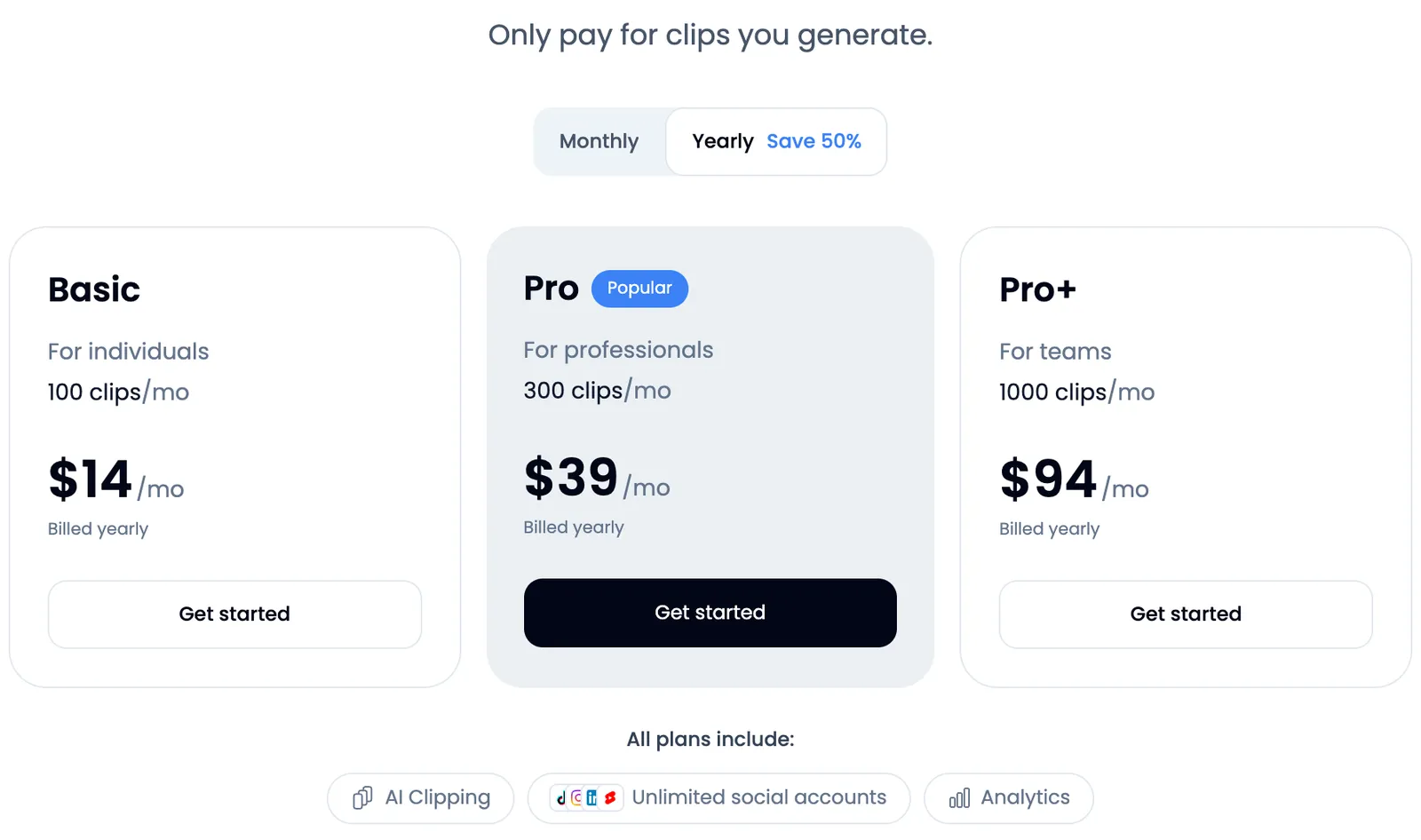
Klap’s plans on its pricing page, yearly billing shown by default, screenshot taken Oct. 8, 2026. The allowance is a number of clips a month, not minutes.
2. Vizard – OpusClip Pro’s yearly price with twice the minutes
Vizard clips long videos, with an editor, auto reframing, subtitle translation and direct posting.
Entry price. Creator at $29 a month or $14.50 billed yearly ($174 a year), with 600 credits a month; Business at $39 or $19.50, with a shared workspace (Vizard pricing, checked Oct. 8, 2026).
What counts. 1 credit = 1 minute of uploaded video, charged once per project even if you also transcribe it (credits). Unused monthly minutes carry over to the next month, per a help article dated Jan. 28, 2025, which sets no limit.
Free plan. 60 credits a month, a watermark, 720p exports of up to 10 minutes, the full editor, and projects deleted after 3 days.
Limits. Each upload is capped at 600 minutes and 30 GB on paid plans (60 minutes and 1 GB free). Refunds only within 7 days and before any use (refund policy).
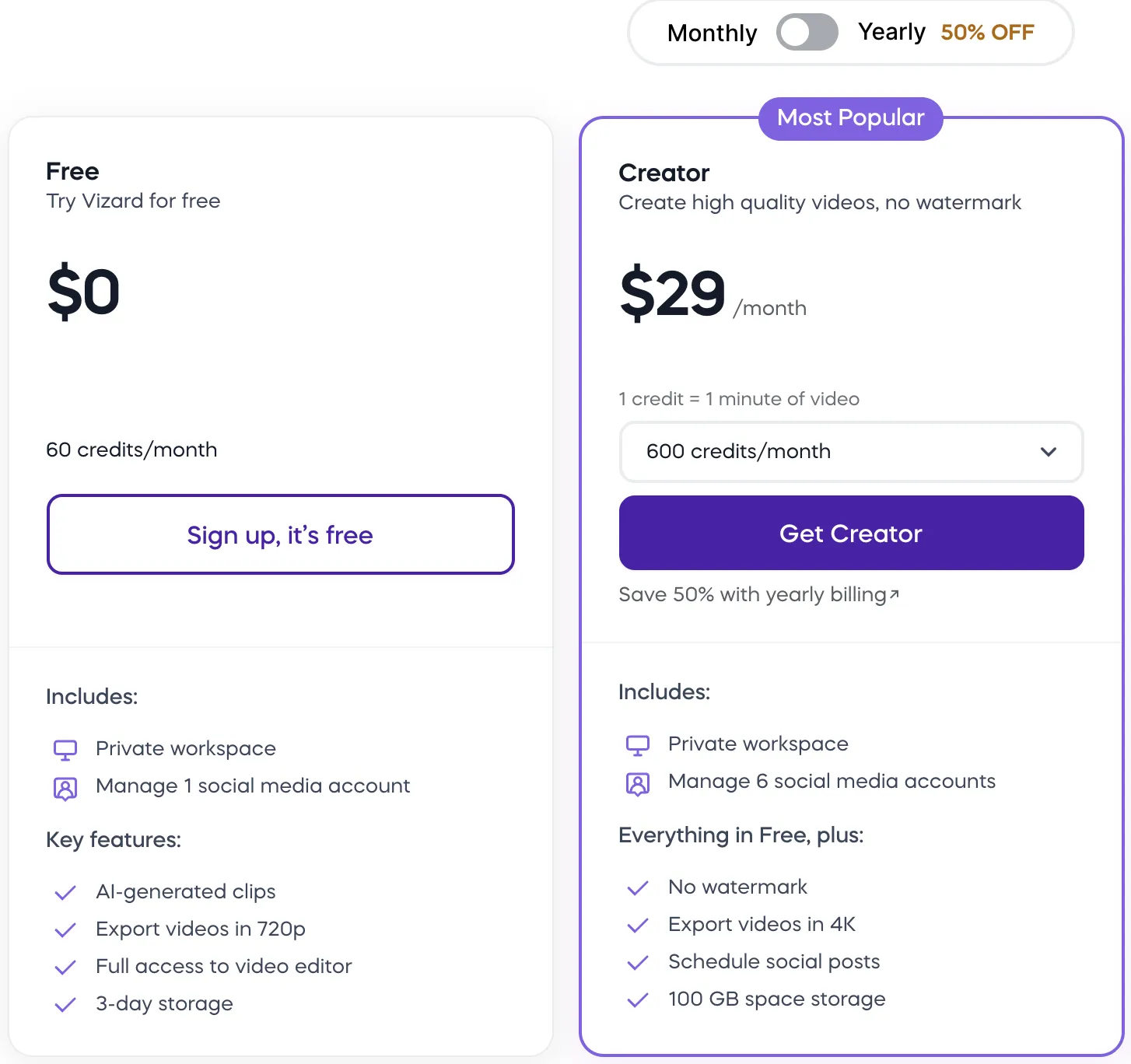
Vizard’s Free and Creator plans on its pricing page, monthly billing, screenshot taken Oct. 8, 2026. Note the “1 credit = 1 minute of video” line above the credit menu.
3. Quso (formerly vidyo.ai) – twice the credits on yearly plans
Quso, vidyo.ai’s new name, clips, captions and schedules posts.
Entry price. Lite at $29 a month or $19 billed yearly, Essential at $39 or $26, Growth at $49 or $33. Yearly billing doubles the credits: 100 a month on Lite becomes 200 (Quso pricing, checked Oct. 8, 2026).
What counts. 1 credit per minute uploaded, rounded up; editing, posting and downloading are free. Yearly credits arrive up front (how credits work).
Free plan. 75 credits a month, 720p, 7-day retention, files up to 5 GB and posting to TikTok. Only paid plans are described as watermark-free.
Limits. Lite posts to TikTok only; scheduling to seven platforms starts on Essential. Videos up to 5 hours. No refunds, under the terms.
4. SendShort – clipping plus faceless videos, counted per short
SendShort captions videos, cuts long ones into shorts and generates faceless videos from a prompt.
Entry price for clipping. Professional at $29 a month or $23 billed yearly, for 50 shorts of up to 3 minutes; Starter ($19, or $15 billed yearly) doesn’t clip (pricing, checked Oct. 8, 2026).
What counts. Each finished clip counts as one short.
Free plan. None: no trial, only a refund requested within 24 hours of paying.
Limit. Business ($59, or $47 billed yearly) is “unlimited,” which the FAQ defines as 100+ shorts a month under fair use.
Try SendShort commission.
5. WayinVideo – the lowest monthly price per minute
WayinVideo finds the strongest moments in a long video, clips them with a virality score, captions them and can post them, alongside video summaries and transcripts.
Entry price. Starter at $13.99 a month for 500 credits, Pro at $26.99 for 1,000 and Scale at $139.99 for 6,000 (pricing, monthly billing, checked Oct. 8, 2026).
What counts. 1 credit per minute of source video; searching the same video again costs half. Editor AI tools (hooks, B-roll, music) use extra credits at rates that aren’t listed, and credits reset every month (how credits work).
Free plan. 100 credits once, 720p, clips exportable for 3 days, no local uploads or posting. No plan adds a watermark (how plans work).
Limits
- The entry allowance shrank: on Aug. 5, 2026, the plan at the same price, then called Standard, included 1,500 credits a month.
- Payments are non-refundable, and the terms (Feb. 12, 2026) name neither the company nor the governing country (“the laws of the Country”).
6. Descript – clips inside a text-based video editor
Descript edits audio and video by editing the transcript; creating clips and highlights is one of its AI tools.
Entry price. Hobbyist at $24 a month or $16 billed yearly, with 10 media hours and 400 AI credits; Creator at $35 or $24, with 30 hours and 800 credits (checked Oct. 8, 2026).
What counts. Media minutes for everything you upload or record, plus AI credits for AI tools, neither rolling over. No credit rate is published for clips (media minutes and AI credits).
Free plan. 60 media minutes a month, 100 AI credits once, 720p exports with a watermark.
Limit. Transcription in 25 languages.
7. Riverside – automatic clips from your recordings
Riverside records remote podcasts and interviews in up to 4K, edits them by text and generates Magic Clips.
Entry price. Pro at $29 a month or $24 billed yearly, per the pricing FAQ; a 14-day trial, and no free plan on the page (checked Oct. 8, 2026).
What counts. Recording in Riverside is unlimited; files uploaded from elsewhere are capped at 15 hours a month from Pro to Webinar, unlimited on Business (upload limits). Magic Clips don’t use AI credits.
How clips work. They’re created automatically for anything longer than 3 minutes with a transcript: about 2 clips per 5 minutes, 30 to 90 seconds each. Pro adds up to 2 extra sets per recording, Business 4 (Magic Clips).
8. Submagic – Magic Clips as a paid add-on
Submagic is built to caption and punch up shorts you film. Magic Clips, which cuts a long video into 20+ clips, is an add-on subscription: $19 a month for 10 videos, on top of a plan from $19 a month ($12 billed yearly), per the help center updated Sept. 30, 2026 (checked Oct. 8, 2026).
Limits. The pricing page doesn’t list the add-on, while the Magic Clips page says “Try for free.” Plans cap each video at 2, 5 or 30 minutes; whether that applies to Magic Clips isn’t stated. For captions only, see the guide to adding subtitles automatically.
Try Submagic commission.
Which free plans allow commercial use?
None of these free plans clearly combines commercial rights, no watermark and a monthly allowance. What each provider publishes (checked Oct. 8, 2026):
| Tool | Free allowance | Watermark | Export | Commercial use on the free plan |
|---|---|---|---|---|
| OpusClip | 60 min a month | Yes | Up to 1080p; 3-day export window | No: personal, non-commercial use under the terms |
| WayinVideo | 100 min, once | No | 720p; 3-day export window | No: “personal, internal, and non-commercial” |
| Vizard | 60 min a month | Yes | 720p, 10 min max; projects kept 3 days | Terms make no free/paid distinction |
| Quso | 75 min a month | Not stated | 720p; 7-day retention | Terms make no free/paid distinction |
| Klap | 1 video | Not stated | Not stated | Terms make no free/paid distinction |
| Descript | 60 min a month | Yes | 720p | Terms make no free/paid distinction |
SendShort has no free plan or trial, Riverside offers a 14-day trial of its paid plans and Submagic a 3-video trial with a watermark. Sources: OpusClip terms, WayinVideo terms, Vizard terms (Oct. 31, 2022), Quso terms, Klap terms and Descript terms.
On every tool, you remain responsible for the rights to the source video: footage, music and guests. This is a summary of published terms, not legal advice.
Which tools handle Spanish and other languages?
Language counts as announced by each provider; a listed language says nothing about caption accuracy on your audio.
| Tool | Languages announced | Spanish |
|---|---|---|
| OpusClip | 25+ in the help center, 20+ on the pricing page | Yes, out of beta |
| Klap | 52 | Yes |
| Vizard | 40 for transcription, 128 for subtitle translation | Yes |
| Descript | 25 for transcription | Yes (“Spanish (US)”) |
| Quso | “Over 20” in the help center, “50+” in the FAQ, “100+” in the product menu | Yes |
| WayinVideo | Subtitles in “100+” | No list published |
| SendShort | Captions in “100+” | Yes |
| Submagic | 123, per the Magic Clips page | No list on that page |
Sources, checked Oct. 8, 2026: OpusClip, Klap, Vizard, Descript, Quso, WayinVideo, SendShort and Submagic.
How this comparison was made
- Sources: pricing pages, help centers and terms of service, read on Oct. 8, 2026, with no account and no paid processing. Prices are those displayed in dollars; Riverside displayed euros from Europe, so its dollar prices come from its pricing FAQ.
- Selection: tools that turn a long video into short clips, sold to the public with a public price. Left out: CapCut (its pricing page returned an error when checked), Captions (its prices “reflect iOS plans only”) and Munch (getmunch.com now redirects to Munch Studio, a social media service).
- Order: by use (dedicated clippers, then tools where clipping is one feature), then by the lowest displayed price, excluding promotions, for a plan with commercial rights, no watermark and clipping, billed yearly when shown; a tool whose terms of service don’t name the company behind it goes to the end of its group (WayinVideo). Klap is ranked assuming its paid plans carry no watermark, which its pages don’t state. It isn’t a quality ranking.
- Affiliate links: Génie Artificiel is funded by affiliate commissions. It’s an affiliate of OpusClip, SendShort and Submagic, whose links are labeled. The other tools pay nothing; SendShort and Submagic rank 5th and 8th under the rule above, and no tool was added or moved up for a commission.
More video tools, grouped by task, are in the AI video tools hub.
FAQ
Is there a free OpusClip alternative without a watermark?
WayinVideo, but its 100 free credits are one-time only, in 720p and for non-commercial use. Vizard and Descript watermark their free exports; Quso and Klap don’t say.
Is Vizard cheaper than OpusClip?
Per minute, yes: for the same price ($29 a month, or $14.50 billed yearly), Vizard Creator includes 600 minutes a month and OpusClip Pro 300. OpusClip Starter, at $15, remains the cheaper way to pay month to month.
What happened to vidyo.ai?
It’s now called Quso: vidyo.ai redirects to quso.ai, and the pricing page says former vidyo.ai users keep their plan and pricing.
Can these tools clip a 3-hour podcast?
Yes with OpusClip (up to 10 hours), Quso (5 hours) or a paid Vizard plan (600 minutes), and on Riverside if you spend 3 of your 15 monthly upload hours. Not with Vizard’s free plan (60 minutes), and apparently not with Submagic (30 minutes per video at most).
Do unused minutes roll over?
It depends on the tool: WayinVideo, Quso’s monthly plans and Descript reset every month. OpusClip keeps monthly credits for 60 days, and Vizard’s help center says unused monthly minutes carry over to the next month.