PixVerse Pricing, Free Plan and Limits
Contents
PixVerse generates short videos, with sound, from a text prompt or an image. Its own model, PixVerse V6, launched on March 30, 2026, and the platform also gives access to rival models such as Kling, Seedance and MiniMax. There’s a free plan: 60 credits when you sign up, then 30 credits refreshed every day. Paid plans start at $8 a month billed annually ($10 month to month). The point that matters most: the terms of service limit the use of your videos to non-commercial purposes unless you get a separate license.
This page is based on PixVerse’s pricing page, prompt guide, API documentation, terms of service and official announcements, checked Oct. 13, 2026. The amount shown at checkout is what counts. PixVerse buttons use affiliate links: we may earn a commission. Cited sources remain direct links.
What Can You Do With PixVerse?
Five common uses, with the feature to pick and the plan you need. The example prompts follow the structure recommended in PixVerse’s official prompt guide: one sentence for subject and action, one for camera and style, one for constraints and sound.
Animate a Product Photo
You already have a good photo and want a moving shot for a product page or an ad. Use image to video, and don’t describe what’s already in the photo: according to the guide, re-describing the object pushes the model to change it. Keep the prompt to motion, camera and what must stay the same.
Keep the product exactly as in the reference image. Add a slow camera push-in from the current framing while a soft highlight moves across the surface. Preserve the shape, colors, label and background. Audio: quiet studio room tone.
Standard is enough for 720p output. For 1080p or 4K, you need Pro.
Create an Ad Shot From Text
Without a source photo, text to video can produce a demo shot: a bottle turning, a drink being poured, an object on a set. The guide recommends a short prompt (50 to 80 words), one action and one camera move, rather than a long list of adjectives.
A matte black coffee tumbler stands on a light oak table next to a window at sunrise. Steam rises from the open lid as the tumbler turns slightly to show its logo side. Slow push-in at table height, warm natural light. Keep the tumbler centered and stable. Audio: soft café ambience, a light ceramic clink.
For a whole catalog, PixVerse launched Growth Studio on Oct. 9, 2026: it generates product videos from a catalog and links them to Meta catalog campaigns (Facebook, Instagram, Advantage+). The announcement doesn’t list pricing (Growth Studio announcement).
In the app, the E-commerce & advertising tab of the mini-apps groups ready-made tools for this: Product Video Remix (swap the product in a reference video), Promo Mix (e-commerce videos), Ad Master (ads) and Ad Resize (adapt a poster to 9:16, 1:1 or 16:9).
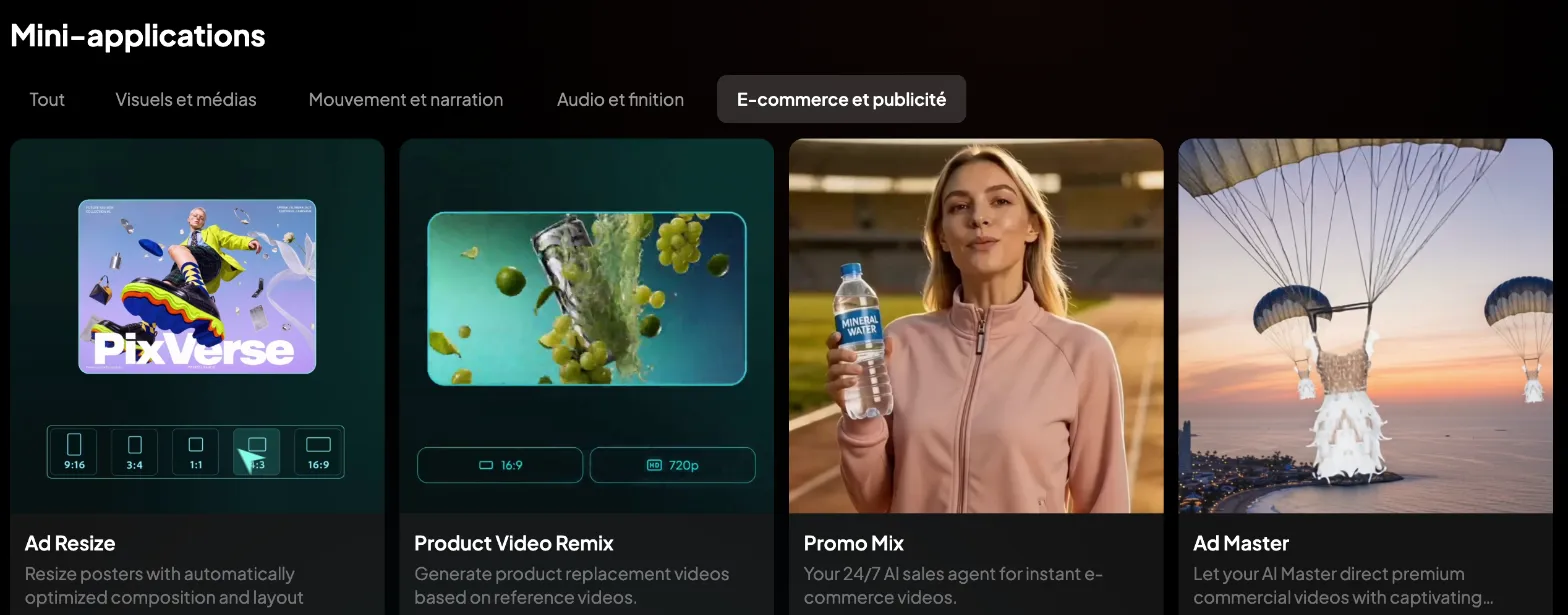
PixVerse’s ad-focused mini-apps, viewed without signing in, as displayed from France; the visuals are the company’s own (screenshot taken Oct. 13, 2026).
Make a Multi-Shot Short
PixVerse V6 promises multi-shot short films with native audio from a single prompt, plus more accurate camera moves (V6 announcement, March 30, 2026). The company still acknowledges limits on directional control in complex scenes. Describe speed through physical effects (a leg pushing, water spraying) rather than the word “fast,” which the guide links to unstable motion.

The V6 launch video, published by PixVerse on its official channel: a company demo, not a test by this site.
A cyclist climbs a narrow mountain road at dawn, then reaches the top and looks over a sea of clouds. First shot: low tracking shot beside the rear wheel. Second shot: wide view from behind as the cyclist stops at the summit. Breath stays visible in the cold air. Audio: chain clicks, wind, distant birds.
Use Ready-Made Effects and Templates
The app’s Template section offers ready-made templates and effects for social media. It’s the fastest way to get a result, but note that the terms reserve these “Platform Creative Materials” for non-commercial, in-platform use unless PixVerse expressly authorizes otherwise (see below).
Lip Sync, Extend or Chain Shots
The API documentation also lists lip sync (make a character speak from audio or text), a talking avatar, extend for longer clips, transition between a first and last frame, sound effects and upscaling. In the app, several of these are offered as mini-apps, grouped by use: Avatar Lip Sync (make a character speak from an image plus audio or a script), Magic Expand, Video Resize, AI Upscale, Sound Effect Generator and Storyboard.
Tips That Save Credits
- Use preview mode: it costs 20% fewer credits on PixVerse models, on every paid plan (pricing, checked Oct. 13, 2026).
- Generate off-peak from the Pro plan: 30% off on Pro, 50% off on Premium and unlimited free generations on Ultra, again on PixVerse models.
- Draft at low resolution, without sound: in the API rate card, one second of V6 costs 5 credits at 360p without audio, versus 12 at 720p with audio and 23 at 1080p with audio (API pricing). The app doesn’t publish its own rates; the exact cost appears before each generation.
- Write short and specific prompts: one camera move, constraints stated positively (“hands stay stable”) rather than a list of flaws to avoid, which the guide advises against.
- Spend the daily credits first: they’re refreshed every day on every plan.
Is PixVerse Free?
Yes. The Basic plan is free: 60 credits when you sign up, then 30 credits refreshed every day (PixVerse pricing, checked Oct. 13, 2026). Paid plans advertise “no watermark and no ads”; the free plan doesn’t. It’s mainly for trying the tool and testing prompts.
How Much Does PixVerse Cost in 2026?
Prices from the pricing page, checked Oct. 13, 2026:
| Plan | Monthly | Annual (per month) | Credits | What you get |
|---|---|---|---|---|
| Basic | $0 | – | 60 at signup, 30 a day | For trying the tool |
| Standard | $10 | $8 ($96/yr) | 60 a day + 1,200 every 30 days | Up to 720p, no watermark |
| Pro | $30 | $24 ($288/yr) | 60 a day + 6,000 | Up to 4K, off-peak 30% off, third-party video models |
| Premium | $60 | $48 ($576/yr) | 60 a day + 15,000 | Off-peak 50% off |
| Ultra | $249 | $149 ($1,788/yr) | 60 a day + 25,000 | Free off-peak generations, discounts on third-party models |
| Team Ultra | $199 per seat | $149 per seat | 25,000 shared | Team workspace |
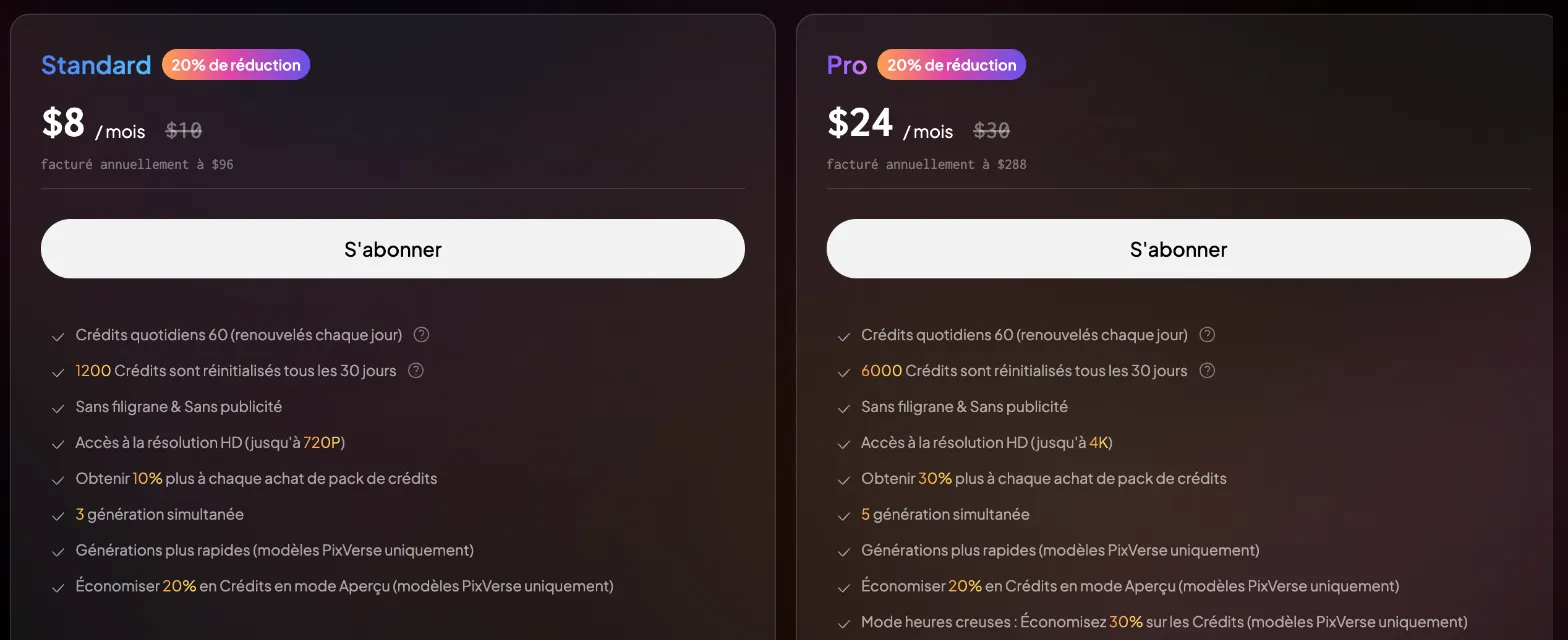
Standard and Pro billed annually, as shown from France: maximum resolution, monthly credits and off-peak mode set them apart (screenshot taken Oct. 13, 2026).
Rival models are only included from Pro. The Standard plan lists image models only. From Pro, the page adds video models such as Seedance 2.5 and 2.0, MiniMax H3, Wan 3.0, Kling O3, Sora 2 and Grok Imagine; Ultra adds 20% to 40% discounts on them. That’s PixVerse’s appeal if you want Kling or Seedance without stacking subscriptions, as covered in our guide on where to use Kling and Hailuo.
Can You Use PixVerse Videos Commercially?
Check this before paying. The terms of service (updated May 7, 2026) say PixVerse doesn’t claim ownership of your videos, but that your use of them is limited to non-commercial purposes unless you obtain separate authorization or a commercial-use license. They don’t say a paid plan grants that license, and the pricing page doesn’t mention it. Platform templates and effects are reserved for non-commercial use unless PixVerse expressly authorizes otherwise.
Several third-party sites claim paid plans include commercial use, but we found no confirmation on official pages. For an ad or client work, ask support@pixverse.ai for written confirmation before you publish. This isn’t legal advice.
Your Uploads and Your Data
You keep your rights to what you upload (photos, text). In return, you grant PixVerse a worldwide, perpetual license to use that content in aggregated, anonymized form, including to train its models, unless you opt out where that option is offered. The service is run by Aivora Pte. Ltd. in Singapore, and disputes fall under Singapore law.
Watch Out for Fake PixVerse Sites
The official sites are pixverse.ai and app.pixverse.ai. On Bing, though, a search for “pixverse gratuit” (French for “free”) shows pixverseai.net right after them, which describes itself as an “independent site, not affiliated with PixVerse,” and pixverseai.org, which doesn’t say so and displays ”© Pixverse IA.” Both domains were registered in December 2024 (checked Oct. 13, 2026). Sign up and pay only on pixverse.ai.
PixVerse or Something Else?
- For Kling directly: our Kling page, with its plans and limits.
- For several models under one subscription: Higgsfield, another platform that resells Kling, Seedance and other models.
- To compare video generators: our top 10 AI video tools, where PixVerse ranks No. 8.
FAQ
Is PixVerse really free?
The Basic plan is free: 60 credits at signup, then 30 credits a day. It’s enough to try the tool, not to produce at volume.
How many credits does a PixVerse video cost?
The app shows the cost before each generation but doesn’t publish a rate card. The API’s gives a ballpark: for V6, from 5 credits per second at 360p without audio to 23 credits per second at 1080p with audio.
How do you remove the PixVerse watermark?
Paid plans, from Standard up, advertise videos with no watermark and no ads.
Can you use Kling or Seedance in PixVerse?
Yes, from the Pro plan. Standard only gives you PixVerse’s own models for video.
Are PixVerse videos royalty-free?
Not automatically. The terms limit use to non-commercial purposes unless you have a separate license. Ask PixVerse for confirmation before any commercial use.
How do you write a good PixVerse prompt?
Three short sentences: subject and action, then camera and style, then constraints and sound. One camera move, positive instructions, and for image to video, don’t re-describe the image.
Useful Links
The verdict
A good place to experiment thanks to free daily credits, and a gateway to Kling, Seedance and MiniMax from the Pro plan. Before any commercial use, get your rights confirmed by PixVerse.
- Best for
- Short-form social creators, draft product ads, testing AI video models

PixVerse
Affiliate link: if you subscribe through this link, we earn a commission at no extra cost to you.