Kling AI Pricing: Plans, Credits and Free Tier
Kling AI pricing explained: every plan, credits per second of video, real cost of a 5-second clip, the free tier, commercial rights and Kling 4.0.
Published . 10 min read. Based on official sources, checked on the update date; every price links to its source. Our method.
Contents
- How Much Does Kling AI Cost in 2026?
- Is Kling AI Free?
- How Much Does a Kling Video Cost?
- Which Kling Plan Should You Choose?
- Can You Use Kling Videos Commercially?
- Your Videos and Model Training
- Kling 4.0: What Changes for Pricing?
- The Kling API: Separate Pricing
- Watch Out for Fake Kling Sites
- Kling AI Alternatives
- FAQ
- Useful Links
Kling AI is the AI video generator from Kuaishou, the Chinese short-video company. It turns a text prompt or an image into a 3- to 15-second clip, with optional sound. Paid plans start at $6.99 for the first month, then $8.80 a month for 660 credits, which works out to about $0.40 for a 5-second 720p clip without sound. There’s also a free tier, with a watermark and no commercial rights.
This page is based on Kling’s pricing page, guides, terms of use and API documentation, checked Oct. 3, 2026. Prices are shown in US dollars, and several are introductory: the amount shown when you pay is what counts. As of Oct. 3, 2026, none of the links on this page are affiliate links.
Kling 4.0 is due in October 2026. Since Sept. 28, 2026, only Kling 4.0 Flash has been open, to a limited group and to Ultra annual subscribers. Its credit cost hasn’t been published yet, so the prices below are for Kling 3.0. We’ll update this page when Kling 4.0 launches.
How Much Does Kling AI Cost in 2026?
Kling sells four paid plans, billed monthly or annually. Each one comes with a monthly credit allowance that you spend on every generation, depending on the model, length, resolution and sound (Kling plans, checked Oct. 3, 2026).
| Plan | First month | Monthly after that | Annual | Credits per month |
|---|---|---|---|---|
| Basic | Free | Free | – | Monthly free credits, amount not published |
| Standard | $6.99 | $8.80 | $79.20 ($6.60/mo) | 660 |
| Pro | $25.99 | $32.56 | $293.04 ($24.42/mo) | 3,000 |
| Premier | $64.99 | $80.96 | $728.64 ($60.72/mo) | 8,000 |
| Ultra | $127.99 | $159.99 | $1,429.99 ($119.17/mo) | 26,000 |
Every paid plan removes the watermark, unlocks 1080p and 4K, and allows commercial use. Pro, Premier and Ultra add priority access to new features; Ultra adds beta invites. The first-month discount (29% to 30%) applies once, and annual billing is shown as 34% off the monthly list price.
The “price per 100 credits” on the plan cards is based on the discounted first month. The Standard card says $1.06 per 100 credits, which is $6.99 divided by 660 credits. From the second month on, the same math gives $1.33, the figure used in Kling’s own credit guide (checked Oct. 3, 2026). Compare plans on the price you’ll pay after the discount.
Is Kling AI Free?
Partly. The FAQ on Kling’s pricing page promises non-subscribers free credits every month, claimed when you log in and valid for 31 days, but doesn’t say how many. Kling’s credit guide says the opposite, listing “No monthly Credits” for the Basic plan. Two official pages disagree (checked Oct. 3, 2026).
Free videos carry a watermark and can’t be used commercially. 1080p and 4K are for subscribers, but on Oct. 3, 2026, the generator on a free account showed “3 trials left” for trying both modes; generating several videos at once is still for subscribers only. After you sign in, the pricing page also offers a “Trial Package” of limited-time free credits; according to the FAQ, 7-day trial credits expire after seven days.
How Much Does a Kling Video Cost?
Kling 3.0 is billed by the second (Kling VIDEO 3.0 guide, checked Oct. 3, 2026):
| Kling 3.0 mode | 720p | 1080p |
|---|---|---|
| No sound | 6 credits/sec | 8 credits/sec |
| Native audio | 9 credits/sec | 12 credits/sec |
| Voice control (add-on) | 2 credits/sec | 2 credits/sec |
Native 4K costs 30 credits per second (credit guide). Kling gives three examples of its own: 30 credits for 5 seconds at 720p without sound, 60 at 1080p with sound, and 70 with voice control on top.
The generator shows that cost on the “Generate” button before you start, and it updates with every setting. On Oct. 3, 2026, for a 5-second Kling 3.0 clip, it showed 30 credits at 720p without sound, 45 with sound, 40 at 1080p without sound, 60 with sound and 150 in 4K, matching the published rates exactly.
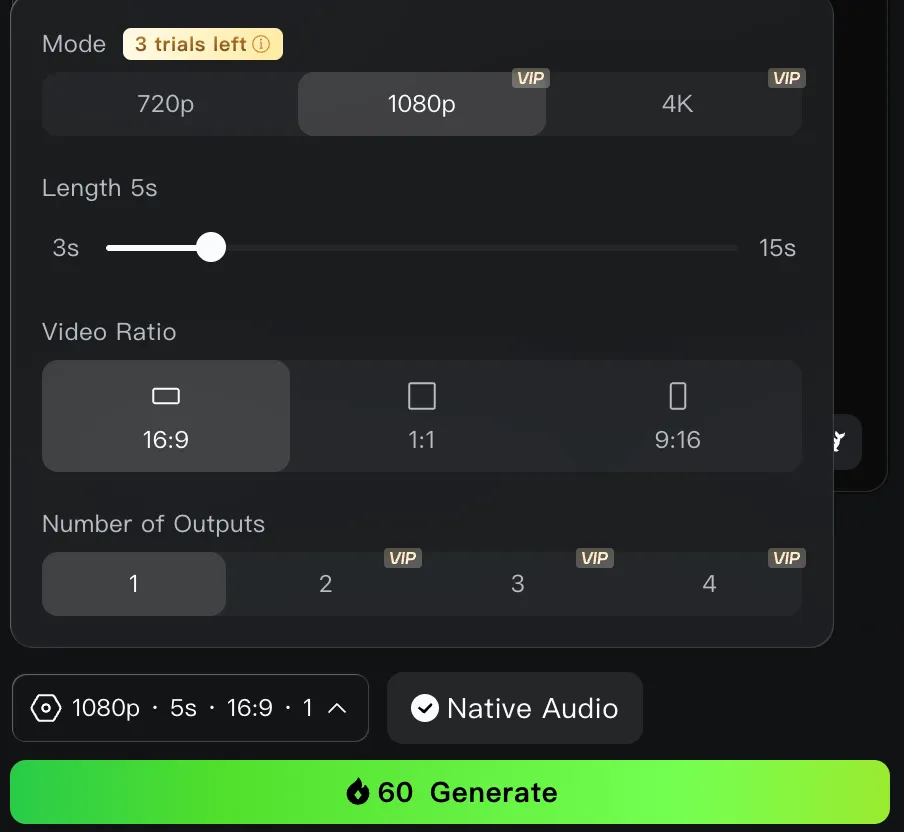
The Kling 3.0 generator’s settings panel on a free account: at 1080p, 5 seconds, with native audio, the button shows 60 credits before you generate (screenshot taken Oct. 3, 2026).
The table below converts those credits into dollars, first at the monthly price after the first-month discount, then at the annual price. It’s our own math, and it assumes you use your whole monthly allowance:
| Clip | Credits | Standard | Pro | Premier | Ultra |
|---|---|---|---|---|---|
| 5 sec, 720p, no sound | 30 | $0.40 (annual $0.30) | $0.33 ($0.24) | $0.30 ($0.23) | $0.18 ($0.14) |
| 5 sec, 720p, with sound | 45 | $0.60 ($0.45) | $0.49 ($0.37) | $0.46 ($0.34) | $0.28 ($0.21) |
| 5 sec, 1080p, with sound | 60 | $0.80 ($0.60) | $0.65 ($0.49) | $0.61 ($0.46) | $0.37 ($0.27) |
| 10 sec, 1080p, with sound | 120 | $1.60 ($1.20) | $1.30 ($0.98) | $1.21 ($0.91) | $0.74 ($0.55) |
| 5 sec, 4K | 150 | $2.00 ($1.50) | $1.63 ($1.22) | $1.52 ($1.14) | $0.92 ($0.69) |
In practice, Standard’s 660 credits cover 22 five-second clips at 720p without sound, 11 at 1080p with sound, or four in 4K. Failed attempts cost as much as keepers, so budget some headroom. Kling’s credit guide claims “33 720p videos” on Standard, or 20 credits per video, which Kling 3.0’s rates can’t produce; it most likely refers to an older model.
Which Kling Plan Should You Choose?
- To try it out: the free tier, if the promised monthly credits show up in your account, then a $6.99 first month of Standard.
- To post short clips regularly: Standard covers about 20 five-second 720p clips a month; Pro (3,000 credits) gets you about 50 at 1080p with sound.
- For 4K or high volume: Premier or Ultra. A credit costs less than half as much on Ultra as on Standard.
Monthly or annual? Annual billing cuts the price by about a quarter, but credits are still issued month by month and expire after 31 days. With Kling 4.0 about to launch at an unknown credit price, a year up front locks you into rates that may change. Right now, only Ultra annual comes with early access to Kling 4.0 Flash.
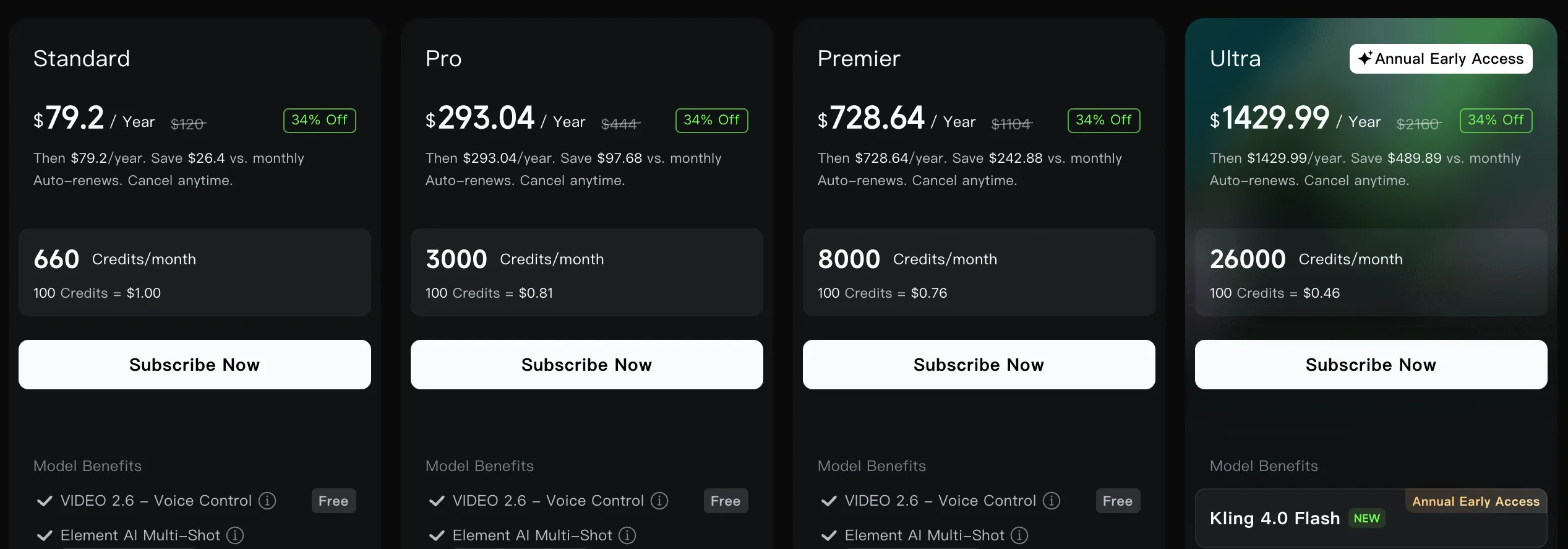
Kling’s annual plans: only the Ultra card mentions early access to Kling 4.0 Flash (screenshot taken Oct. 3, 2026).
How long credits last. According to the pricing FAQ (checked Oct. 3, 2026): monthly credits are valid for 31 days; credits you buy separately, for two years; daily bonus credits for subscribers expire the same day. Credits that expire soonest are used first. When a subscription ends, unused monthly credits are lost. Credits can’t be cashed out or transferred.
Canceling and invoices. On the web, you cancel from your profile (Manage Plan); on iPhone or Android, through your Apple or Google Play subscription settings. Invoices can only be requested on the website, from your purchase history, and arrive within 10 business days.
Can You Use Kling Videos Commercially?
Yes, on a paid plan. According to the pricing FAQ, subscribers may use, distribute and modify generated content for commercial purposes, as long as it isn’t used to build a product that competes with Kling. Outside that, including on the free tier, Kling’s terms of use (updated April 21, 2026) bar commercial use without written permission.
Kling also points out that you’re responsible for everything else: likeness and publicity rights, copyright, trademarks, advertising rules and AI-content labeling.
Your Videos and Model Training
Section 4.7 of the terms grants Kling a license to what you upload and generate, and lets it use that content to build, test and train its models. You can withdraw that permission by emailing support@kling.ai. Section 4.8 adds that content you publish on Kling can be reused by other users, for example through the “Recreate” feature.
The service is run from Singapore (its contact address is One Raffles Place). Keep confidential images and footage out of it.
Kling 4.0: What Changes for Pricing?
Kling announced Kling 4.0 on Sept. 28, 2026, with a full launch planned for October (release note, checked Oct. 3, 2026). The main changes:
- clips up to 30 seconds (15 with Kling 3.0);
- up to 10 keyframes and 15 references (images, videos, voice) in a single generation;
- stereo sound, 10-bit HDR at 1080p and 4K “coming soon,” and more dialogue languages, including Portuguese, German, French and Hindi.
Kling 4.0 Flash, the faster version, has been open to a limited group since Sept. 28, 2026: 3 to 20 seconds, 720p only. Kling’s pricing page reserves that early access for Ultra annual subscribers. As of Oct. 3, 2026, no credit cost has been published for 4.0 or 4.0 Flash, and Kling’s API packages don’t support Kling 4.0 yet.
If per-second billing carries over, a 30-second clip will naturally cost more credits than a 15-second one. Wait for the official rates before picking a plan for Kling 4.0.
The Kling API: Separate Pricing
The Kling API is billed separately from the subscription, through prepaid packages valid for 180 days with no rollover: $700 for 5,000 units, with 10% off from the 30,000-unit package up (checked Oct. 3, 2026). On Sept. 26, 2026, a 100-unit trial package was also offered for $9.80. One unit is $0.14 at list price:
- Kling 3.0 without sound: $0.084/sec at 720p, $0.112/sec at 1080p, or $0.42 and $0.56 for 5 seconds;
- Kling 3.0 with sound: $0.126/sec at 720p, $0.168/sec at 1080p;
- 4K: $0.42/sec, or $2.10 for 5 seconds.
That’s close to what the Standard subscription costs per clip, without credits that expire every month, but with a much higher upfront payment.
Watch Out for Fake Kling Sites
Kling’s official site is kling.ai; the old klingai.com domain redirects there, and the official API lives at kling.ai/dev (checked Oct. 3, 2026). Search results for Kling pricing also surface other sites: klingapi.com, for instance, ranks for “kling ai pricing” and signs its pages ”© 2026 Kling API,” while kling3.ai, kling3.io, kling.art and klingmotioncontrol.com sell their own plans and credits under their own names. Klingmotioncontrol.com states in its footer that it is “not affiliated” with Kling.
Check the address bar before you pay. The credits, commercial rights and terms described on this page only apply to kling.ai and its official apps.
Kling AI Alternatives
- Using Kling elsewhere: Higgsfield, Magnific, Krea, OpenArt, Runway and fal offer Kling 3.0, sometimes at a similar cost per clip. See our breakdown of where to use Kling and Hailuo.
- Higgsfield: one subscription for several video models (Kling, Veo, Seedance, MiniMax), from $19 a month before tax (checked Sept. 26, 2026).
- Hailuo AI: MiniMax H3 in 2K with sound, from $10.50 a month on a promotional price (checked Sept. 26, 2026).
- Runway: its own models, with Kling 3.0 included in every paid plan.
- Google Flow: Veo 3.1 with 50 free credits a day, ranked first in our top 10 AI video tools.
FAQ
Is Kling AI free?
Partly. Kling promises non-subscribers free credits every month without saying how many, and one of its own pages says otherwise. Free videos carry a watermark and can’t be used commercially.
How much does a 10-second Kling video cost?
With Kling 3.0, 10 seconds at 1080p with sound costs 120 credits, about $1.60 on Standard monthly and $0.74 on Ultra monthly. At 720p without sound, it’s 60 credits, about $0.80 on Standard.
Do Kling credits expire?
Yes. Monthly credits expire after 31 days and are lost when your subscription ends. Credits you buy separately last two years.
Is Kling 4.0 more expensive?
Kling hasn’t published its rates as of Oct. 3, 2026. Kling 4.0 Flash is limited to a test group and Ultra annual subscribers, and the full Kling 4.0 launch is planned for October.
How do you pay for Kling?
Prices are in US dollars. On the web, payment goes through Stripe; in the mobile apps, through Apple or Google Play.
Can you cancel a Kling subscription?
Yes. Kling’s pricing page says monthly plans can be canceled anytime: from Manage Plan in your profile on the web, or from your Apple or Google Play subscription settings. When a subscription expires, unused monthly credits are lost.
Useful Links
- Kling plans and the Kling 3.0 credit guide
- Kling 4.0 release note and release history
- Terms of use and API pricing
- Our guide to where to use Kling and Hailuo: official site or third-party platforms
The verdict
One of the cheapest ways to produce AI clips with a single model. Wait for Kling 4.0's credit pricing before paying for a full year.
- Best for
- Creators and small teams who regularly produce short clips