Free AI Voice Generators in 2026: 7 Tools Compared by Quota and Commercial Rights
TTSMaker, Luvvoice, Clipchamp, ElevenLabs, Narakeet, Murf and Speechify: free quotas, download formats, attribution rules and commercial rights, side by side.
Contents
At a glance: the 7 tools
-

A free MP3 with US voices, one cloned voice, and an FAQ that allows commercial use
-

The largest free quota, commercial use granted in writing, no account or credit line
-

A voiceover dropped straight onto a video and exported without a watermark
-

Trying Eleven v4 and Voice Design for free before publishing on the $6 plan
-

Twenty test files without signing up, then a one-time pack instead of a subscription
-

Listening to a business script before buying; no free export
-

Listening to 10 minutes of voiceover before an annual plan; no free export
Seven AI voice generators have a documented free tier in October 2026, but only two say, in their own words, that you can download a file and use it in a monetized video without paying: TTSMaker (20,000 characters a week) and Luvvoice (10,000 characters a month), and Luvvoice contradicts itself. ElevenLabs and Narakeet let free users download, but for personal use only; Murf and Speechify Studio only let you listen. Every fact below comes from the vendors’ pricing pages, help centers and terms, checked Oct. 8, 2026.
Voice quality is not rated here. Before you commit, run the same short passage (a brand name, a number, an acronym, a long sentence) through each tool you shortlist.
Which Free AI Voice Generator Should You Use?
- Publish a free audio file, even on a monetized channel: Luvvoice or TTSMaker. TTSMaker has the bigger quota and 11 US English voices that don’t count against it.
- Add a voiceover without leaving your video editor: Clipchamp, Microsoft’s editor, free with a Microsoft account.
- Try Eleven v4 and the voice library before paying: ElevenLabs, about 10 minutes a month, as long as anything you publish carries “elevenlabs.io” in its title.
- Try without creating an account: Narakeet (20 files) or TTSMaker.
- Evaluate a business voiceover tool: Murf or Speechify Studio, whose free tiers are for listening only.
If you already pay for ElevenLabs and want a cheaper per-minute rate, see the ElevenLabs alternatives instead.
What Can You Publish on a Free Plan?
What each vendor says about its free tier, checked Oct. 8, 2026 (sources in each tool section below). “First commercial tier” is the smallest amount you must pay to get commercial rights. Prices are the US-dollar amounts on each pricing page; Narakeet showed euros to a French visitor, so its dollar price comes from the FAQ on its pricing page.
| Tool | Account required | Free download | Credit line required | Commercial use on free plan | First commercial tier |
|---|---|---|---|---|---|
| Luvvoice | No, up to 3,000 characters per conversion | MP3 | None stated | Yes per the FAQ; the pricing grid lists it from Plus only | $0 per the FAQ, otherwise Plus at $13/month |
| TTSMaker | No (captcha) | MP3, WAV, OGG, AAC, OPUS | No (“not mandatory”) | Yes, written license | $0 |
| Clipchamp | Yes (Microsoft account) | 1080p video or audio only, no watermark | None stated | Not addressed by Microsoft | No tier mentions voice rights |
| ElevenLabs | Yes | MP3, 128 kbps | “elevenlabs.io” or “11.ai” in the title | No | Starter, $6/month before tax |
| Narakeet | No (20 files) | MP3 or WAV | None stated | No: personal, educational or evaluation use | 30-minute pack, $6 one-time |
| Murf | Yes | No | n/a | No | Creator, $29/month or $19/month billed annually |
| Speechify Studio | Yes | No (MP3 is for paid plans) | n/a | No | Studio Starter, $100/year |
A voice license only covers the voice. You still need the rights to the script you feed it, as Narakeet’s rights page points out. This summary of published terms is not legal advice.
How Many Free Voiceover Minutes Do You Get per Month?
This table is a calculation, not a figure published by the vendors. Formula: minutes ≈ free characters ÷ 1,000, based on ElevenLabs’ own plan grid, which equates 10,000 credits (1 credit per character) with about 10 minutes (pricing, checked Oct. 8, 2026). A month counts as 52 ÷ 12 ≈ 4.33 weeks. Real output depends on the language, voice and speed: TTSMaker estimates 300,000 characters at 6.9 hours of English audio (about 725 characters per minute, or 38% more minutes) but 4.3 hours in Spanish (about 1,160 characters per minute, or 14% fewer minutes) (TTSMaker pricing, FAQ).
| Tool | Published free quota | Calculation | Voiceover minutes | Usable in a monetized video |
|---|---|---|---|---|
| TTSMaker | 20,000 characters a week | 20,000 × 52 ÷ 12 ≈ 86,700 characters ÷ 1,000 | ≈ 87 min a month, plus unlimited voices | Yes |
| Luvvoice | 10,000 characters a month (grid); 20,000 (FAQ) | 10,000 to 20,000 ÷ 1,000 | 10 to 20 min a month | Yes per the FAQ |
| Narakeet | 20 files without signup, 1,000 characters max each | 20 × 1,000 ÷ 1,000 | 20 min at most, one time | No |
| ElevenLabs | 10,000 credits a month | 10,000 ÷ 1,000 | ≈ 10 min a month | No |
| Clipchamp | No published quota; 10 min max per voiceover | Not computable | Not published | Not addressed |
| Murf | 10 min of generation, one time | No download | 0 exportable minutes | No |
| Speechify Studio | 600 credits (1 credit per second) | 600 s = 10 min, no download | 0 exportable minutes | No |
The Seven Generators, One by One
1. Luvvoice – 10,000 Characters a Month, and an FAQ That Allows Commercial Use
Luvvoice turns text or a document (PDF, TXT) into MP3, with 200+ voices in 70+ languages. Its terms of service name the operator: Soundsynth Tech LLC.
Free plan. 10,000 characters a month, 3,000 per conversion, MP3, files kept 30 days, and one custom (cloned) voice with 500 credits (pricing, checked Oct. 8, 2026). The homepage tool works without an account up to 3,000 characters; a button prompts you to log in for more.
Rights. The FAQ on the homepage says yes to commercial use, YouTube included, without separating free and paid users, and the terms say you own the audio. Yet the pricing grid only lists “Unlimited commercial rights” from Plus up.
Contradictions. The free quota is 10,000 characters on the grid and 20,000 in the FAQ. For unambiguous commercial rights, Plus costs $13 a month ($7.75 a month billed annually) for 1.5 million characters; Lite, at $8, does not list them.
Voices. The default voice is US English; the language menu also covers UK, Canadian and Australian English, among others.
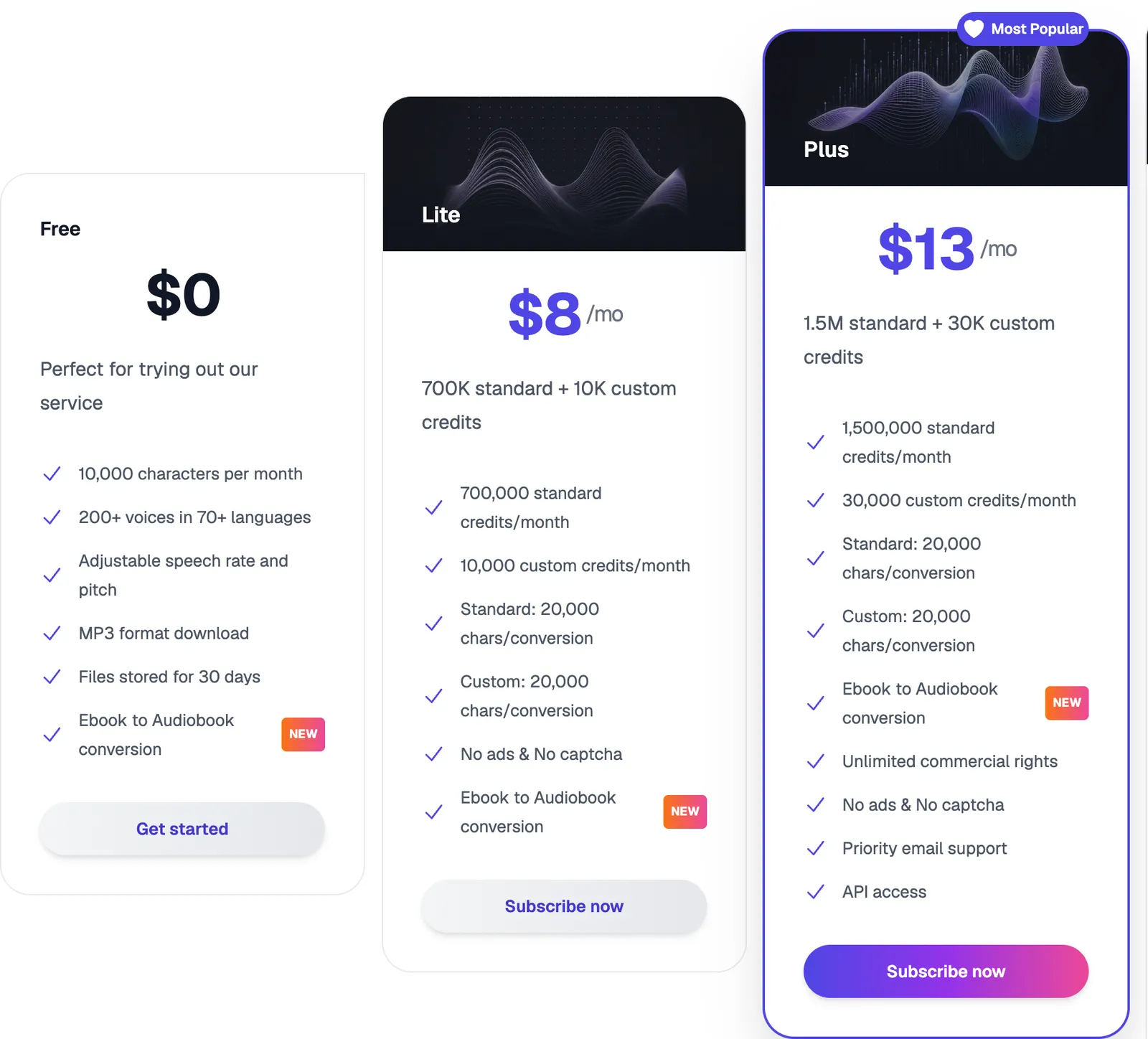
Free, Lite and Plus on Luvvoice’s pricing page, monthly billing, captured Oct. 8, 2026. The “Unlimited commercial rights” line appears only on Plus, while the site’s FAQ allows commercial use on any plan.
2. TTSMaker – 20,000 Characters a Week, Plus Unlimited Voices
TTSMaker is a web text-to-speech tool with 600+ voices in 100+ languages, and ads on its free version.
Free plan. 20,000 characters a week, unlimited downloads, 30 minutes of history, captcha and ads (pricing, checked Oct. 8, 2026). Voices tagged “Unlimited” don’t count against the quota, according to the tool page, which asks for no account. Formats: MP3, WAV, OGG, AAC or OPUS.
Rights. The commercial license grants a “perpetual” right to use the audio commercially (games, films, audiobooks, ads) at no cost. The FAQ says crediting TTSMaker on YouTube or TikTok is not required. In a contradiction, the license grants “usage rights, not copyright ownership,” while the terms of service say you “fully own” the audio files you create.
Voices. Dozens of US English voices, 11 of them tagged “Unlimited.”
Limits.
- The terms of service name no company: the contract is with “TTSMaker,” under Wyoming law.
- The per-conversion cap varies: 500 characters on the pricing grid, 300 to 3,000 depending on the voice in the tool.
- Paid: Lite at $13.99 a month for 300,000 characters, no captcha or ads.
3. Clipchamp – a Voiceover Inside a Free Video Editor
Clipchamp, Microsoft’s video editor, includes text to speech powered by Azure AI Speech. Operator: Microsoft.
Free plan. Editing, watermark-free 1080p exports and audio-only export with a personal Microsoft account (plan comparison, checked Oct. 8, 2026). Each voiceover runs up to 10 minutes, roughly 1,500 words; Microsoft publishes no monthly quota and invites you to regenerate “without limits” (text-to-speech overview, updated Feb. 2, 2026).
Rights. Neither the help article nor the Microsoft Services Agreement, which governs personal accounts, says whether the voice can be used commercially. Without a written answer from Microsoft, don’t plan on it for an ad.
Paid. Premium features (4K, premium stock, brand kit) come with Microsoft 365 Personal or Family; none relates to voice.
4. ElevenLabs – 10 Minutes a Month, Attribution Required
ElevenLabs (Eleven Labs Inc.) offers the Eleven v4 and v3 models, Voice Design (a voice from a text description) and a shared voice library.
Free plan. 10,000 credits a month, about 10 minutes of speech, no rollover; MP3 at 128 kbps; no cloning (pricing, checked Oct. 8, 2026). Some library voices are paid-only.
Rights. No commercial use on the free plan. Published content must include “elevenlabs.io” or “11.ai” in its title, and audio created outside a paid subscription stays non-commercial even after you upgrade (publishing rules, checked Oct. 8, 2026).
First commercial tier. Starter at $6 a month before tax ($5 billed annually): 30,000 credits, commercial license and instant voice cloning. A short-lived first-month discount shown on Oct. 8, 2026 is left out.
Voices. The library filters by language, then by accent, so you can narrow to American English (Voice Library guide).
Step-by-step setup is in the ElevenLabs voice tutorial. Try ElevenLabs commission.
5. Narakeet – 20 Files Without Signing Up, Then Minute Packs
Narakeet, operated by Video Puppet Limited (England), reads plain text, Word documents or PowerPoint decks.
Free plan. 20 audio files without registering, 1,000 characters max per file; the generator page advertises MP3 or WAV files (generator, checked Oct. 8, 2026).
Rights. Free files are limited to personal, evaluation or educational use, with no monetization (usage rights). Its FAQ, however, says you can use its voices on YouTube “even for commercial purposes,” without mentioning that a paid account is needed.
First commercial tier. Any pack turns on a commercial account, with no subscription. The smallest is 30 minutes for $6, according to the FAQ on the pricing page, which showed €6 before VAT to a visitor from France; the US-dollar grid itself could not be displayed. Billing is per second of final audio.
Voices. 228 American English voices (American English voices).
6. Murf – a 10-Minute Trial With No Downloads
Murf (Murf Inc.) sells a voiceover studio for business, with Canva and PowerPoint integrations.
Free plan. It is a trial: 10 minutes of voice generation and 10 of transcription, all voices, no downloads (trial features, checked Oct. 8, 2026). The pricing page labels it “$0 / month,” but the trial ends once the 10 minutes are used (trial length).
First commercial tier. Creator at $29 a month for 2 hours of generation a month, or $19 a month billed annually ($228 a year) for 24 hours a year; unlimited downloads, commercial rights (Murf pricing, Studio tab, checked Oct. 8, 2026).
Try Murf commission.
7. Speechify Studio – 10 Minutes, Listen Only
Speechify Studio, separate from the Speechify reading app, handles voiceovers, dubbing and voice changing.
Free plan. 600 credits at 1 credit per second of voiceover, or 10 minutes; 1,000+ voices; no commercial rights. Per the FAQ, MP3 downloads require a paid plan (Speechify Studio pricing, checked Oct. 8, 2026). The page doesn’t say whether the credits renew.
First commercial tier. Studio Starter at $100 a year, annual billing only: 86,400 credits (24 hours) and commercial rights to the audio “in perpetuity,” per the FAQ.
Which Tools Have the Most American English Voices?
No listening ranking here: only what each vendor documents as of Oct. 8, 2026. Before publishing, test how each voice reads numbers, dates and acronyms.
| Tool | American English voices | Other English accents | Free voice cloning or design |
|---|---|---|---|
| Narakeet | 228 | UK, Australia, Canada and more | No |
| TTSMaker | About 70 entries tagged United States, 11 of them unlimited | Several | No |
| Luvvoice | Yes (default voice) | UK, Canada, Australia, Ireland, India and more | One custom voice |
| ElevenLabs | Filter by language, then accent | Same filter | No cloning; Voice Design is free |
| Clipchamp | English among 80+ languages, via Azure AI Speech | Not detailed | No |
| Murf | English among 33 languages | Not detailed | No |
| Speechify Studio | English among about 20 languages, 1,000+ voices | Not detailed | No |
Why CapCut and Canva Aren’t on the List
- CapCut advertises free text to speech and says its output can be used in ads, but publishes no free quota or price grid on the web. US users fall under a separate CapCut US Materials License Agreement, according to the global agreement, which splits assets into those marked “commercial” and the rest; a video mixing both is limited to non-commercial use.
- Canva lists a selection of free voices and up to 1,000 characters per conversion on its feature page, with no monthly quota or voice-specific commercial rule; its help center denied access on Oct. 8, 2026.
How This Comparison Was Made
- Sources: pricing pages, help centers, FAQs and terms of service, read Oct. 8, 2026, without an account or any generation. Pages were loaded from France; dollar prices are the ones those pages display.
- Selection: generators whose free tier and terms are public. Left out: CapCut and Canva (see above) and NaturalReader, whose free commercial version allows no downloads.
- Order: by use case (publish for free, edit a video, try then pay, listen only), then by the smallest amount you must pay for commercial rights, excluding promotions; ElevenLabs and Narakeet tie at $6, so the euro prices shown in Europe break the tie (about €5.36 vs. €6, both before tax, at the ECB rate of Oct. 8, 2026). Within each group, a tool whose terms don’t name the company behind it goes last (TTSMaker). This is not a quality ranking.
- Affiliate links: Génie Artificiel is funded by affiliate commissions. It is an independent ElevenLabs affiliate and a Murf affiliate; their “Try” links may earn it a commission. The other tools pay nothing, and commissions don’t affect the order.
For music rather than voices, see free AI music generators.
FAQ
Which free AI voice can I use on a monetized YouTube channel?
By their own wording, TTSMaker and Luvvoice. TTSMaker states it in a dedicated license; Luvvoice says so in its FAQ but reserves the “commercial rights” line for its Plus plan on the pricing grid. Platform monetization rules still apply: TTSMaker’s terms disclaim liability if YouTube declines to monetize a video with synthetic speech.
Is ElevenLabs free?
Yes, about 10 minutes a month, but for non-commercial use only, with “elevenlabs.io” or “11.ai” in the title of anything you publish. Plan details are on the ElevenLabs page.
Can I make an AI voiceover without signing up?
Yes, with TTSMaker (captcha), Narakeet (20 files) or Luvvoice (3,000 characters per conversion). Clipchamp, Murf and Speechify Studio require an account; so does ElevenLabs for its 10,000 monthly credits, although its publishing rules cover content generated without signing in (same attribution rule).
Does free-plan audio become commercial if I pay later?
Not at ElevenLabs: content made outside a paid subscription stays non-commercial. Narakeet grants rights to content created with a commercial account, so after you buy; reusing a trial file isn’t covered.
Do I have to disclose that a voice is AI-generated?
Luvvoice’s terms require it where the law, platform rules or reasonable audience expectations call for it, and forbid misleadingly passing synthetic audio off as an authentic recording of a real person. Check your platform’s rules too. This is not legal advice.